How to Mine on RaveOS: Detailed Guide and Mining Setup
January 28, 2021
Mining requires a lot of your attention. You should know how to choose the most profitable coin, as well as monitor such parameters as current hash rate and potential mining software reboot. RaveOS makes your life easier and helps increase your profit from cryptocurrencies. RaveOS features an intuitive dashboard that boosts efficiency and lowers downtime and energy consumption. Let’s get into it.
What Is RaveOS
According to the main page of the RaveOS website, RaveOS increases hash rate performance and stability with less downtime and power consumption.
RaveOS is an operating system that allows you to configure, monitor, and administer your rigs and ASICs. The platform supports a wide range of graphic cards. You can manage 3 devices for free.
Here are key RaveOS features that every miner needs:
Advanced monitoring. The system displays hash rates, power consumption, errors, and much more. RaveOS has a built-in watchdog that tracks errors and reboots the miner or the whole rig. You can also have multiple user accounts for monitoring, each with different access rights.
Easy system installation. Simply burn the image to a disk or USB flash drive and connect to the rig. The system will automatically detect your hardware, apply settings, and display the settings on the control panel. It also allows you to set up firmware and overclock cards.
Mobile app. It will help you monitor your rigs. You’ll receive important notifications when a card overheats or gives out a low hash rate. Plus, the mobile app allows you to reboot a rig, change the cryptocurrency wallet for rewards, and change the coin to be extracted.
Referral program. The system allows you to get passive income by bringing in new people. The more people you invite, the more you earn.
How to Set Up Mining on RaveOS
Before you start using RaveOS, make sure your device matches the system requirements. You can check them on the installation page.
Here are the minimum system requirements.
Intel® Core™ 2 / AMD am2+
4GB RAM (for ETH mining on RX Vega 56, RX Vega 64, Radeon VII, RX 5700 you will need 6GB RAM)
If your device matches the system requirements, download the installation file. To do that, you need to create an account and log in.
We were testing on MacOS, but the setup process is the same for all operating systems.
Once you are logged in, you should add a new rig. Indicate a rig name, description (we recommend adding your GPU models here), choose a password and specify the number of GPUs.
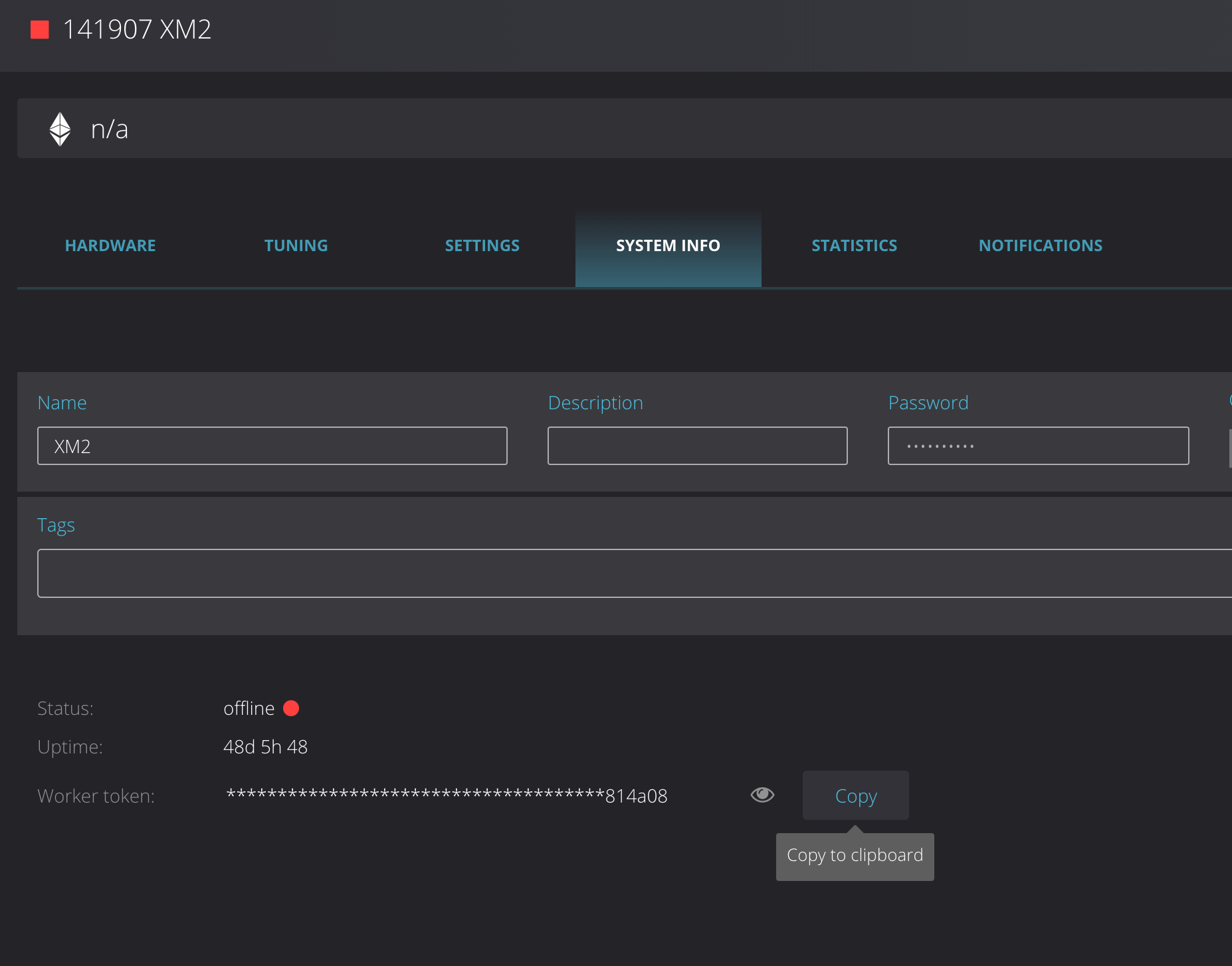
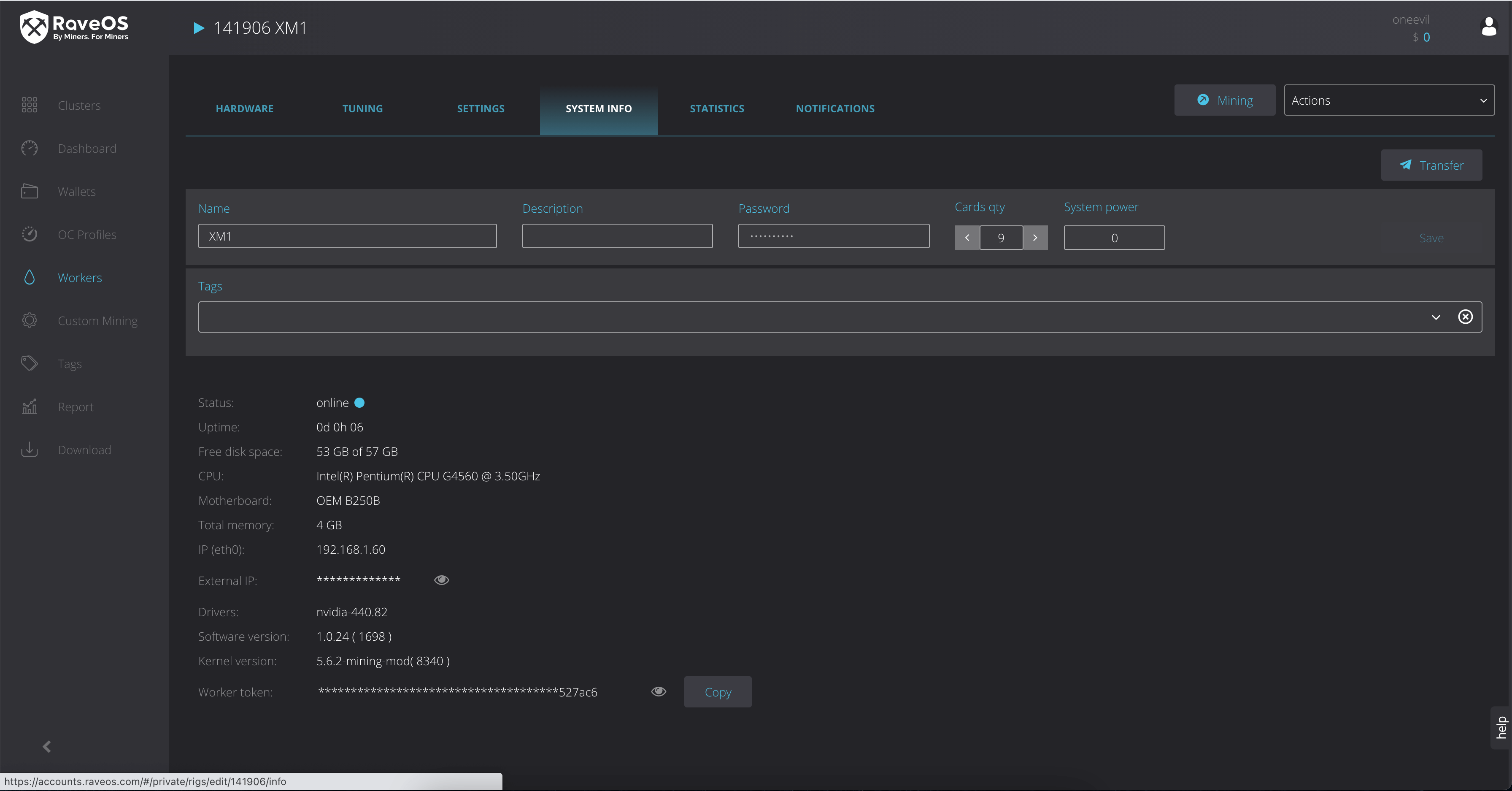
Then go to the System Info tab and copy the Worker’s token. On the screenshot below it’s at the bottom.
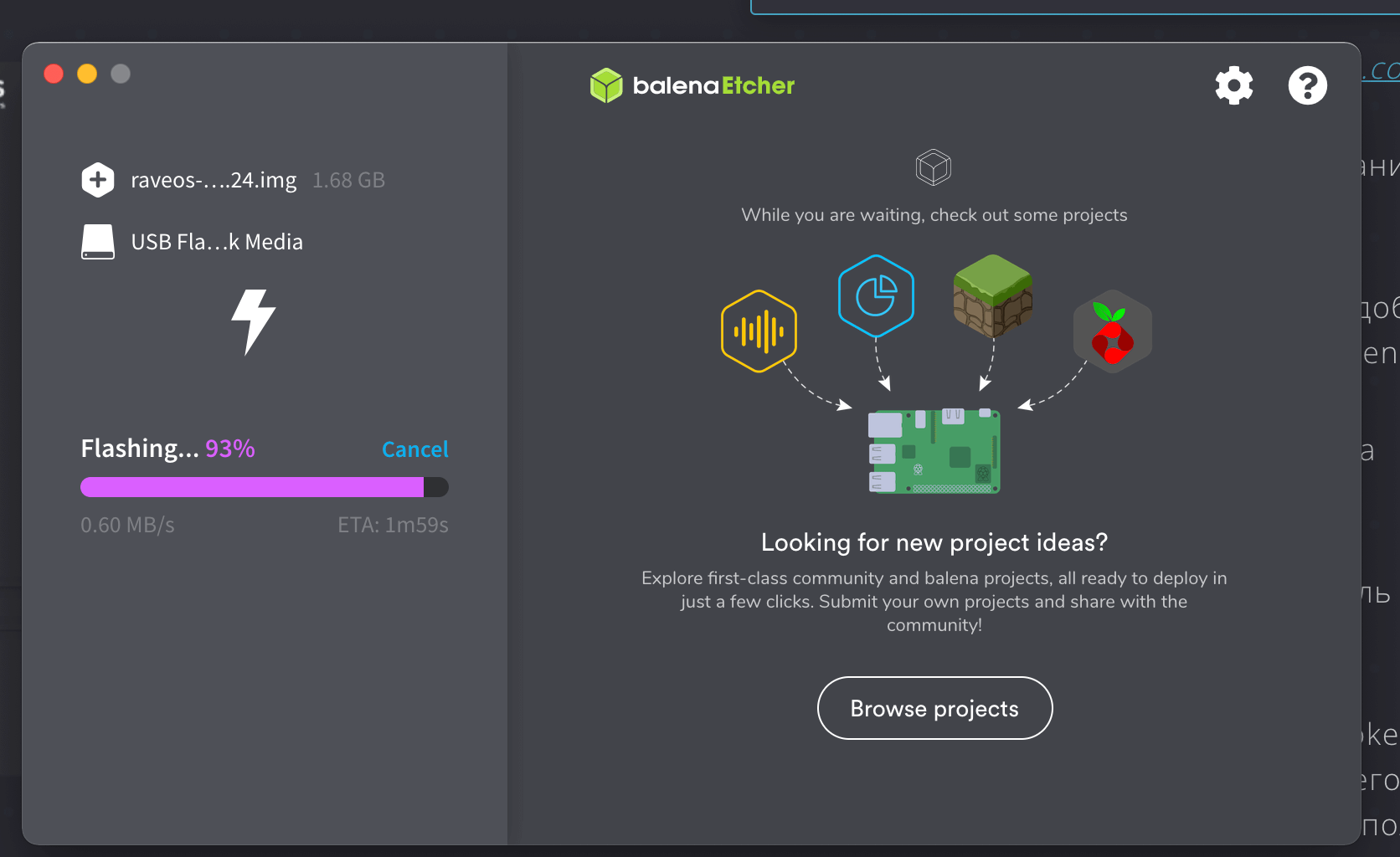
Download RaveOS image. The file size on MacOS is 1.68 GB.
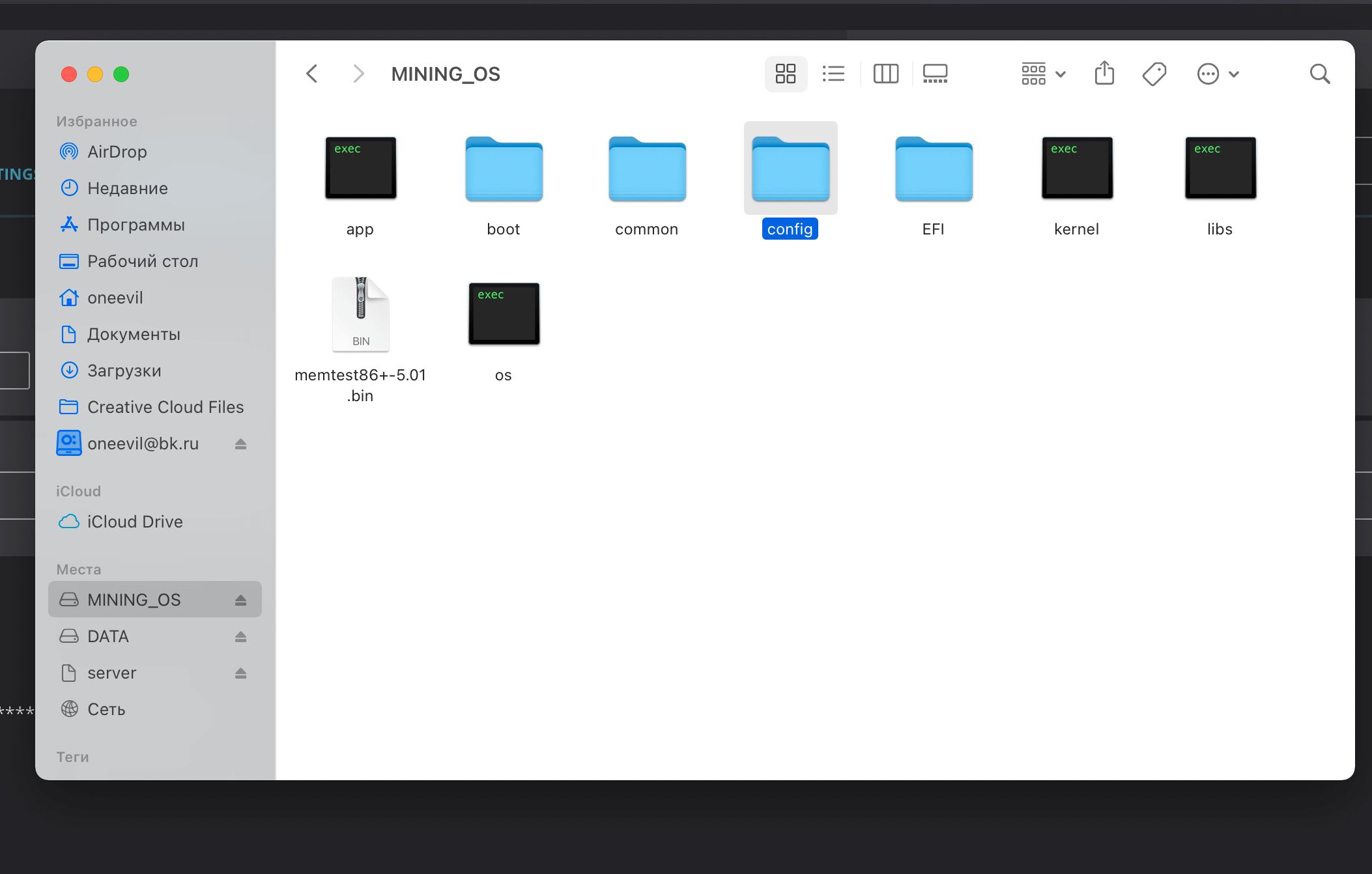
Go to the file manager, find the mining system folders and go to the config folder.
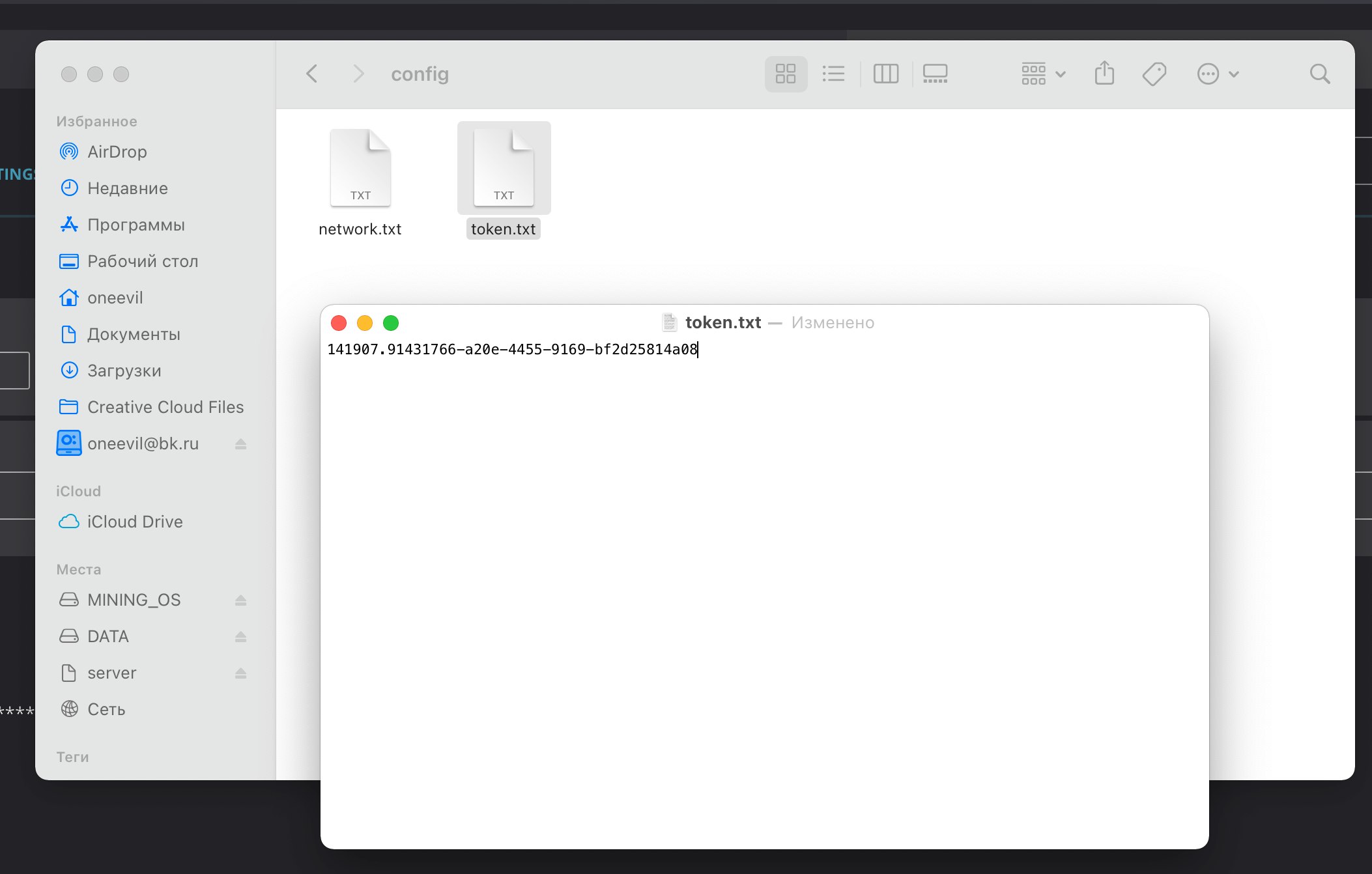
Open token.txt and paste the Worker’s token.
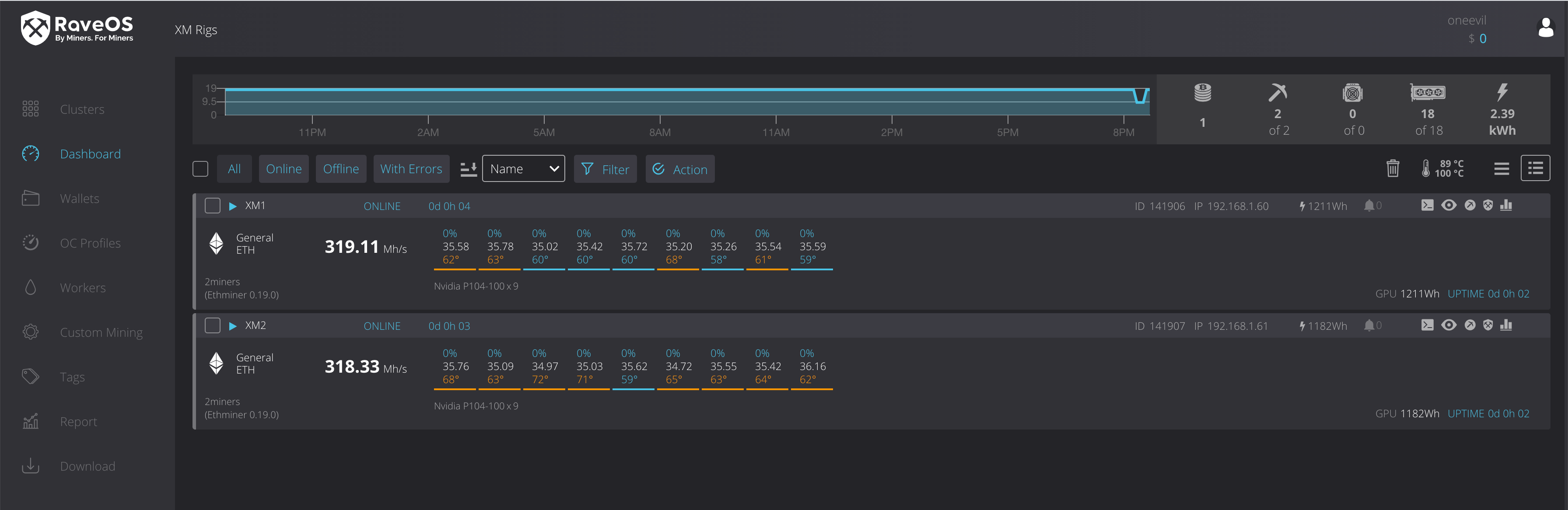
Then boot the rig and go to the dashboard that has all the information.
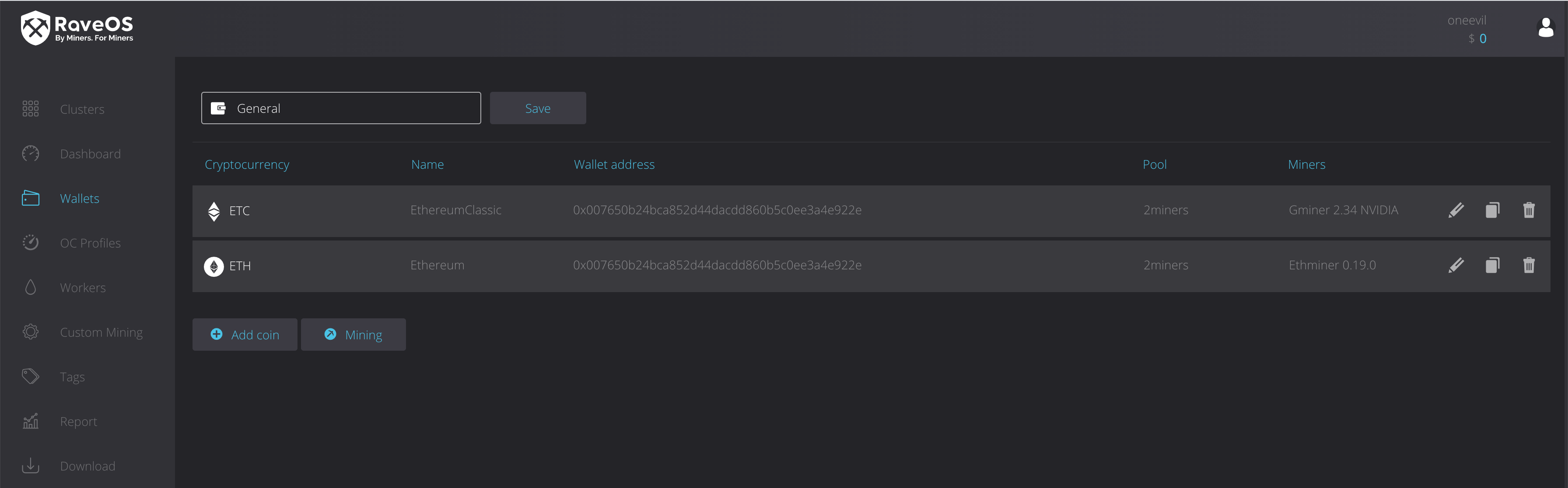
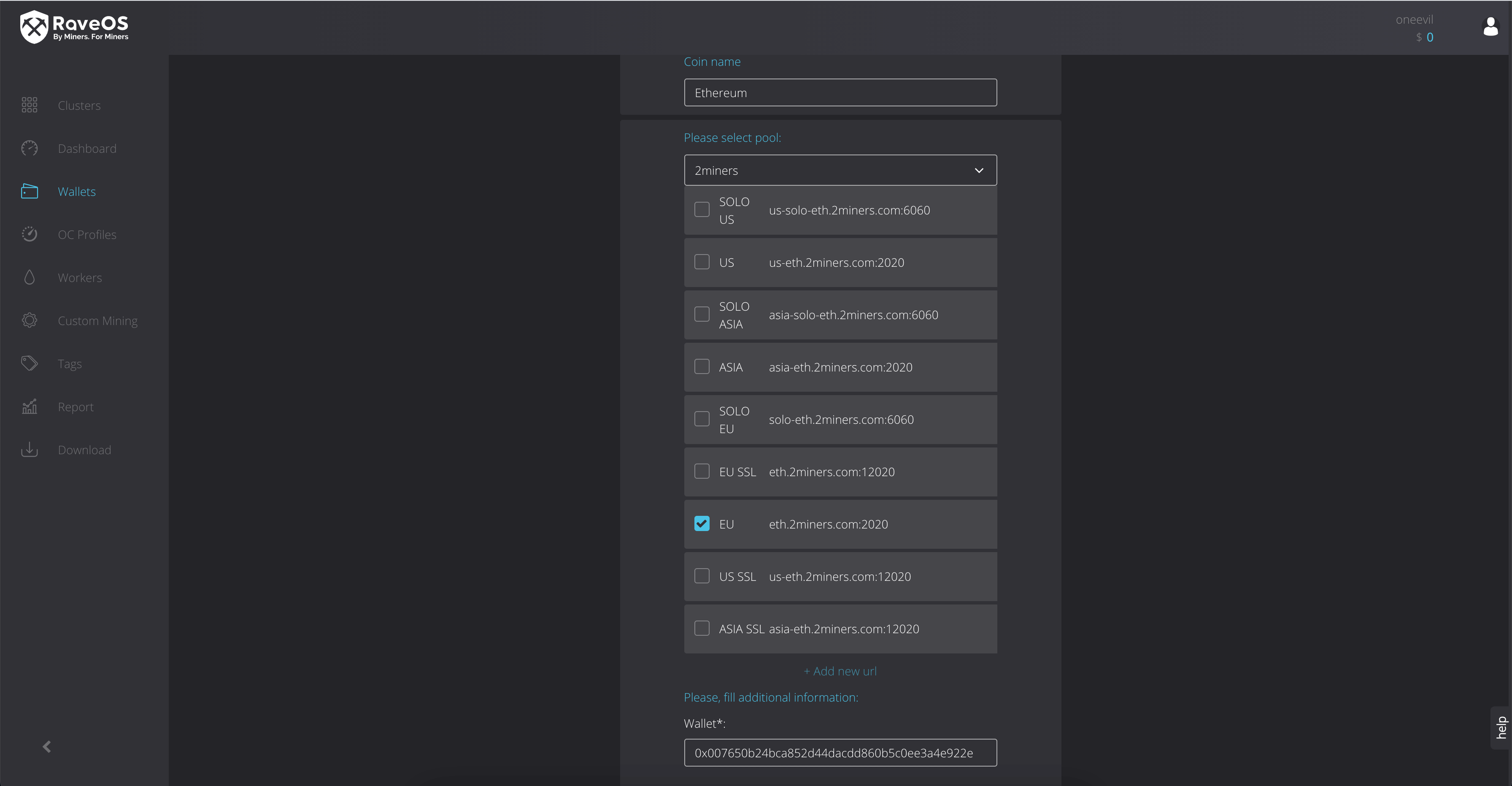
The next step is to add your cryptocurrency wallet address where you want to receive rewards. Go to Wallets in the menu on the left to do that, then choose a coin, mining pool (we recommend 2Miners), and the wallet address.
Click Save.
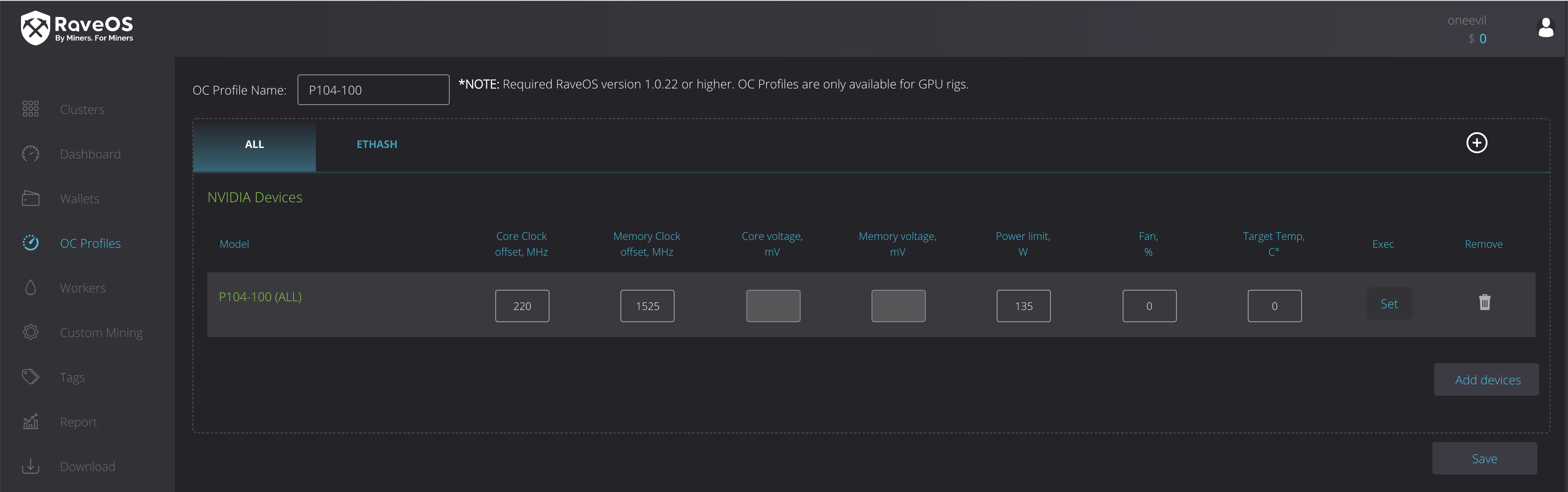
The next step is Tuning. You can choose clock, voltage, temperature, and fan activity.
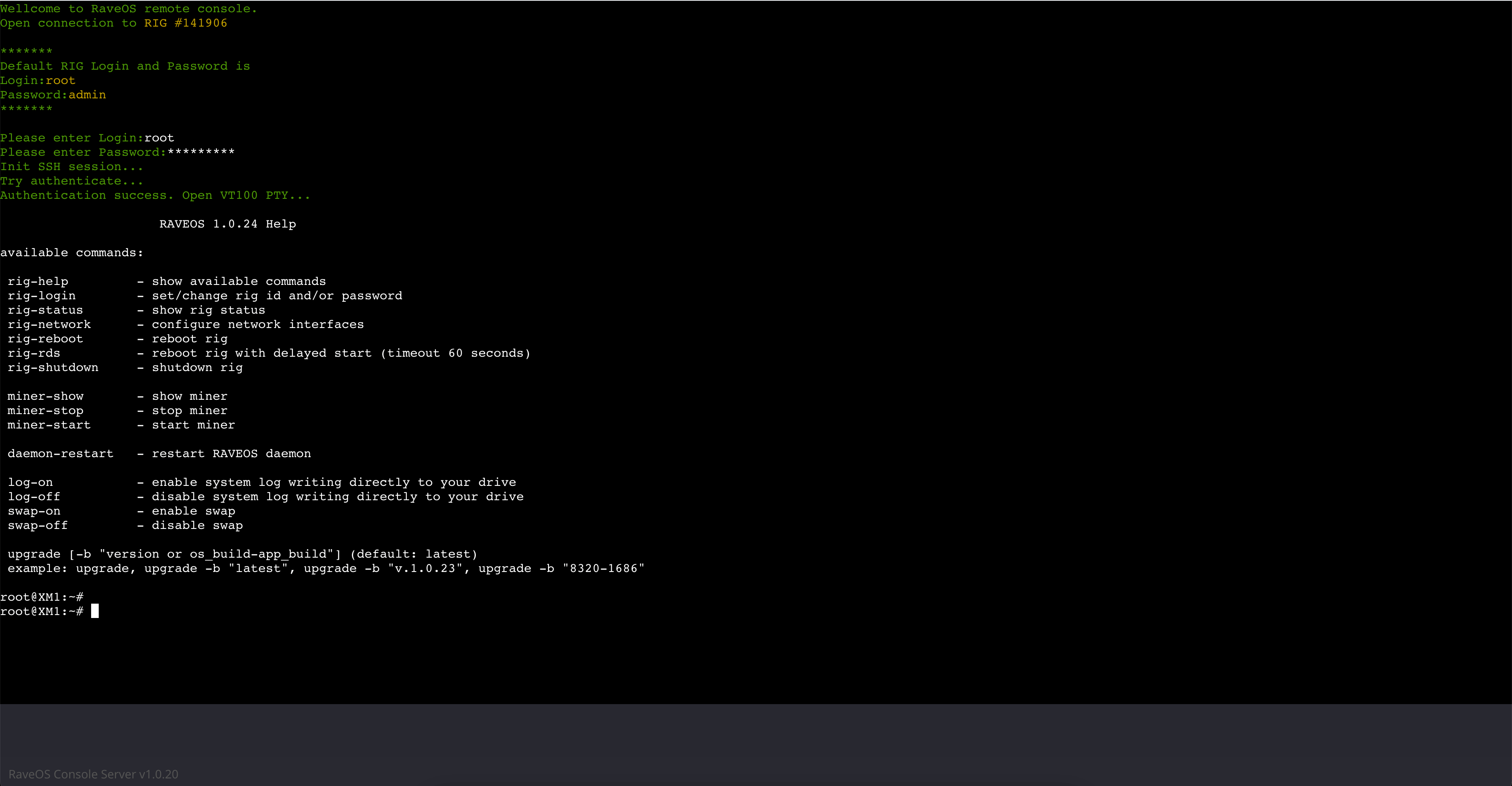
Then go to Console and enter login and password.
The system will display available commands.
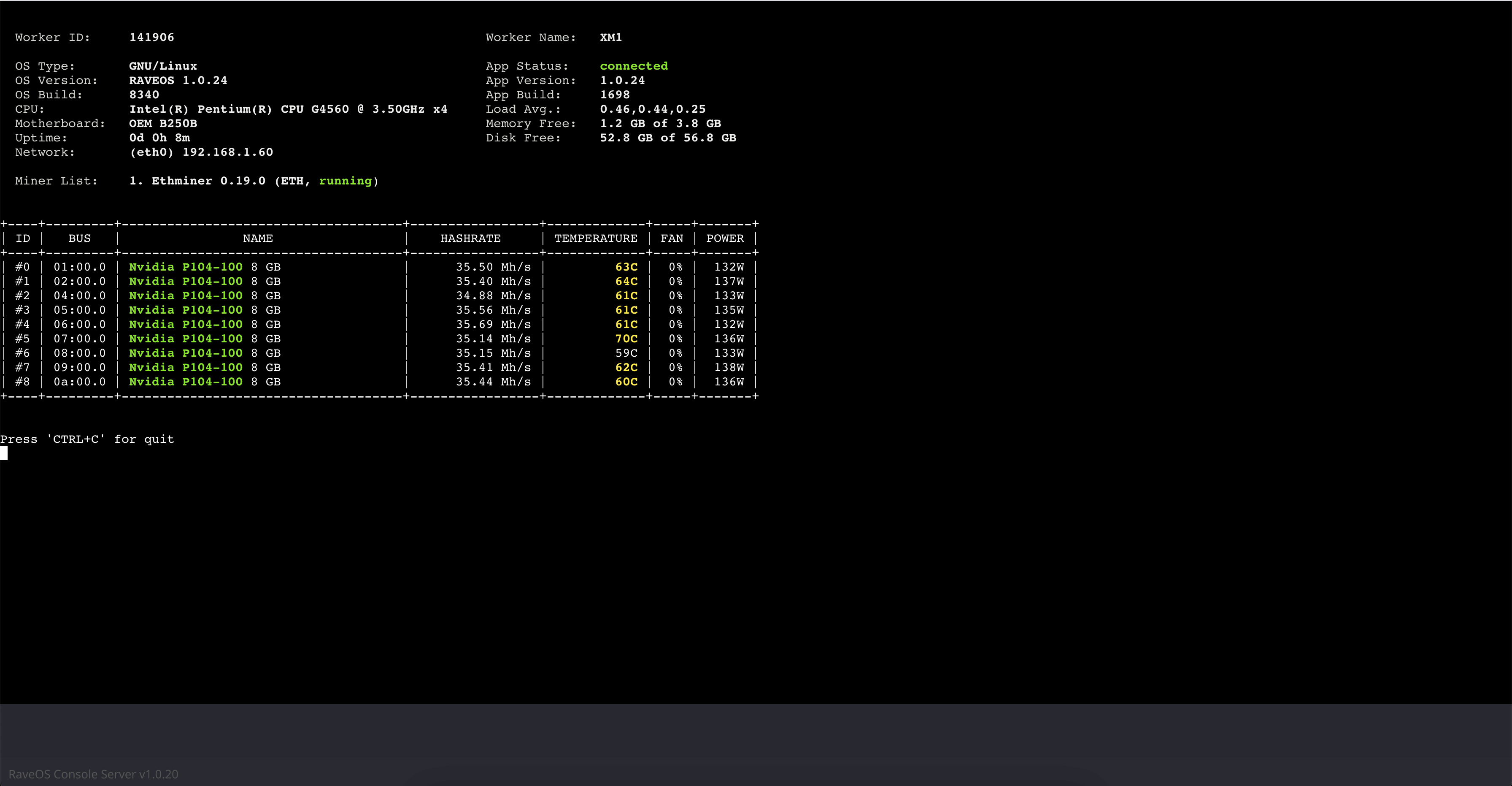
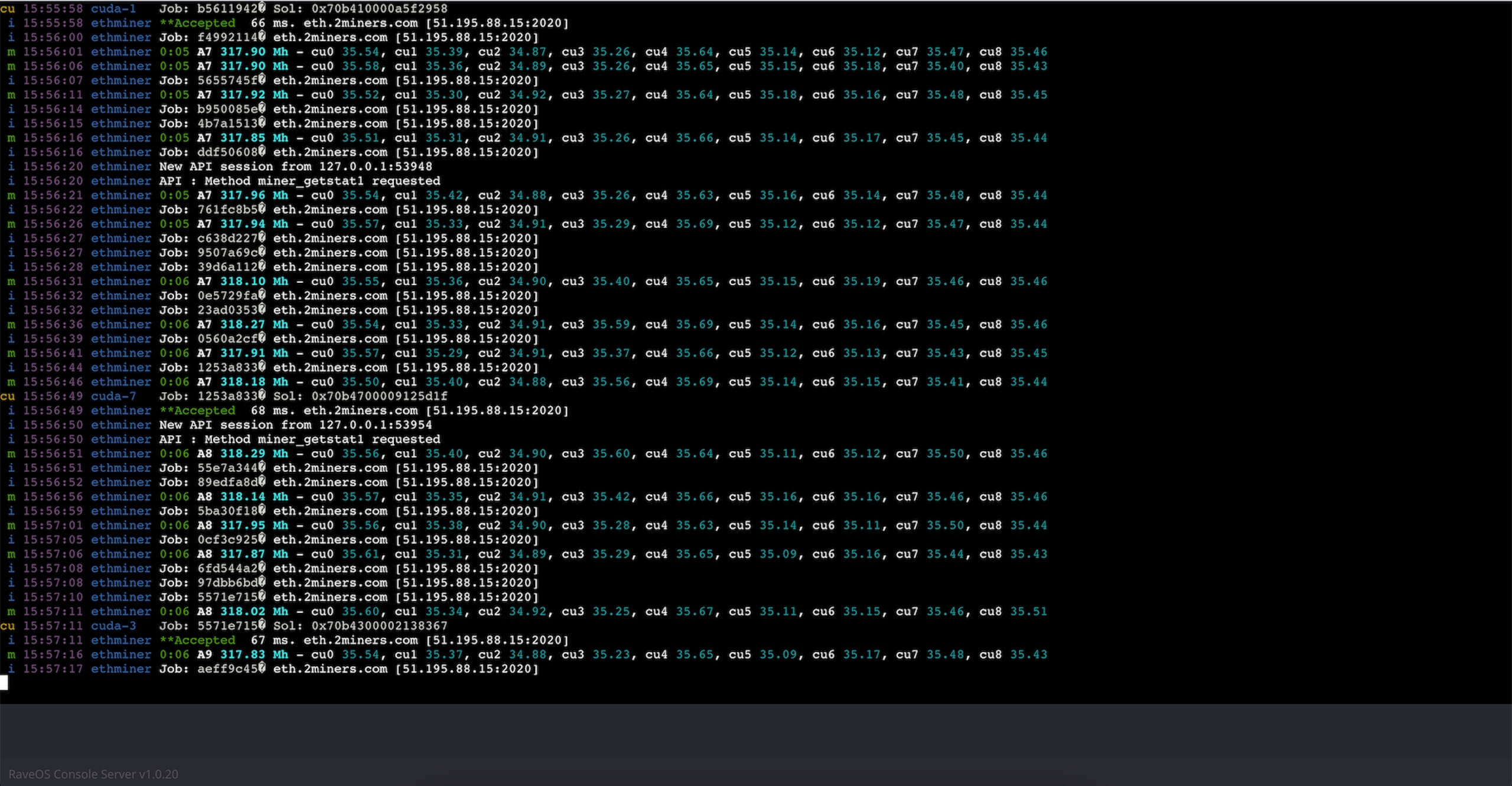
Enter miner-show to get all the information about your rig: hash rate, temperature, etc.
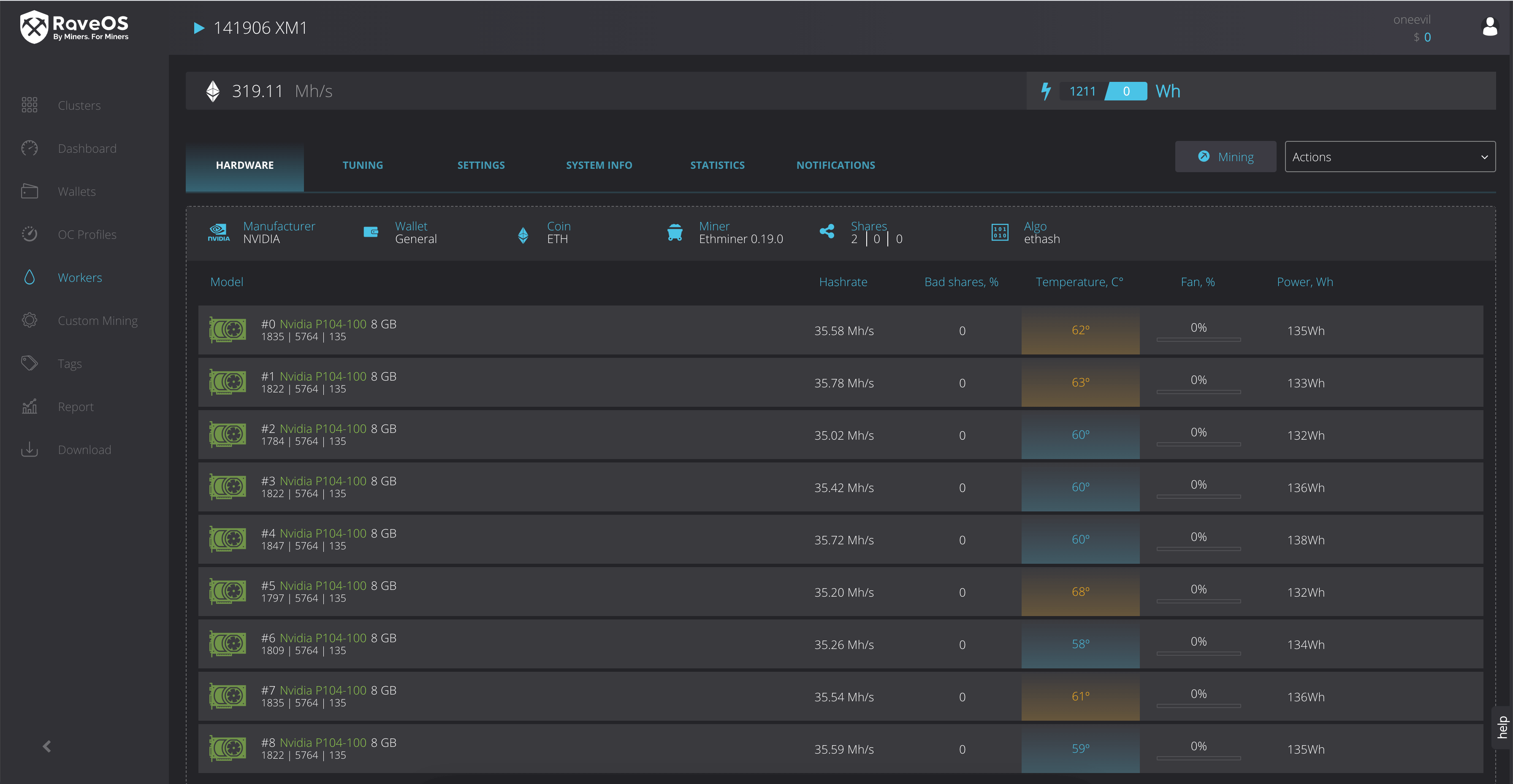
You can also look up the information about GPUs on the website. Here’s what it looks like.
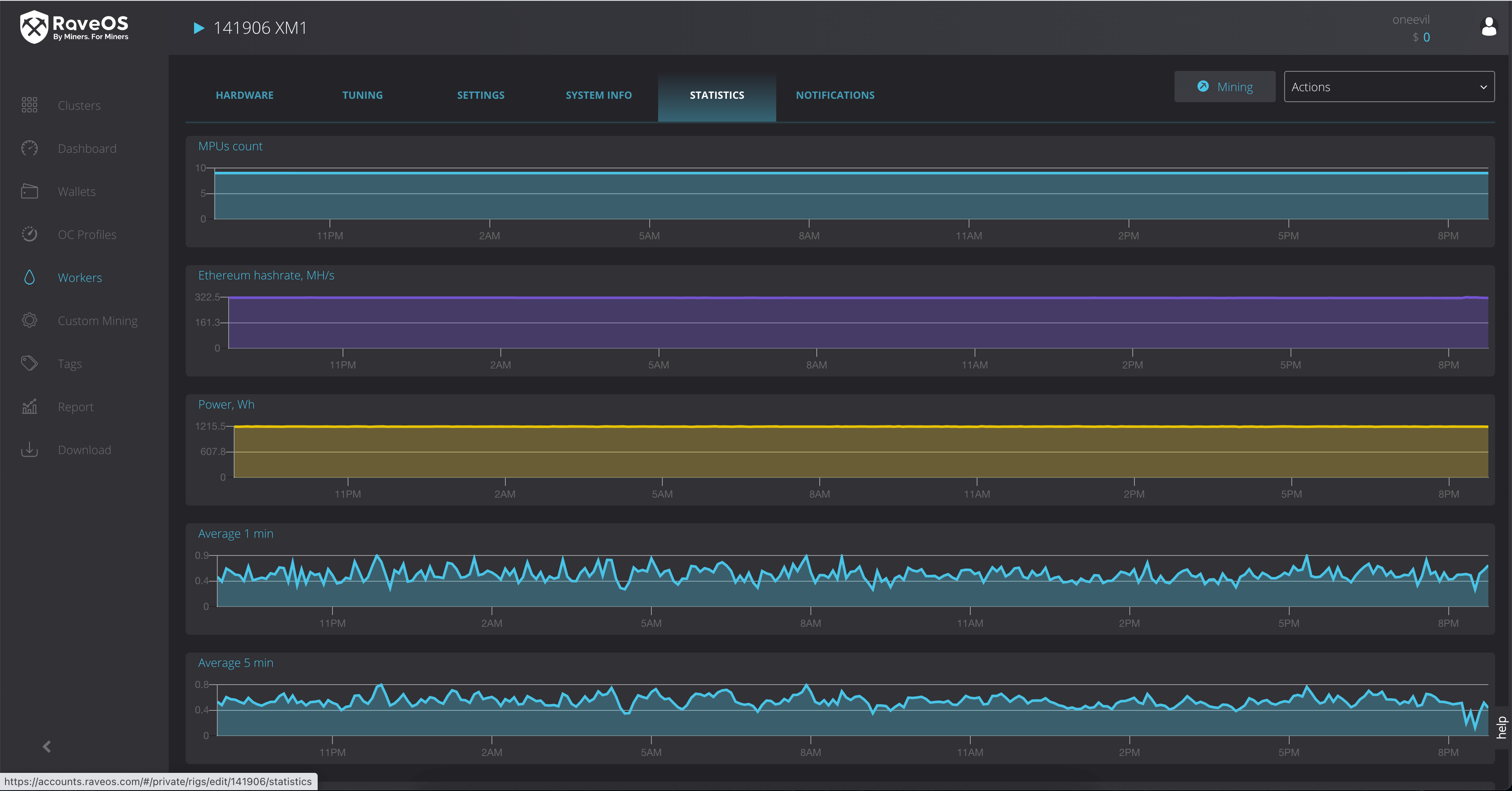
Users also have access to stats.
And system information.
RaveOS Pricing
RaveOS is free for up to 3 running devices. Plus, users get access to the basic online support.
If you have more than 3 devices, you pay $2/month for each. Users get all their devices running and can fully access system functionality.
RaveOS also offers special business conditions for users with at least 100 devices. Conditions are discussed individually.
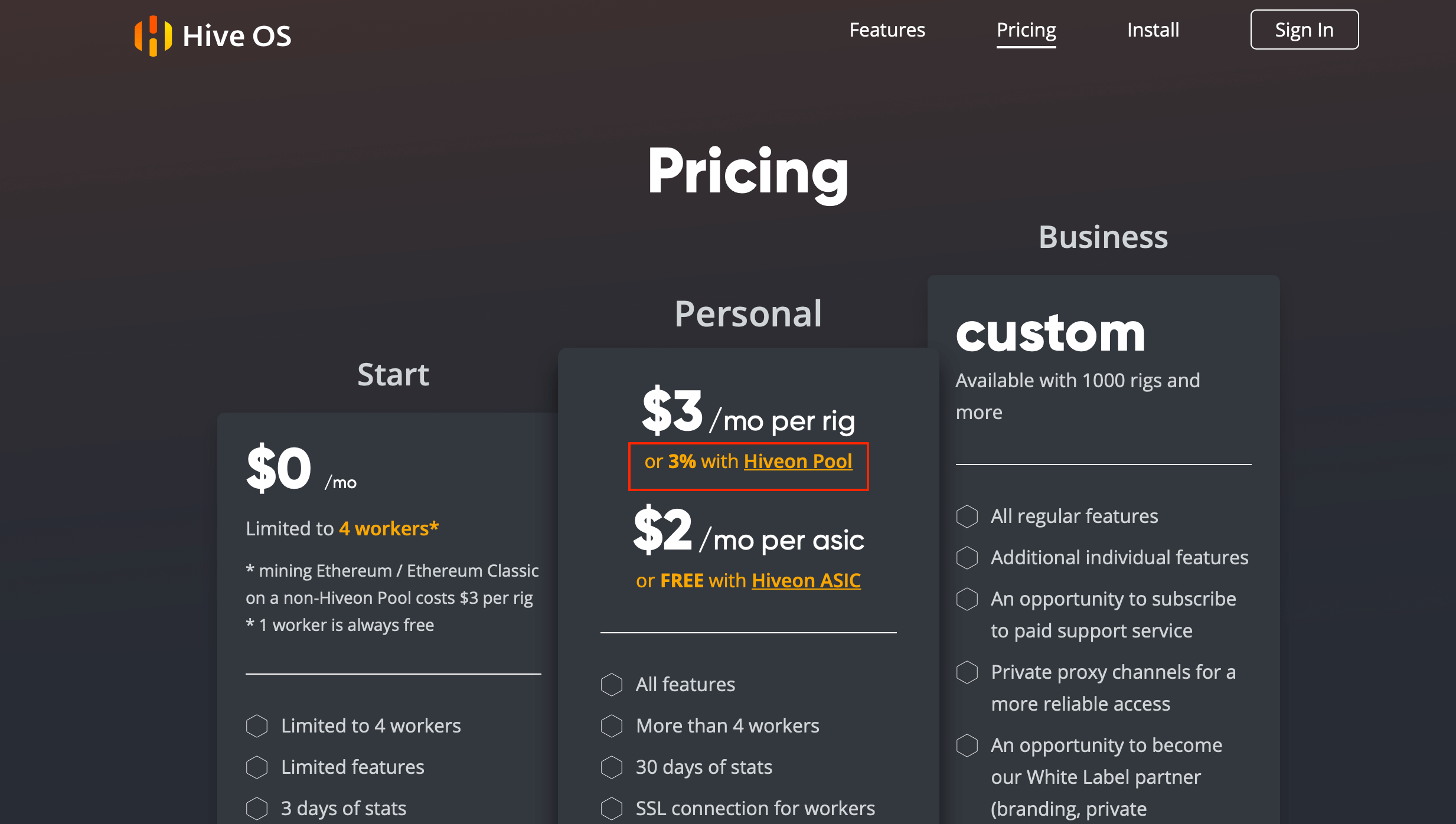
It should be noted that another mining platform HiveOS is free only if you mine in their Hiveon pool, but that charges a 3% fee.
Conclusion
RaveOS is a great tool for miners that want to control mining processes from anywhere in the world. The system is easy to set up, auto-detects mining hardware, and even knows mining pool settings. You are guaranteed to spend little time on learning the system functionality as it’s super easy.
You just install the system on your rig and add your mining information. And then you can enjoy the process and make corrections as needed.
Remember to follow us on Twitter to get all the news as soon as possible.
Miner since 2017, the 2Miners pool co-founder. Became interested in cryptocurrencies at the dawn of the latest bull run and bought his first graphics cards. After having built and set up a few mining rigs, he realized that existing mining pools didn’t satisfy him – that’s how the idea of creating the 2Miners pool was born.
John published a series of articles about the basics of cryptocurrency mining. He gave valuable tips on how to buy ASICs and GPUs from abroad and then shared their mining performance. On the website, you can find early articles about cryptocurrency mining, blockchain in general and mining pool operation principles. The readers gave positive feedback on John’s practical guides, such as building an Ethereum mining rig and Nvidia 1080ti overclocking.
Unofficial Release of Innosilicon A11 for Ethereum Mining: ASIC Features and Setup
January 23, 2021
Ethereum price reached an all-time high the other day surpassing the previous record of $1,420. In the meantime, Bitcoin not only hit a new record, but doubled the previous one in the first half of January. This led to the growing popularity of ETH mining, and so higher demand resulted in higher supply. Innosilicon released its new flagship ASIC. Let’s get into it.
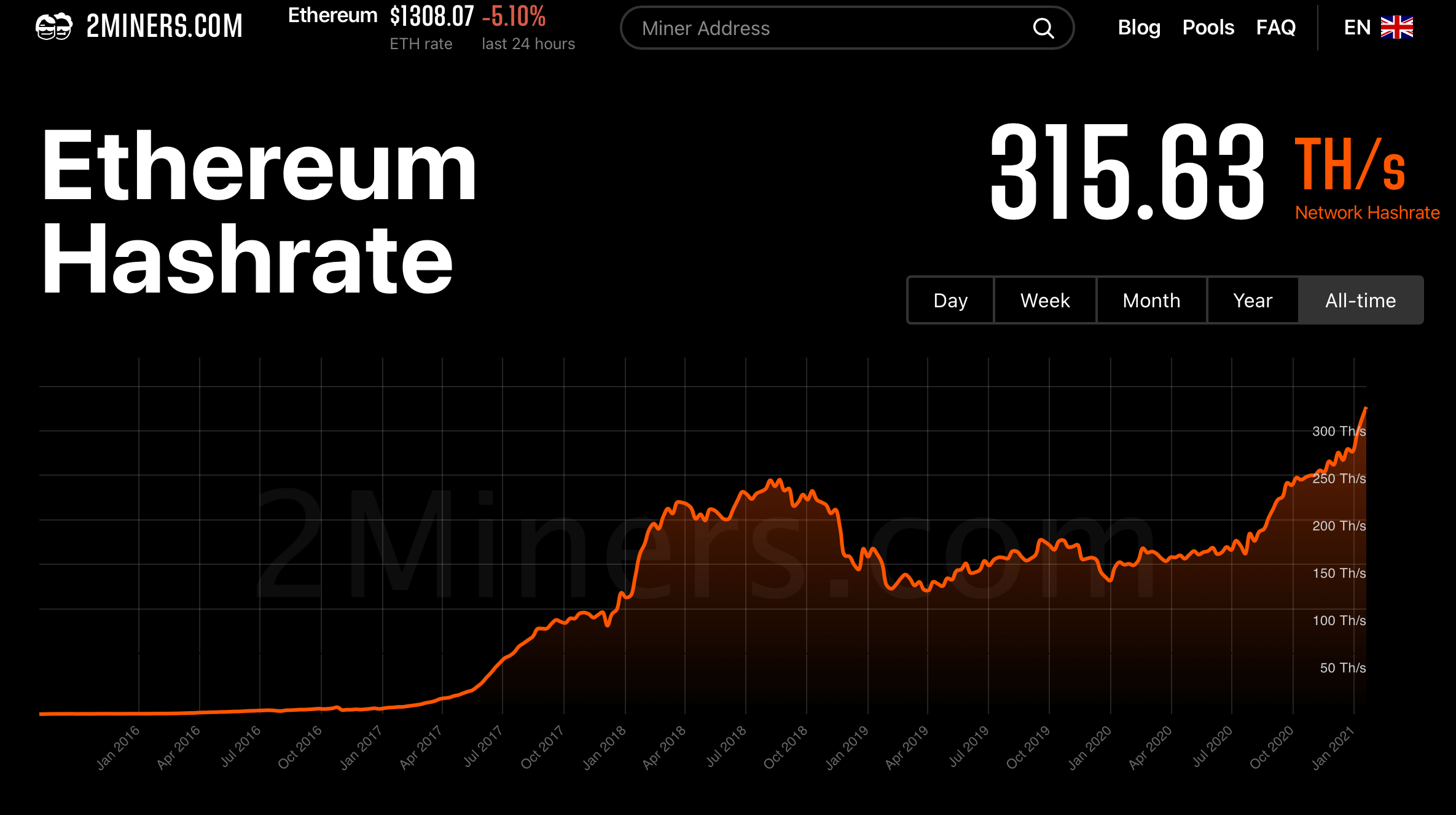
Ethereum mining popularity is truly at its all-time high at the moment. The cryptocurrency network hash rate, which is the cumulative computing power of all its devices, proves the point. Over the last year it increased 2.2 times meaning that the number of GPUs and ASICs equivalent to computing power doubled at the very least.
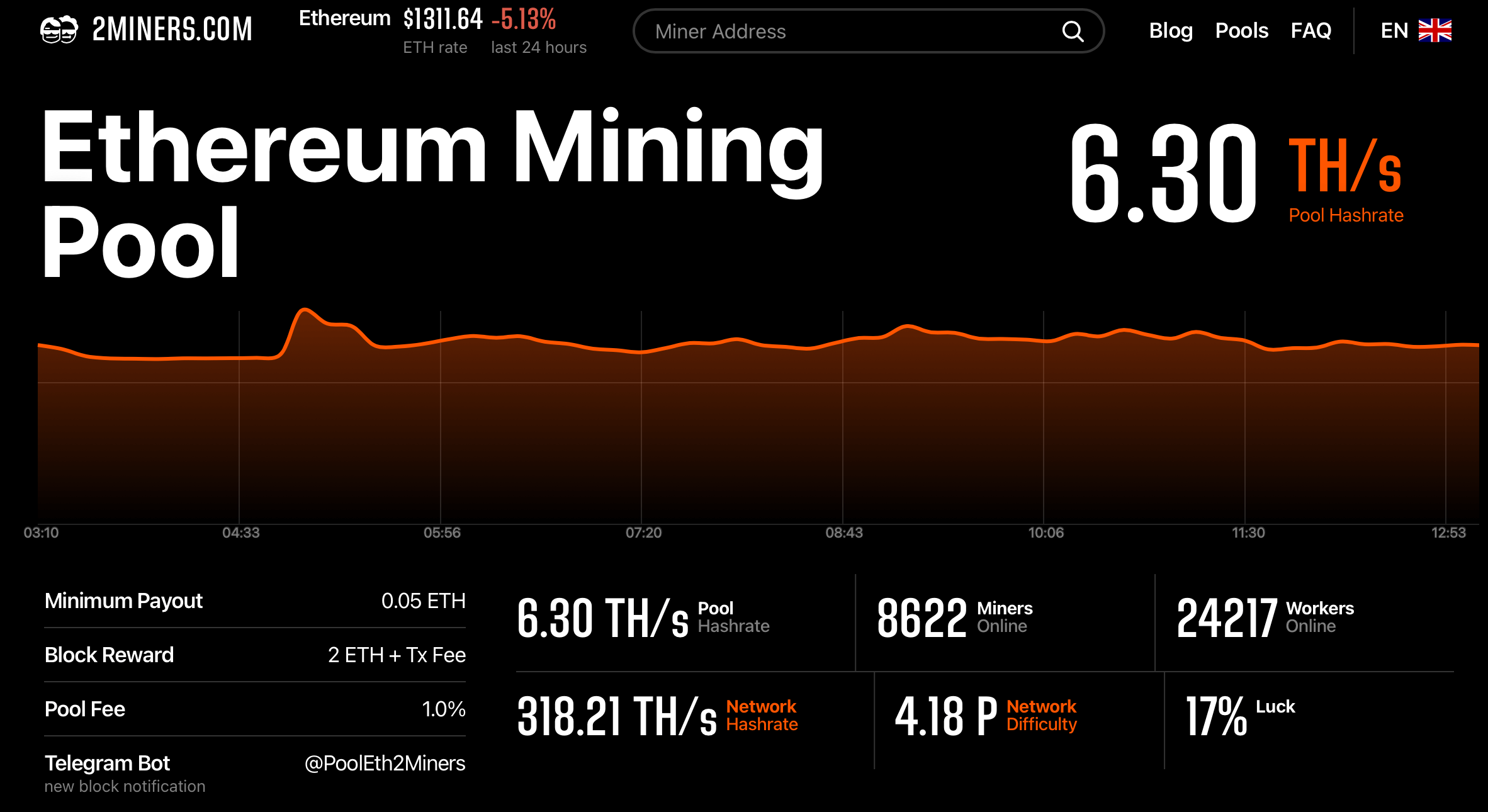
The growing number of miners in the 2Miners pool also reflects the rising demand for Ethereum mining. The number of miners hit a new record of over 8600, while on December 1, 2020 it was 5000.
Innosilicon A11 Specs
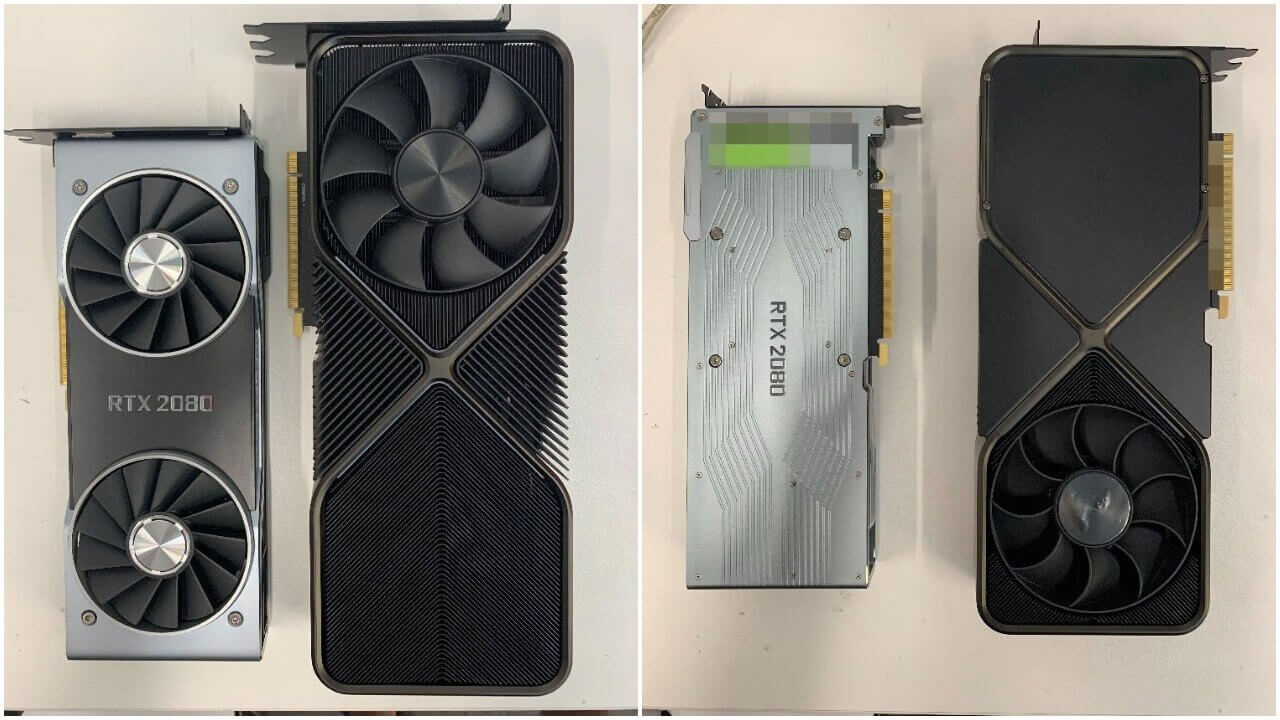
Despite the growing Ethereum mining popularity, it’s not easy to find up-to-date equipment. In the recent article we discovered that it’s almost impossible to order the new-generation Nvidia RTX 3000 series graphics cards, while the models in stock are sold at a much higher price. Other brands are also releasing new products due to the growing mining popularity.
According to the source on the Chinese platform Weibo, some mining equipment sellers are already accepting payments for the new Innosilicon A11. This Ethereum mining device is the successor of the A10 ETHMaster series announced in July 2018.
There isn’t much information about the new device, but here are some Innosilicon A11 key features.
Hash rate – 2100 MH/s ± 10%
Consumption – 2300 W
Memory – 8GB
Supply – April–June 2021
The new ASIC costs around 100 thousand yuan or 15.46 thousand dollars. In 2018 the A10 ETHMaster devices with 365 MH/s and 485 MH/s cost $3,800 and $5,000 respectively, so today’s price has hardly surprised anyone.
Plus, the hash rate of the new ASIC is equivalent to 67 Nvidia GeForce 1070Ti graphics cards. According to the source, the supply is going to be limited.
Innosilicon A11 Profitability and Payback
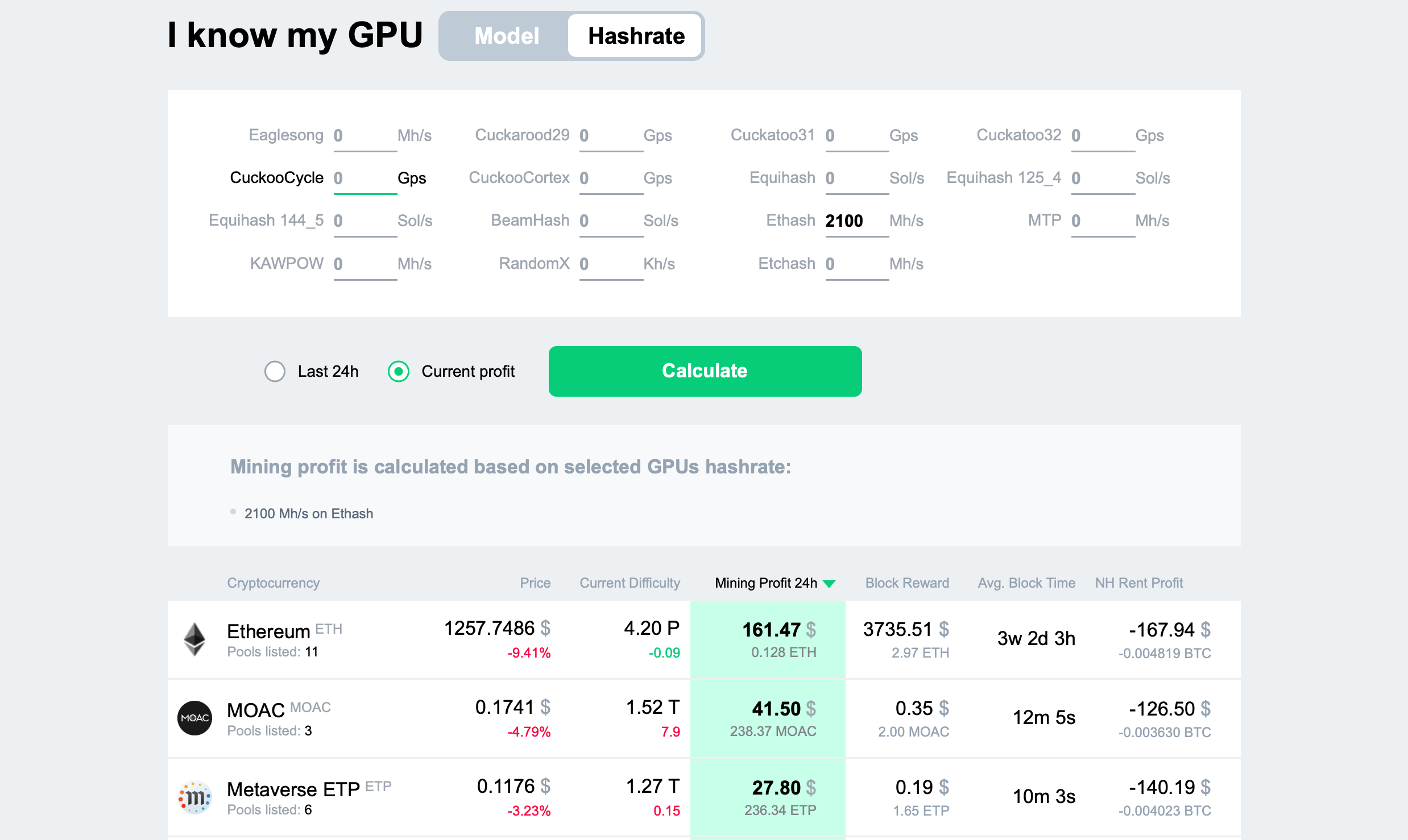
The hash rate of the new ASIC is high enough to estimate Ethereum mining profit using 2CryptoCalc. We are entering 2100 MH/s for Ethash and getting an estimated daily profit of $161. The profit is unadjusted for electricity cost due to the difference in rates for users.
Without considering electricity expenses, the payback period is as short as 3 months.
Innosilicon A11 Life Expectancy
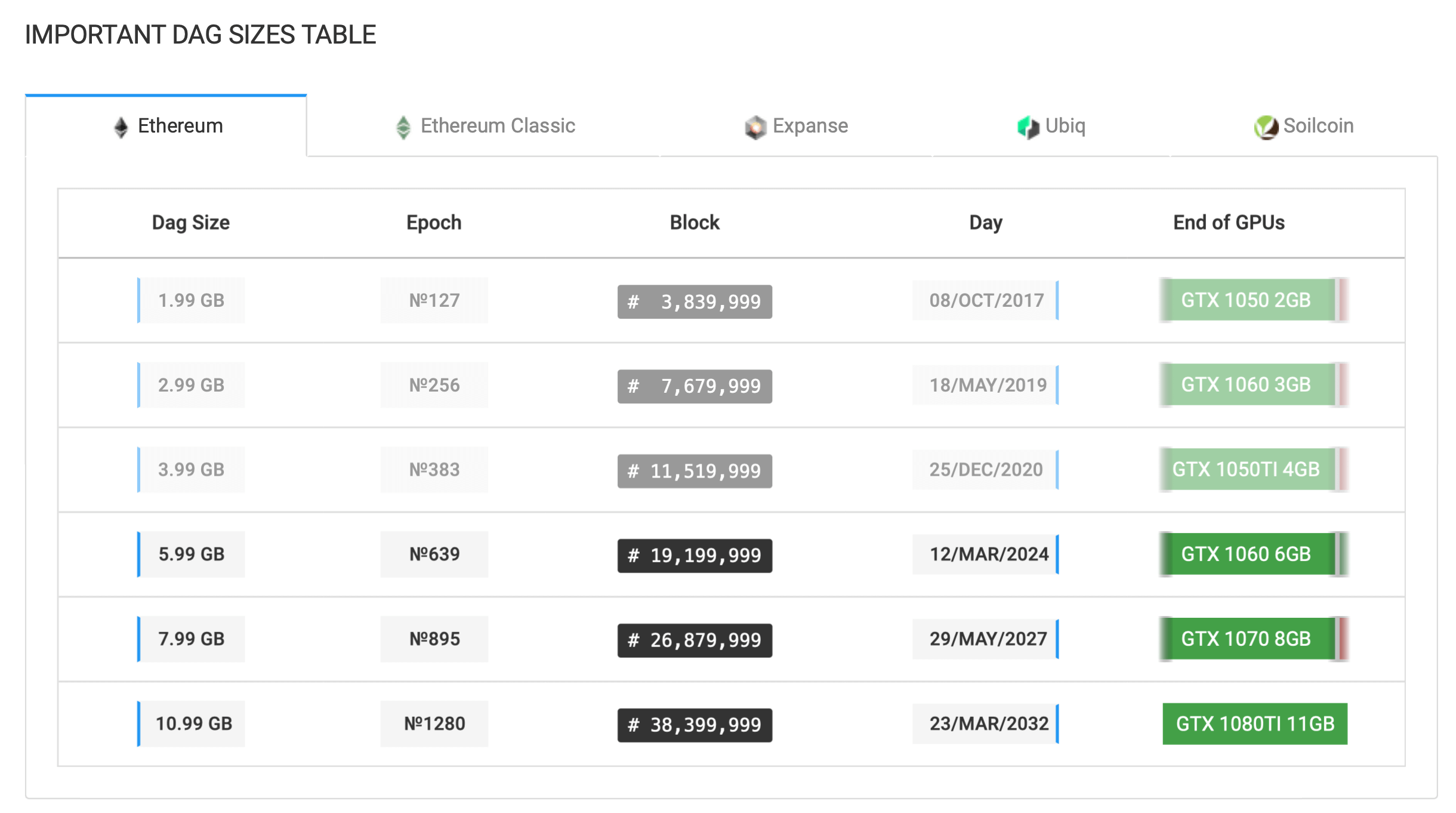
The new ASIC features 8GB of memory. According to Investoon, it is enough to mine Ethereum till #895 epoch coming in May 2027.
Plus, Ethereum is planning to upgrade to version 2.0 switching from Proof-of-Work to Proof-of-Stake. So ETH mining on GPUs will become inefficient. The switch is part of phase 1.5 planned for 2021, but there may be some changes and delays.
Innosilicon A11 Mining Setup
Despite all the upcoming changes, there is still plenty of time to mine Ethereum on Innosilicon A11. If you bought the new ASIC, you can start mining in the 2Miners pool using the following settings.
URL: stratum+tcp://eth.2miners.com:2020

Worker: YOUR_ADDRESS.ASIC_ID

Password: x
YOUR_ADDRESS is a cryptocurrency address where you get mining rewards. You should indicate your wallet address here starting with 0x.
Innosilicon created a powerful and expensive ASIC. Despite the limited supply, the device will not only pay back, but also bring you a profit thanks to the high hash rate at the current cryptocurrency exchange rates. It will still be true even if Ethereum manages to switch to PoS this year.
The new Innosilicon ASIC will arouse a lot of interest among users and remind GPU manufacturers about the high demand on the market. GPUs are difficult to find these days, so Nvidia should definitely think about increasing its supply.
Remember to follow us on Twitter to get all the news as soon as possible.
The 2Miners pool co-founder, businessman, miner. In 2017 started mining cryptocurrencies and built many rigs on his own. As a result, he gained lots of practical knowledge and became interested in sharing it with others.
In his articles on 2Miners, he shares useful tips that he tried and tested himself. For example, Darek gives advice on how to buy hardware components for the basic mining rig and how to connect them to each other correctly. He also explained lots of complicated terms in simple words, such as shares, mining luck, block types, and cryptocurrency wallets. After the pool was launched, he published a series of articles ‘Crypto Mythbusters’ where he explained how to protect the network against 51% attack, talked about cryptocurrency mining difficulty and difficulties of launching your own node.
Beginning Miner’s Guide and GPU Overclocking on Different Algorithms
January 14, 2021
Cryptocurrency mining is a lucrative business. Confessions of a Miner show you how with initial capital and strategy mining equipment alone can be worth tens of thousands of dollars. If you are just starting out, we’ve got you covered. This article is about mining basics, overclocking, and useful tips and tricks.
Mining means providing computing power for the cryptocurrency network protection in exchange for a potential reward for equipment operation. Sadly, many legislators wrongly believe that mining is directly connected to coin creation. It’s wrong to say that miners issue cryptocurrency or somehow participate in this process. For most modern currencies the daily outflow of up to 10% of miners will affect the speed of coin issuance by less than 1%.
If there are only ten miners out of a million left in the end, the coin creation will not stop and soon regain the same level with adjusted difficulty.
Miners provide protection to cryptocurrencies against the potential hold or cancelation of a transaction. More miners mean better protection and lower risk of an attack. They would make an attack almost impossible due to the lack of necessary mining equipment in the world.
Any PoW cryptocurrency network (Proof of Work) pays miners for this work with their coins by issuing new coins and using transaction fees.
Let’s draw an analogy with the modern banking system. Cryptocurrencies are the Central Bank (issues money), mining pools are commercial banks (prepare transactions, distribute rewards, and compete with each other), and miners are clerks (does the essential work). Banks can’t operate without clerks, but it doesn’t mean that clerks issue money.
How to Mine Cryptocurrencies in 2021
Who can we consider a professional miner? How much experience must they have? We don’t have an exact answer, but a professional miner is someone who knows how to adjust under constantly changing circumstances. The crypto market is highly volatile. A certain coin can be 20–30% less profitable than your optimal coin today, but bring twice as much profit tomorrow.
Here’s an example. Cortex (CTXC) was bringing $4.17 per GPU (1080Ti) on August 13–15, 2020, two weeks later – less than $1.8 a day, and on August 30–31 it rose to $3.31 a day per GPU.
Mining is a source of passive income for most miners, so they usually don’t switch from one coin to another on a daily basis. They prefer to stick to major, expensive coins with a stable average profit.
However, every miner must know the capabilities and limits of their graphics cards.
Sure, there are profitability calculators, so why would you need to know that? Even 2CryptoCalc, a powerful cryptocurrency profitability calculator, can’t tell you how an increase in your utility rates will affect mining profitability, or whether the profitability of your coin will decrease five or more times tomorrow. It also can’t tell you whether the room is ventilated well enough for mining, when a multi-rate meter switches rates, and which equipment noise level is acceptable during the day or at night.
ASICs and GPUs for Mining
Initially, CPUs were considered a universal mining tool that everyone could use on their computer. Soon after, it became clear that GPUs are much more powerful and efficient, while single-purpose devices (rare FPGAs and widespread ASICs) are even more powerful.
ASIC is a single-purpose mining device designed for a specific algorithm. ASICs are produced by a few companies with highly opportunistic pricing policies. They are also notorious for mining on their devices before shipping them to clients.
ASIC mining is straightforward, but it doesn’t provide a stable profit. Competition is limited only by operation capacity and manufacturers’ greed.
Cheap and powerful ASICs replaced GPUs on most old algorithms unwilling to protect themselves from such devices.
The biggest ASIC issue is its limited use and constantly decreasing cryptocurrency profit as manufacturers are constantly launching newer, much more energy-efficient models.
A Graphics card (GPU) is a widespread universal device that works with multiple new algorithms and has a good depreciation value (40–60%) on the second-hand market even after a few years of use. You can sell graphics cards to gamers after the warranty expires (or, even better, right before).
Most new cryptocurrencies are trying to be as decentralized as possible protecting themselves against ASICs. Plus, you can improve GPU energy efficiency multiple times even within the same GPU series. The pattern is different for every algorithm. So, apart from GPUs, miners’ assets include valuable knowledge they acquire in the process and relevant information they obtain about the crypto market.
Plus, GPUs with limited power bring several times more profit per kW than ASICs.
So for personal use, miners usually use GPUs of the latest or previous generation.
Graphics Cards for Mining
AMD and Nvidia are two major worldwide corporations that produce powerful gaming GPUs. Miners and gamers call them “red” and “green” respectively (by the color of their logo).
Mining utilizes computing rather than gaming GPU capabilities using special libraries (OpenCL for AMD and CUDA for Nvidia). Such use of graphics cards is considered non-standard. GPU load in mining is similar to its load when designing and calculating same-type texture maps in gaming. With more gaming power added due to growing gamer demands, GPUs acquire more computing power.
AMD Mining and Overclocking Basics
AMD GPU architecture was initially designed to have fewer logic blocks and more stream processors, so it worked better with the first mining algorithms successfully executing a lot of minute operations. It’s no surprise that before the launch of ASICs AMD cards accounted for 95% of mining. The rest were mining on processors.
Modern mining algorithms of new coins require good interaction between core and memory which is beautifully implemented by gaming GPUs, but it’s hard to implement for ASICs. Historically, Ethereum (ETH) has become the most successful ASIC-resistant project among new cryptocurrencies. AMD cards were designed better for ETH mining than Nvidia.
These two facts have defined mining for years to come. From 2015 through 2018, AMD GPUs had a major share in mining, and in most cases, they were mining Ethereum.
The basic setup of AMD cards for Ethereum mining is quite simple.
First, we should identify the max memory clock at +25 MHz intervals. Find the clock value that makes it crash – reload – the GPU driver, and move 50 MHz down, to the stable area.
Find the core voltage that will give you the desired GPU energy consumption. Lower voltage results in lower consumption, but also in a lower max hash rate. The relationship is not proportional. When you lower the consumption by 20–25% from the standard, the hash rate decreases only by 10–15%.
and the max stable core clock (at +25 MHz intervals), move 25 MHz down from it.
Fine-tuning would give us an additional 5–6% of hash rate or 3–4% of energy efficiency, but we will not go into more detail in this article.
Nvidia Mining Basics
The basic Nvidia GPU architecture had a significantly lower number of stream processors combined in larger CUDA blocks which made them less efficient for mining until 2016.
The 9xx series with the Maxwell architecture could already mine ETH at an acceptable hash rate. However, it was the new 10xx series with the Pascal architecture in 2016 to bring to an end AMD’s dominance in mining.
Gamers have always appreciated Nvidia graphics cards for their energy efficiency and good cooling systems. They weren’t heating like AMD cards and weren’t dropping clocks in games due to overheating. The green brand has become associated with optimal energy consumption. With every new series, Nvidia was trying to get ahead of AMD on this parameter.
The 10xx series was no exception. In 2016–2018 it was still behind AMD in terms of Ethereum mining power, but it was leading in energy efficiency. Nvidia on the 16 nm process achieved better results than AMD on 14 nm (the 4xx and 5xx series).
Important: Nvidia GPUs show full consumption (not just core consumption), so you can’t compare them directly to AMD GPUs using the information from drivers.
You can compare them only by measuring real consumption when you plug the whole rig.
The 10xx series wasn’t designed for mining, so in 2020 miners with the 10xx cards experienced a drop in hash rate on Ethash (the current Ethereum mining algorithm). Miners had to increase energy consumption to maintain the hash rate which affected energy efficiency. AMD encountered that problem at the beginning of 2017. They solved it by producing special drivers. Then they integrated a special Compute mode in standard drivers. Nvidia solved this problem only for their new series (16xx and 20xx).
Despite the problem of the 10xx series with Ether mining, green cards still have a significant advantage. They are better suited for many other mining algorithms. Most cryptocurrencies that emerged after 2017 didn’t want to use existing algorithms. They wanted to create somewhat unique products.
Before we get to algorithms for green GPUs and Nvidia overclocking principles, we are going to address an important question: how to assemble a working computer for mining with several graphics cards, known as a “rig” among miners.
How to Build a Mining Rig and Choose an OS
We are not going to talk about hardware. All modern motherboards support mining with at least 4 GPUs (most support 8+ GPUs with cheap slot extenders).
We are mostly interested in operating systems. Most miners can be divided into two groups: Windows and Linux users. The latter mostly don’t use Linux in its original form. They use ready-made mining operating systems, like HiveOS, RaveOS, and mmpOS.
Rave OS
Rave OS is a system for miners that allows them to control mining rigs remotely. Rave OS promises stable mining, high hash rate, and minimal down-time that usually leads to losses.
You can manage three devices for free. If you have more, you pay $2.00 a month per each.
The main advantage of the system is its simplicity. You just have to record an image on the data storage device and connect it to your device. The system automatically detects the model of the equipment, adjusts settings accordingly, and allows you to start mining.
Mining on Windows
Mining on Windows has a few main disadvantages.
You need to install a lot of necessary mining programs and drivers manually, disable auto-updates and antiviruses.
You need to study stability and reboot of mining devices in and out.
There is no built-in restart algorithm in case the system crashes because of power supply issues, freezing GPUs, etc.
You also need to install a remote control/desktop system, as you can’t be around your rig all the time. Plus, rigs usually don’t have additional monitors, mouses or keyboards, as it would add expenses on peripherals.
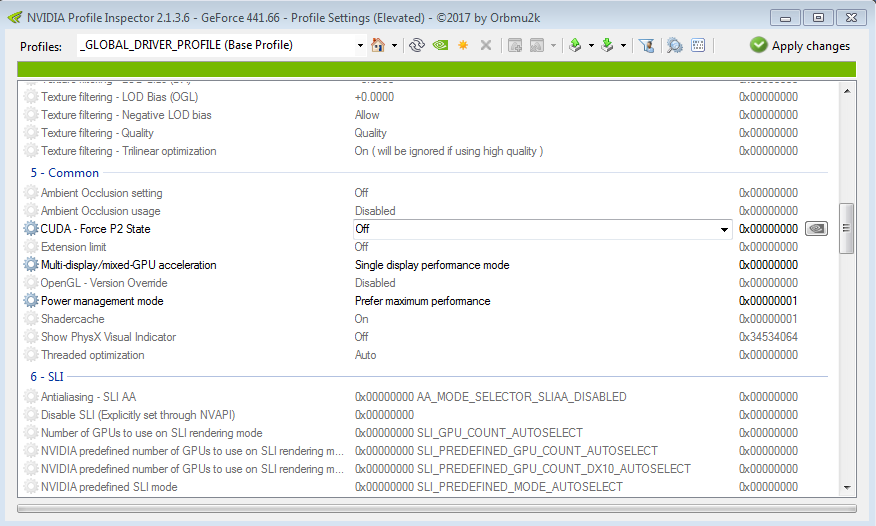
There is an issue with Nvidia graphics cards on Windows. The GPU memory at a standard clock commits a few errors that are not critical when rendering images in games, but they may be critical when making exact calculations. So for CUDA, Nvidia designed a special lower memory clock state (P2).
GPUs switch to this state automatically, but miners often try to maximize hash rate by overclocking memory significantly (to +700, +1000, or even more). We have a situation where P2 lowers the clock, while a mining device increases it at the same time. The mining device keeps working, but when you turn it off, P2 switches back, while manually added overclock remains. This leads to clocks that GPUs can’t manage. As a result, the driver crashes when you turn off or restart the mining program.
The best thing to do is to disable CUDA P2 state through the nvInspector tool (more specifically, through its nvProfileInspector subtool). Find CUDA Force P2 state parameter, disable it, and launch your miner.
Important note: this parameter is reinstated every time you install a new Nvidia GPU, so don’t forget to double-check.
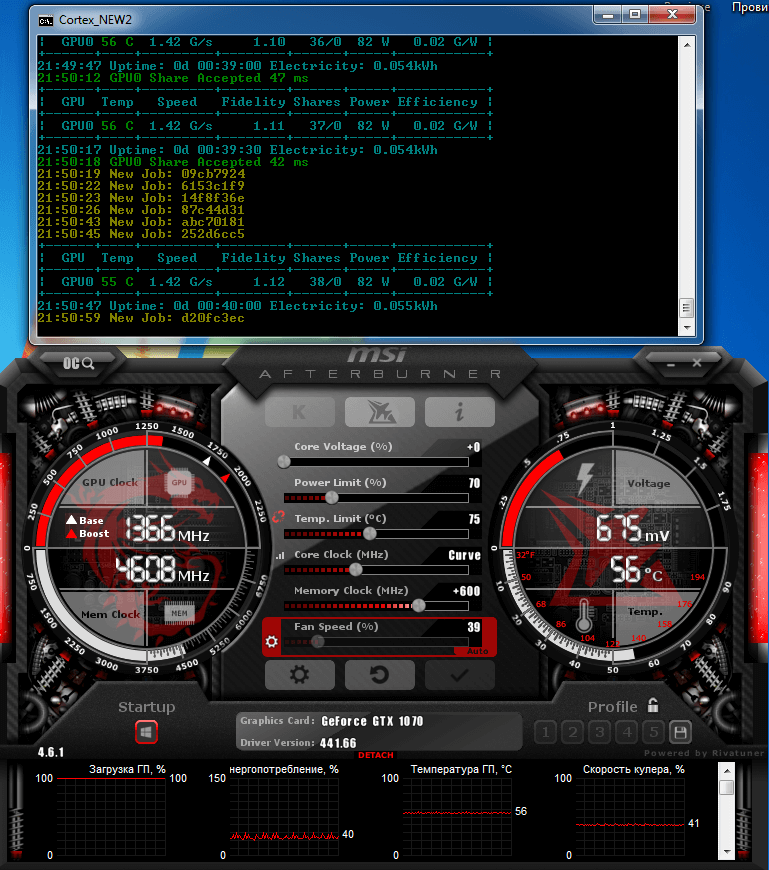
If you use MSI Afterburner to monitor your GPUs (every miner should use it), you will notice an increase in operating memory clock when mining and a higher hash rate when mining RAM-dependent algorithms, like Cortex. Memory clock will not fluctuate, so you can overclock memory safely. You will get a real operating value in MHz, not just a plus sign in the settings.
Nvidia Mining in 2021
Nvidia graphics cards are more universal in terms of algorithms, but it doesn’t mean that they are always more profitable than AMD.
Mining algorithms can be “hot” (the GPU gets really hot) or “cold” (the GPU doesn’t heat up too much). Hot algorithms mostly use GPU core, so their performance depends on the core clock. The max core clock is achieved by the increasing voltage which leads to a proportional increase in GPU power consumption.
Cold algorithms mostly use memory, so they are highly limited by bandwidth capacity or memory access time. As a result, there is no point in overclocking the core much, as it doesn’t increase the hash rate. Maximum efficiency is easily reached on such algorithms. We need to find out which core clock maximizes hash rate, and then obtain that core clock with the lowest possible stable core voltage.
In summer 2020, green cards didn’t have a lot of algorithms. The leading algorithms (coins) by profit were: Ethash (ETH), MTP (XZC), and Cuckaroo30 (CTXC).
Let’s get into more detail.
Nvidia Mining and Overclocking on Ethash
Ethereum algorithm used to be one of the most efficient for the Nvidia 10xx, 16xx, and 20xx series. However, every 3–4 days its difficulty rises by a bit, which requires more and more GPU memory. At first, the requirement was 2GB, but at the end of 2020, GPUs were required to have at least 4GB of RAM to mine ETH.
It turned out that the 10xx GPU architecture prevents them from mining ETH effectively on the new epoch. In a few months, their mining hash rate dropped by 25%. You can remedy this by increasing core clock and voltage by a lot which will lead to a significant decrease in energy efficiency.
Conclusion: from 2020 onwards, ETH mining on the 10xx GPUs is not the most efficient alternative.
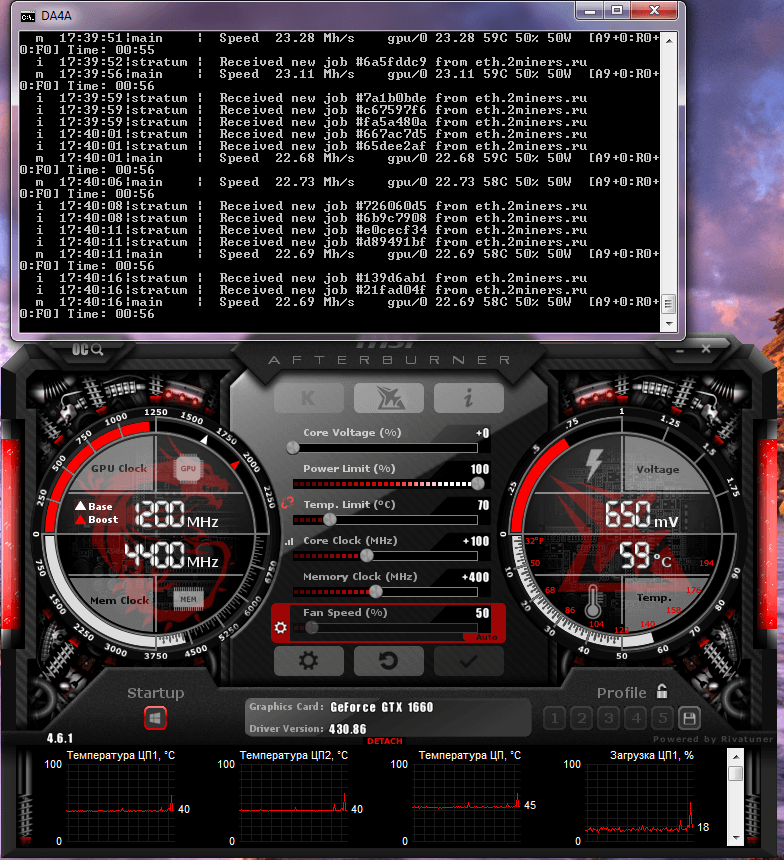
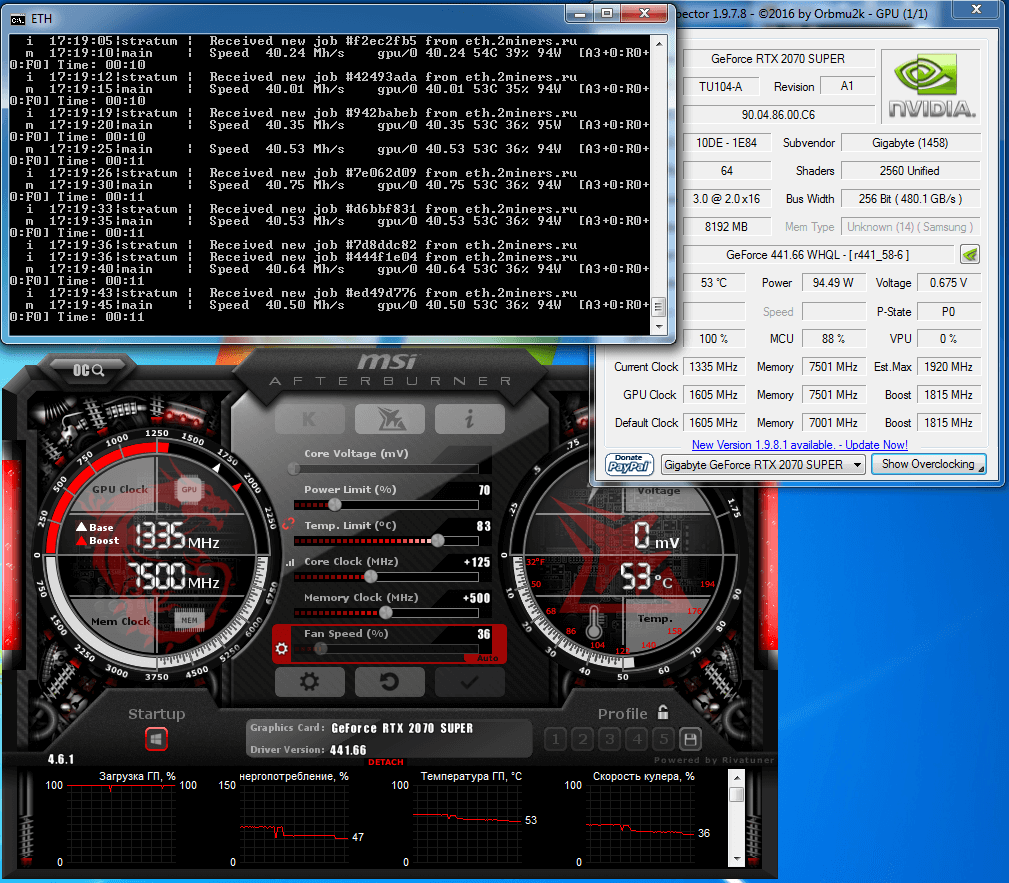
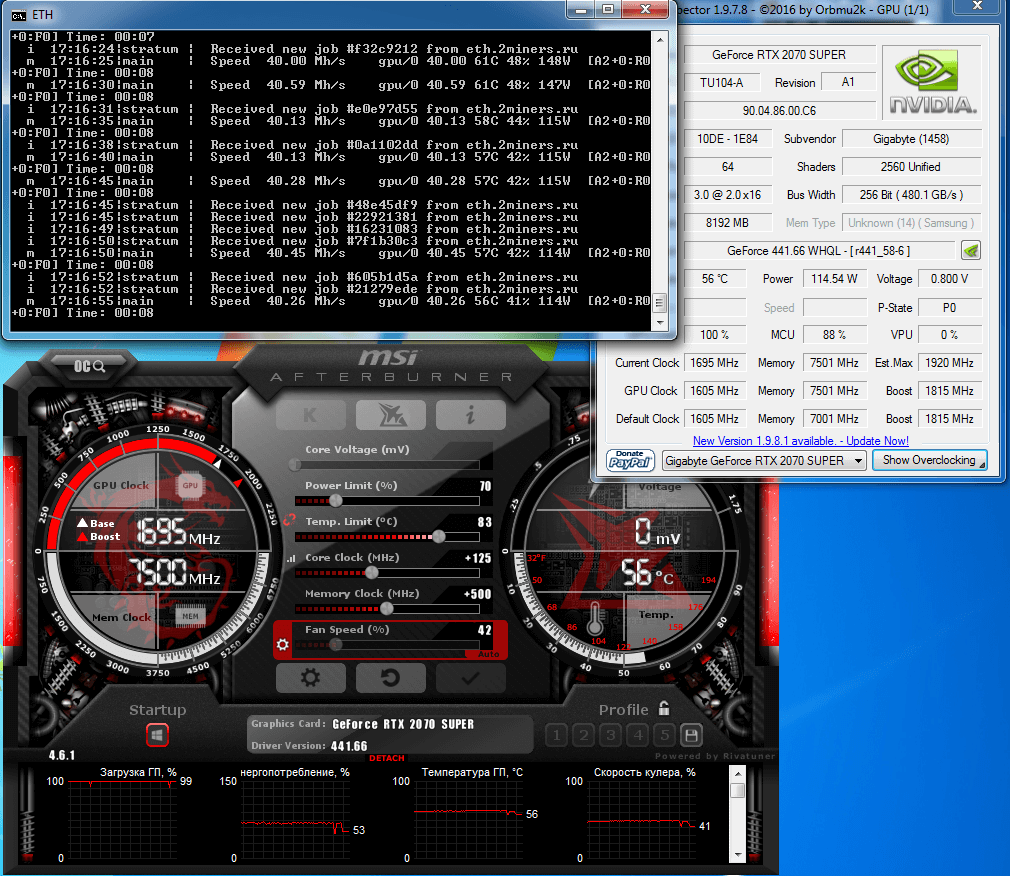
The newer 16xx and 20xx GPUs don’t have this problem, so they can mine this cold algorithm efficiently. And with enough memory (6GB+), you won’t have to worry about the DAG file increase for a few years.
The most efficient configurations are below. This is the GTX 1660.
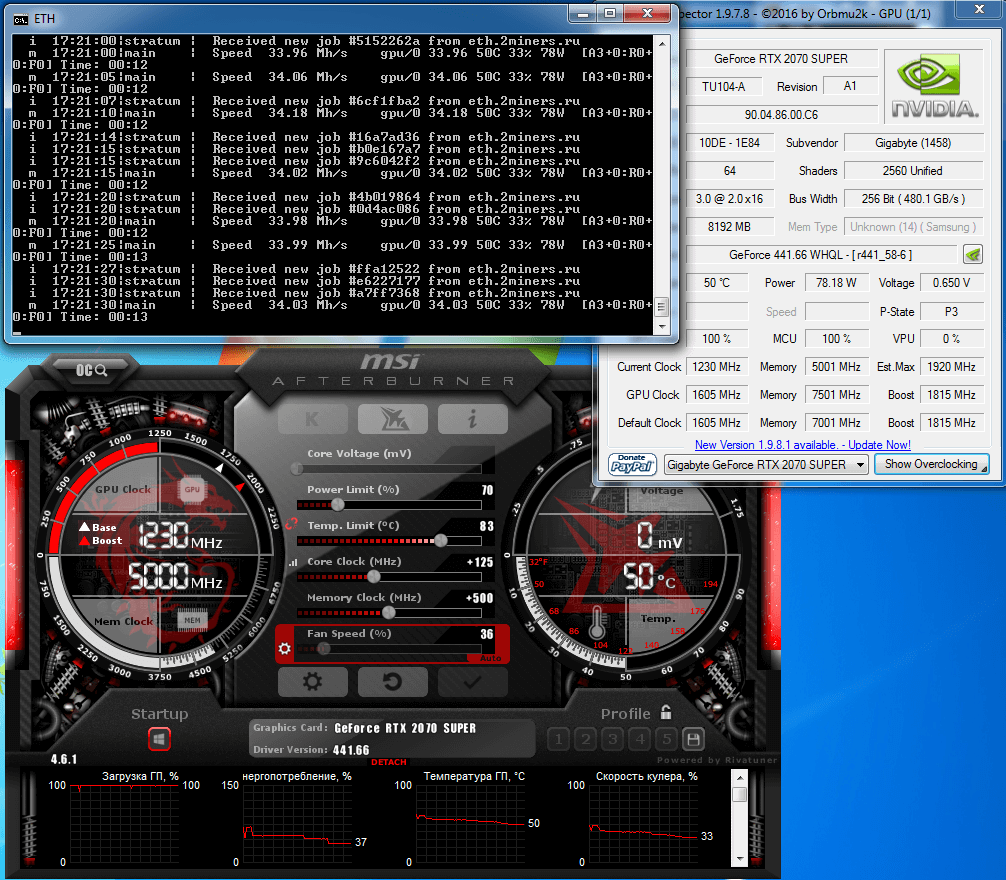
And this is the RTX 2070s.
As you can see, you don’t gain any hash rate by increasing core clock and voltage. So the optimal energy efficiency for Ethereum mining for this GPU series is 220W–230W per 100 MH.
Setting the core to 650 mV on new cards leads to a significant decrease in max hash rate, but doesn’t increase energy efficiency, because GPU switches to the P3 state with a significant decrease in memory clock (much needed for this algorithm).
Nvidia is getting closer to AMD by the number of stream processors, so the new series (the 30xx and modifications) became even more competitive on this algorithm.
However, Ethereum is planning to abandon the PoW system, so its profitability in the next few years may decrease by a lot.
Nvidia Mining and Overclocking on MTP
The MTP algorithm appeared when Zcoin was switching (or running away) from the old algorithm due to the ASIC threat.
The algorithm was initially designed as ASIC-resistant. It requires at least 6GB of GPU memory. Luckily, this parameter doesn’t grow as it does with Ethereum.
The algorithm is quite hot. It depends highly on both the core clock and the memory clock. You won’t necessarily increase energy efficiency by simply lowering the voltage.
As you can see in the screenshot if you lower the 1660 core voltage to 650 mV, the hash rate drops significantly, but energy efficiency doesn’t grow. It’s important to search for and know your GPU’s optimal minimum, as well as an optimal maximum (without overheating). Overheating leads to a significant deterioration of GPU functions and can even cause it to break.
The 10xx series efficiency ranges from 15kH/W to 22kH/W. The 20xx series ranges from 19kH/W to 3kH/W.
The new series must have improved this value to some extent (by 20–30%). They haven’t raised it multiple times (like with Ether), so even in 2020 the 10xx series GPUs are working well on this algorithm.
You need to activate the pill to maximize the hash rate for the 1080 and 1080ti (3.4MH and 4.4MH respectively).
Nvidia Mining and Overclocking on Cuckaroo30
The algorithm for Cortex is hybrid. It uses both core and memory with the latter prevailing. It can be considered a rather cold algorithm. It works well for mining on GPUs with at least 10GB of RAM. For example on the 1080ti it gives out as much as MTP does at full capacity or Ethash at standard capacity. However, the real energy consumption of plugged graphics cards is 40% lower than that of MTP and 25% lower than that of Ethereum.
It’s worth pointing out that Cuckaroo30 is an algorithm with a changing load. Sadly, systems like HiveOS only show the current load changing within a 30% range. In the mining program, say Gminer, you can see the real load, but most users interact with the web interface that doesn’t provide this information.
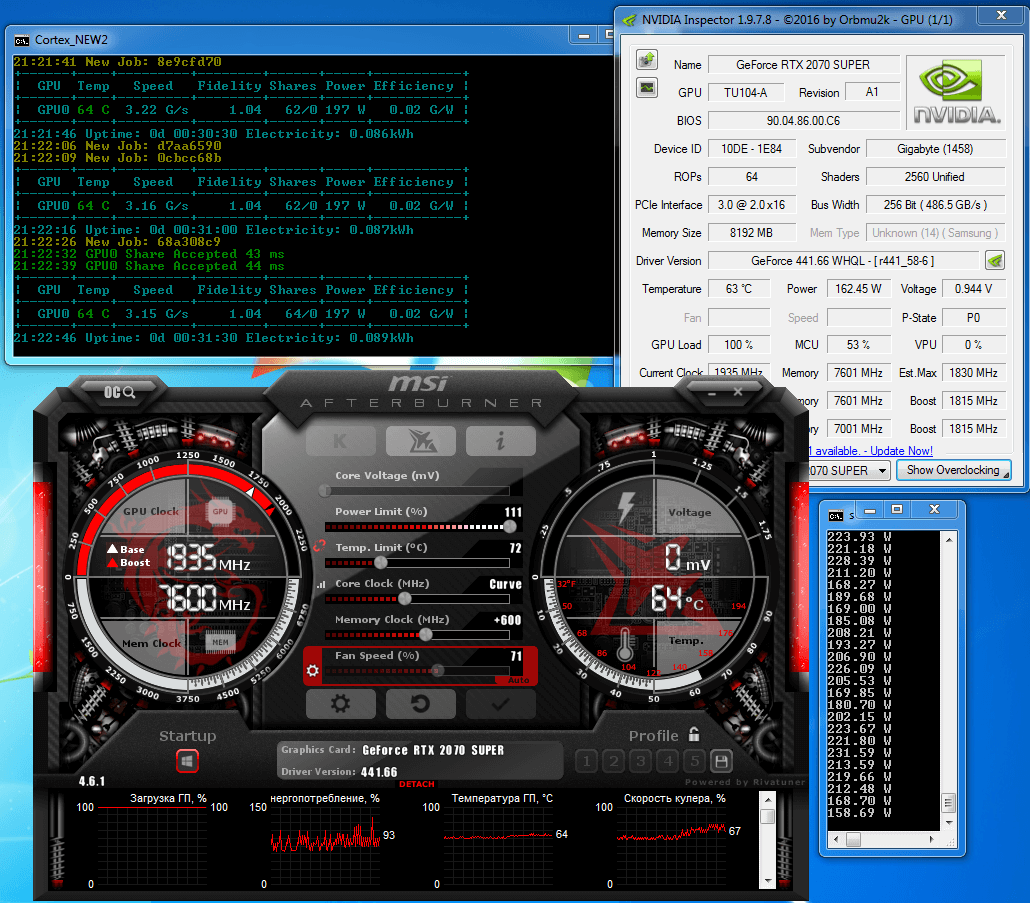
For example, if such users set the power limit at 240W in RaveOS for the 2070s GPUs, they wouldn’t understand that on this algorithm a GPU doesn’t consume more than 200W, as the short active core load stage is followed by the long memory load stage.
You can easily notice it in Windows. When you set the max PL at 111% (245W), the real-time consumption monitor will only show a few single values higher than 220W following one another. The rest of the time consumption is much lower, with a minimum of 158W and a mean value of 197W. Note that with Platinum PSUs, estimated power values correspond to the real consumption.
Windows 7 and Linux systems (RaveOS, MMP, etc.) allow you to use Gminer to mine with 8GB GPUs.
It’s not efficient for the 10xx series: the hash rate of 1070, 1070ti, and 1080 is 1.55, 1.5, and 1.65 respectively. But it works well with the 2070 and 2070s, where the hash rate is directly dependent on the Power Limit value. If you set PL at 240W, the 2070s with 8GB consumes around 197W and gives out a decent hash rate (comparable to the 1080ti with 11GB).
Mining Algorithms for Low-End Nvidia GPU’s
Sadly, GPUs with low memory, old GPUs, and even some new GPUs can’t mine the algorithms mentioned above, and if they can, they are less efficient. There are a lot of profitable algorithms for such Nvidia cards.
The two most profitable in the second half of 2020 are BeamHash-III (Beam) and Kawpow (Ravencoin).
Nvidia Mining and Overclocking on BeamHash-III
The third version of the Beam algorithm is an ASIC-resistant algorithm for GPU mining.
The initial requirement was 3GB+ GPUs, but soon after LolMiner activated support for 3GB GPUs (i.e., for memory that doesn’t display images in Windows).
When you overclock the core of the 10xx series GPUs, the algorithm gets limited by their memory pretty fast, at the average power consumption level (around 70%). Further core overclocking doesn’t lead to an increase in hash rate. So this algorithm can’t be considered hot, but it brings a decent average annual profit on 3GB/4GB GPUs.
The algorithm is not featured among the most profitable for 6GB+ GPUs , as there is a large number of old GPUs on the algorithm.
Nvidia Mining on Kawpow
Kawpow (with RVN as a major coin) was quite promising at the beginning, but after three months it wasn’t featured among the most profitable algorithms anymore.
That’s a short success story, but Kawpow has some key advantages. The algorithm works even with 3GB GPUs, adjusts well (many GPUs that are problematic on other algorithms work well on kawpow), the hash rate correlates to GPU PL, and RVN is featured on many major exchanges.
If you look at all the factors, the algorithm comes second best in terms of prominence and profitability after Ethash.
Overclocking is similar to Beam, so we won’t get into more detail. It was Beam to take on some part of 3GB GPUs, which allowed kawpow users to feel more optimistic in 2020.
Plus, after the ETC upgrade and the outflow of more 3GB GPUs there, Kawpow will be featured among the most profitable algorithms more often, even for powerful GPUs.
Nvidia Mining and Overclocking on Cuckarooz29 and Cuckatoo32
Both algorithms (C29 and C32) mine GRIN cryptocurrency that was initially said to be GPU-focused and ASIC-resistant. So it makes slight changes to algorithms from time to time to make it too costly to build new ASICs for the network.
Grin mining on C29 was featured among the most profitable algorithms very rarely. This algorithm was tied to a single coin, and Grin’s popularity went a bit down. Grin v5.0.0 hard fork has happened at block 1 048 320 (January, 15) and the C29 algorithm was terminated. At the moment C32 is the only active algorithm for GRIN mining. Read more
Unlike C29, C32 requires at least 8GB of GPU memory for mining, and top GPUs in the series give out a higher hash rate, just like with the Cortex algorithm. This algorithm is often featured among the most profitable for the 1080ti, 2080ti, 3060ti, 3070, 3080, and 3090.
The algorithm doesn’t cause issues and works well even on weak GPUs.
Nvidia Mining and Overclocking on Equihash-xxx
Anonymous ZEC coin on equihash was launched in 2016 challenging the ETH dominance in mining. Initially, coin mining was only available on CPU, but after a month they launched a GPU mining device that was giving much better results on green cards than on red cards.
Equihash is highly dependent on the core overclocking and doesn’t have large-size temporary files to place in GPU memory, so it was an easy target for ASICs. Despite the network centralization threat, they didn’t change the algorithm, which made people talk about their affiliation to Bitmain, the biggest ASIC manufacturer.
Unlike the main coin, its various modifications felt threatened by the growing hash rate that might have been concentrated in someone’s hands. So they decided to change the algorithm. That’s how multiple Equihash-xxx variations appeared. xxx is a numerical ID code for example Equihash 125,4 (used by ZelCash) or Equihash 144,5 (used by Bitcoin Gold).
At the same time, the main coin exchange rate fell significantly, as well as the crypto market as a whole. That turned the production of new ASICs for each modification into a losing game.
However, multiple coins created on these algorithms after 2016 can’t compete with top coins in terms of profitability.
If you decide to start mining these coins, you will have to monitor profitability and switch between algorithms/coins from time to time. With that being said, you could still make a nice profit (especially with old GPUs).
These algorithms mostly need core overclocking.
Energy Efficiency in Mining. Operating modes
Any GPU can operate in power-saving mode, but overclocking allows you to maximize the hash rate. At the same time, energy efficiency suffers.
Not all rigs work well with any algorithm, so every expert user must test their GPU operation at maximum and minimum capacity and choose the optimal mode, considering operating temperature and electricity costs.
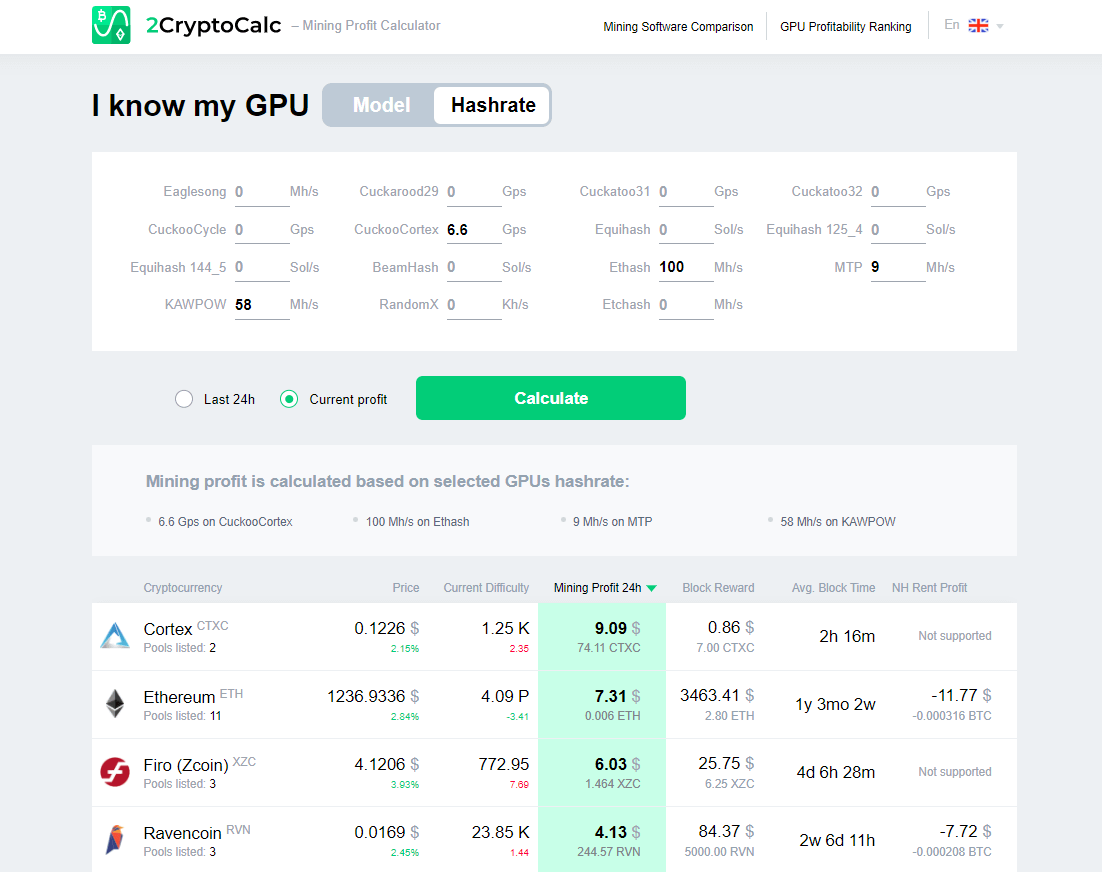
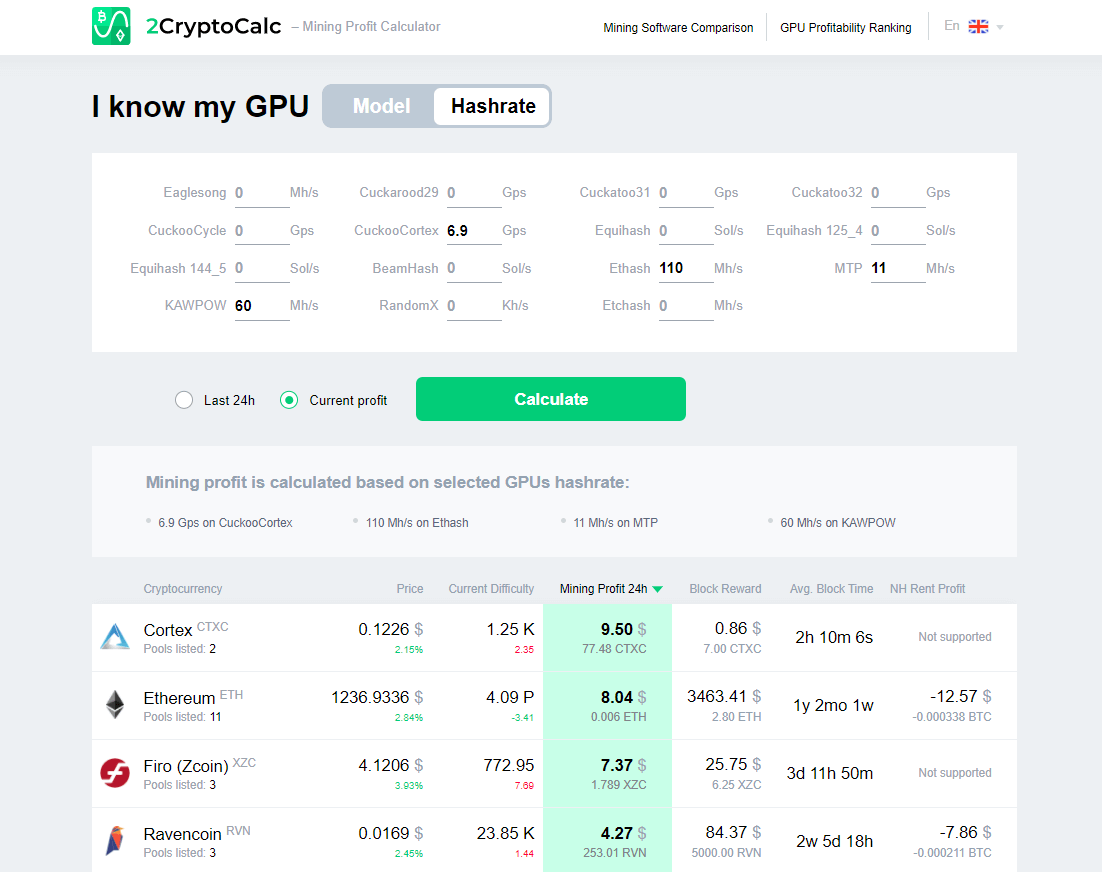
You can save the results as links to the 2CryptoCalc mining profitability calculator that allows you in just a few clicks to evaluate whether your algorithm is better or worse than alternatives in terms of the current mining profitability specifically for your rigs.
Let’s take as an example a small but problematic rig that can mine well only four algorithms on Linux.
Below you can see the results for the middle of January 2021.
You can see that it made sense to overclock the rig in January only at the electricity cost of no more than $0.09 per kWh.
Hot/Cold mode electricity consumption difference is 190W.
That means the Hot mode requires 0.190 x 24 = 4.56kWh more every day.
The hot mode rig operation daily reward is $9.50 while the cold mode reward is $9.09. The hot mode gives you $0.41 more.
0.41 / 4.56 = $0.09 per kWh
Also, remember that the night power rate is usually lower so it would have made sense to operate at full capacity. Electricity costs and current profit are crucial when you are choosing an algorithm and rig operating mode.
Max Energy Efficiency for New Mining Rigs
When you build a new rig, you have to remember that GPU max energy efficiency within one series is almost the same. Usually, mid-range GPUs ($300–$400) have the best max power-to-price ratio.
But it’s tedious to build and monitor a large number of weak rigs, so miners usually choose GPUs at $500–$700.
Sooner or later, all miners end up estimating the max hash rate per 1 kW of a rig power due to either electricity cost or the “free” power limits.
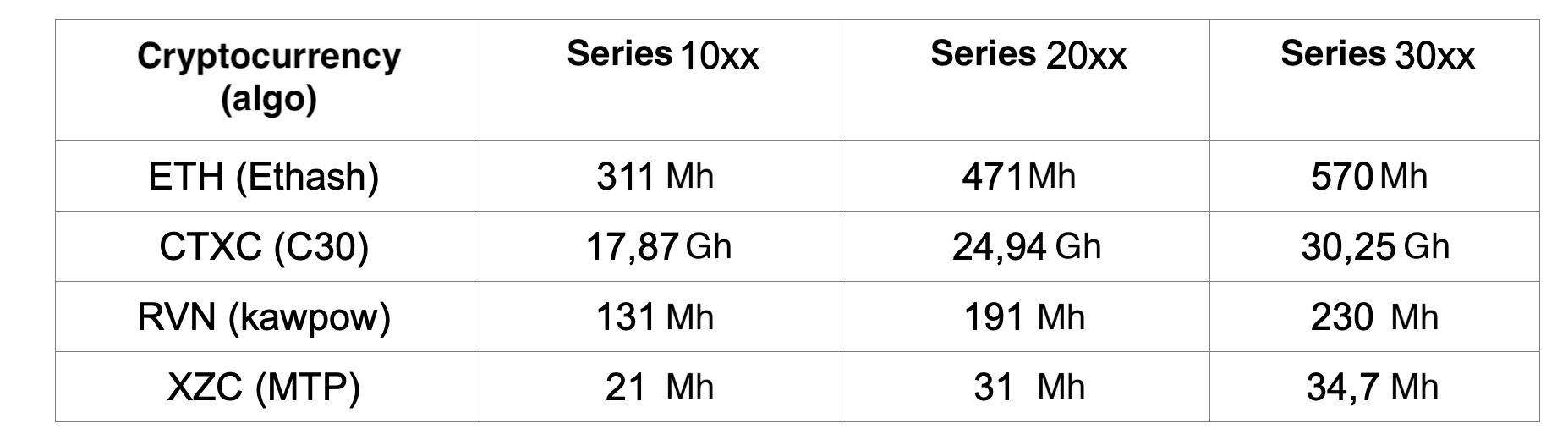
Here are max hash rates adjusted for the dev fee per 1 kW of utility power with Platinum PSUs for the 10xx, 20xx, and 30xx series. The 30xx series stats are up-to-date as of December 25, 2020, so make sure to follow the updates.
As you can see the 20xx series has a marginal benefit per 1 kW 1.5x higher than the previous one. It’s mainly due to the enhanced memory access algorithm. The effect on the core algorithms is not so impressive (33%).
GPU Series Comparison. AMD 5xxx–6xxx vs Nvidia 20xx–30xx
Competition between AMD and Nvidia leads to the constant series upgrade between the two in an attempt to beat the competitor.
In 2017 AMD released the popular 4xx-5xx series. As a response, Nvidia released the 10xx series increasing Nvidia’s share on the market for several years in a row.
Only in 2020 AMD managed to launch the 57xx series in response not only to the 10xx, but also to the less popular 20xx (Nvidia had to upgrade it quickly to the Super subseries).
Nvidia 30xx and AMD 60xx surprised us with the increased number of stream processors. However, the power of core algorithms didn’t increase multi-fold for the first 30xx cards. The results of memory-focused algorithms, ETH in particular, are fantastic. The architecture was modified to a great extent, close to the modern technology limits. It means that multi-fold increase in power is impossible without a substantial rise in GPU prices.
We hope that the future series will feature new ways of interaction with GPU memory to use new and powerful cores to their fullest potential (like the 3090 and its modifications).
Conclusion
Despite the late start in the mining industry, Nvidia has obtained a significant share of the market. As of September 2020, the open data shows that green cards account for 39% of all video cards used for mining as opposed to 25% in 2018. 90% of those cards are from the 10xx series. The 20xx series is only entering the market, while miners may already shift en masse to the next 30xx series very soon.
According to 2Cryptocalc, the versatile choice of algorithms closes the gap between the top and alternative algorithms for Nvidia GPUs. Plus, there are many efficient algorithms to choose from.
We hope that this article will help beginning miners to maximize their profit without damaging or overheating their GPUs.
PS
At the beginning of 2021, we will see a lot of new GPUs. It means that the balance of power may change as new GPUs, mining programs, and algorithms are entering the market. So we will try to keep this article up to date as we get the new data.
Prepared by Denis Trushin, Head of the Advanced Technology Department at ADM Techno. Denis is an active member of the 2Miners mining pool community.
Remember to follow us on Twitter to get all the news as soon as possible.
Miner since 2017, the 2Miners pool co-founder. Became interested in cryptocurrencies at the dawn of the latest bull run and bought his first graphics cards. After having built and set up a few mining rigs, he realized that existing mining pools didn’t satisfy him – that’s how the idea of creating the 2Miners pool was born.
John published a series of articles about the basics of cryptocurrency mining. He gave valuable tips on how to buy ASICs and GPUs from abroad and then shared their mining performance. On the website, you can find early articles about cryptocurrency mining, blockchain in general and mining pool operation principles. The readers gave positive feedback on John’s practical guides, such as building an Ethereum mining rig and Nvidia 1080ti overclocking.
December 2020 Work Progress Report: Exmo Exchange Hack, Horizen Halving
December 31, 2020
Ethereum pool growth and server updates, Grin payout issues, Exmo exchange hack, Horizen halving.
New Milestone For 2Miners
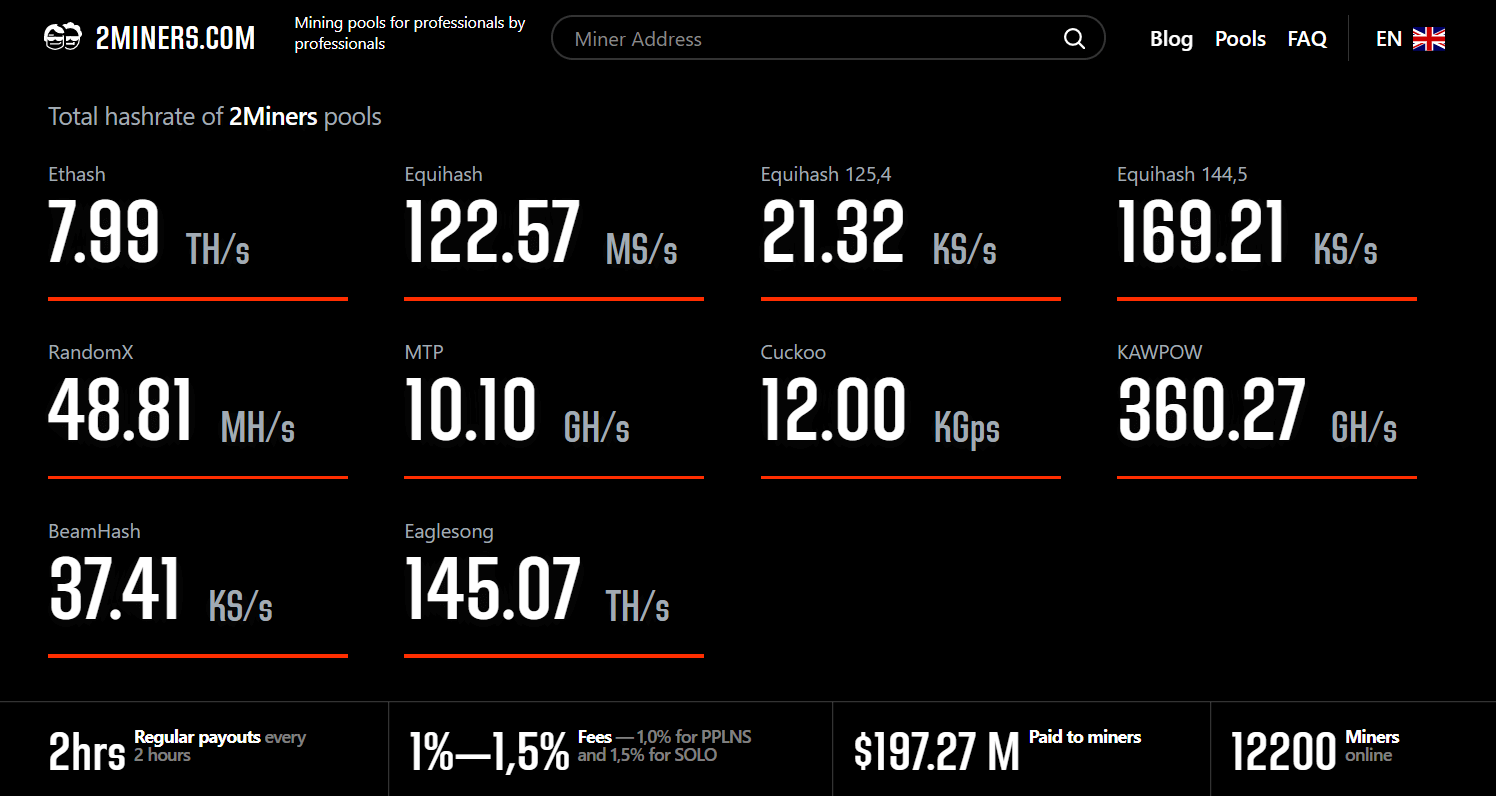
This December we’ve reached the new important milestone – 12 000 miners online and 6 000 miners in Ethereum pools (PPLNS and SOLO). We would like to thank you for your support. We really appreciate that and we do our best to provide the best possible service for our miners.
With Bitcoin reaching the all-time high price this year we can see the increasing interest in the mining process. The number of ASIC and GPU miners is growing day by day. For all the newcomers we do highly recommend to read our blog, especially the most important articles:
That’s very basic knowledge that every miner should have. If you want to jump into the industry now you should calculate the hardware costs and evaluate the mining profitability. We’ve recently updated the post on How to Build the Mining Rig so give it a look. For profitability calculation we always recommend 2CryptoCalc, which is the easiest to use mining calculator. Our post How to Use 2CryptoCalc Mining Profitability Calculator describes all the calc functionality.
Ethereum Mining News
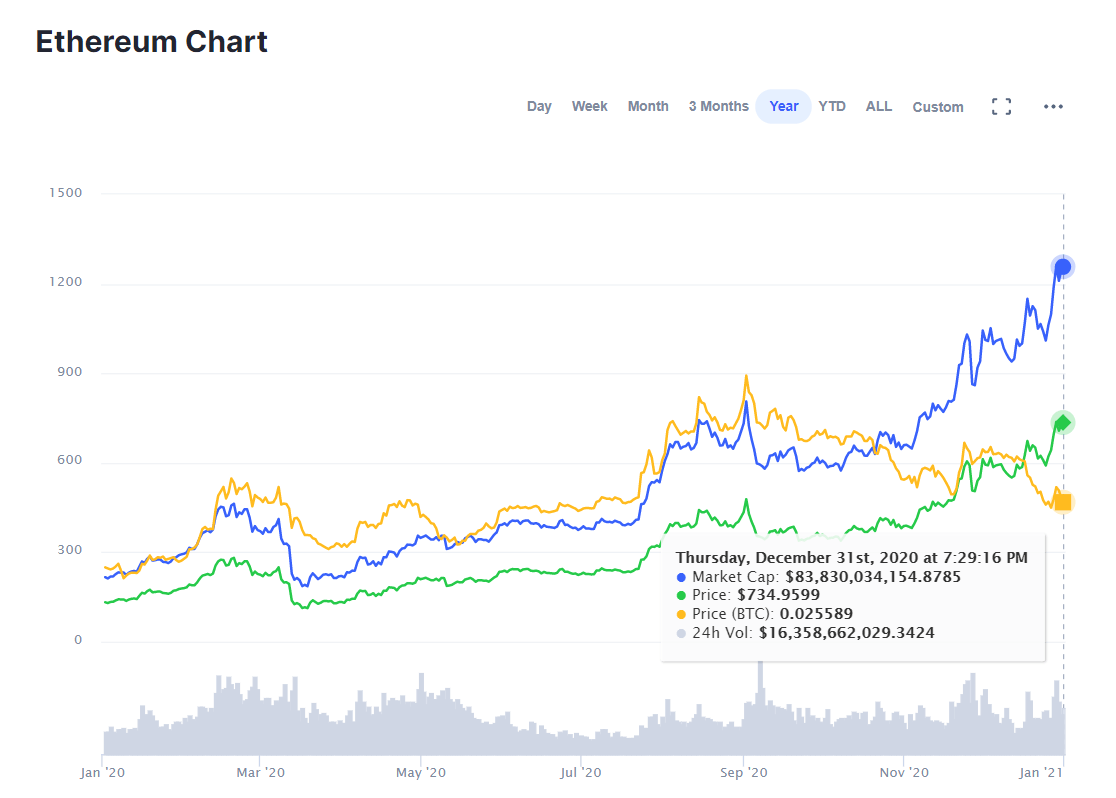
Ethereum has reached the all-year high price this month. The number of our Ethereum miners grew by 20% in December.
Due to increased demand, we have doubled the number of ETH PPLNS servers in European and Asia regions. Happy mining and thanks for choosing us.
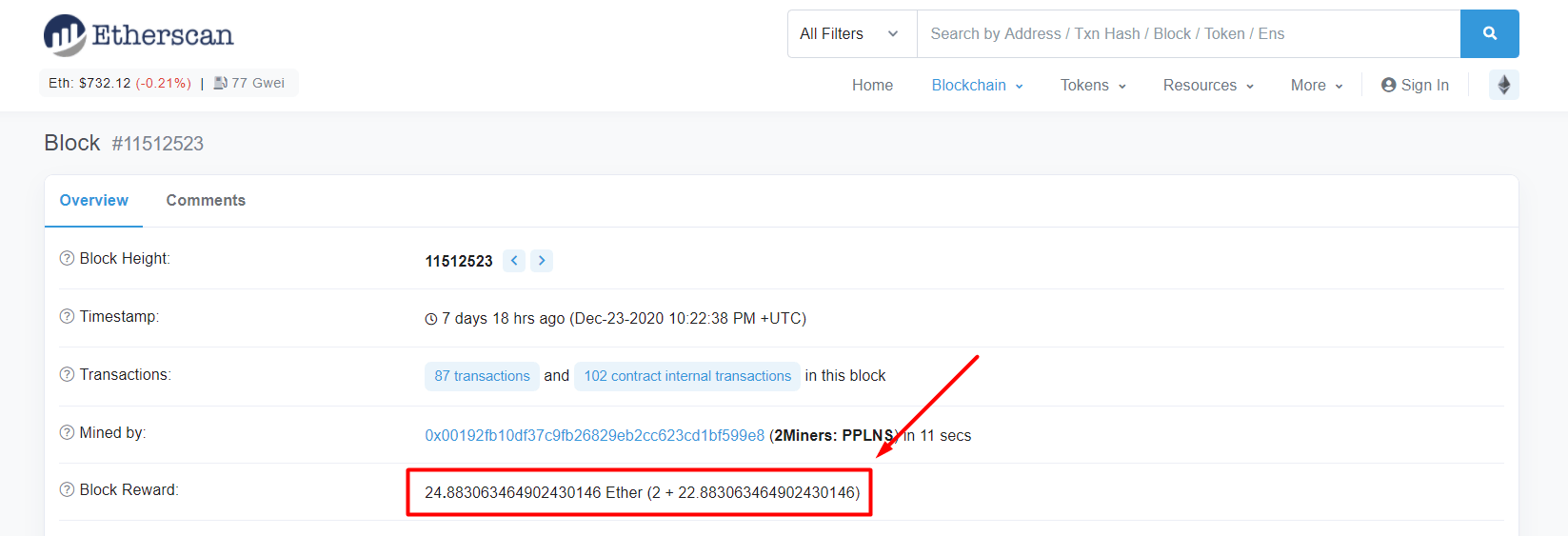
Btw. this month’s Ethereum block record was 24.88 ETH. Almost 25 ETH for a single Ethereum block! Of course, all has been paid to our miners, thanks to the PPLNS rewards system.
Starting from Ethereum epoch 382 (December 16) all 4GB GPUs require the latest versions of the mining software and sometimes additional settings for them. Read How to Mine Ethereum and Ethereum Classic on 4GB GPUs if you have any issues with that.
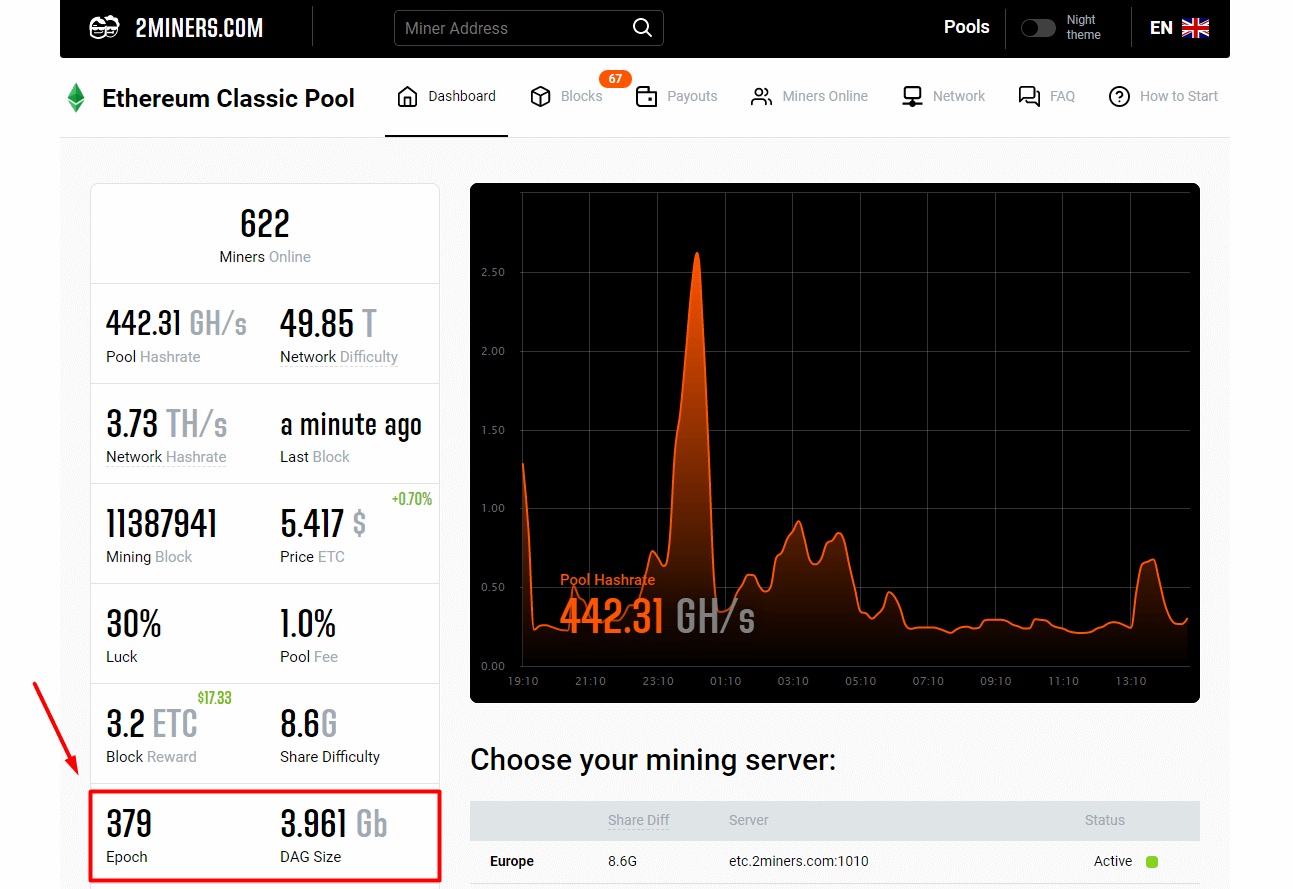
The current Epoch number and DAG size could be always found on 2Miners ETH pool homepage.
EXMO Cryptocurrency Exchange Hack
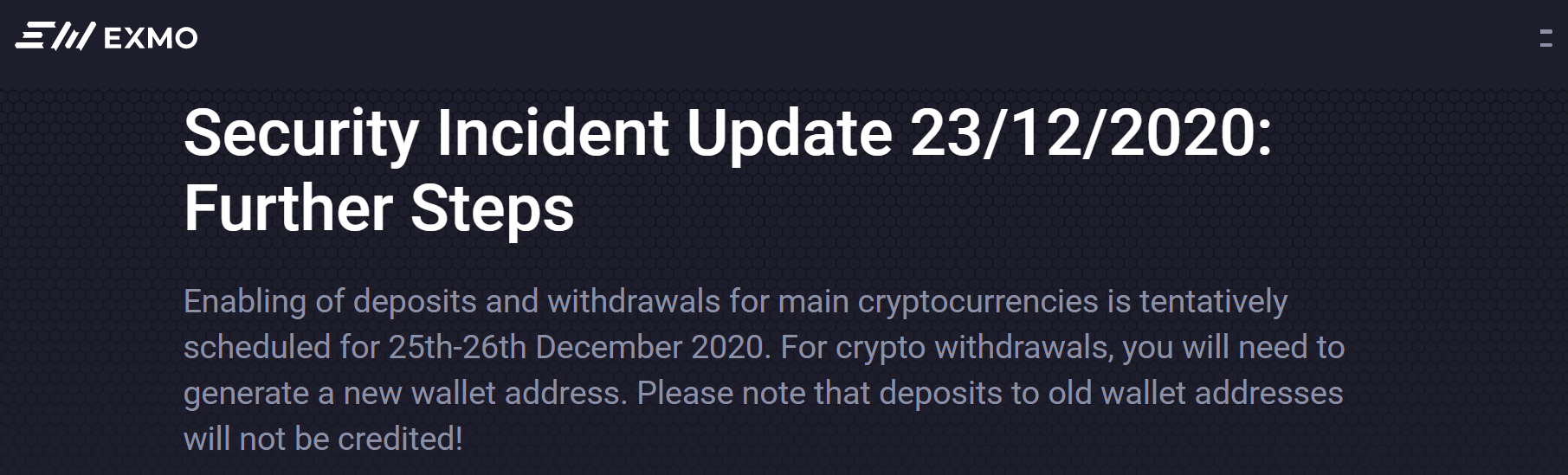
On December 21, EXMO Exchange has been hacked. All the deposits and withdrawals have been suspended. They have been restarted a few days later, the deposit addresses have been changed though.
We have helped our miners to transfer the coins from the old addresses to the new ones even if it was against the 2Miners pool rules. We thought EXMO required our support, especially in difficult times. A friend in need is a friend indeed! We want all crypto-companies to be treated with respect and understanding. Our industry is still very young and we are always ready to give a helping hand to our colleagues.
If you got any EXMO-related problems please write to our Helpdesk.
Horizen ZEN Halving
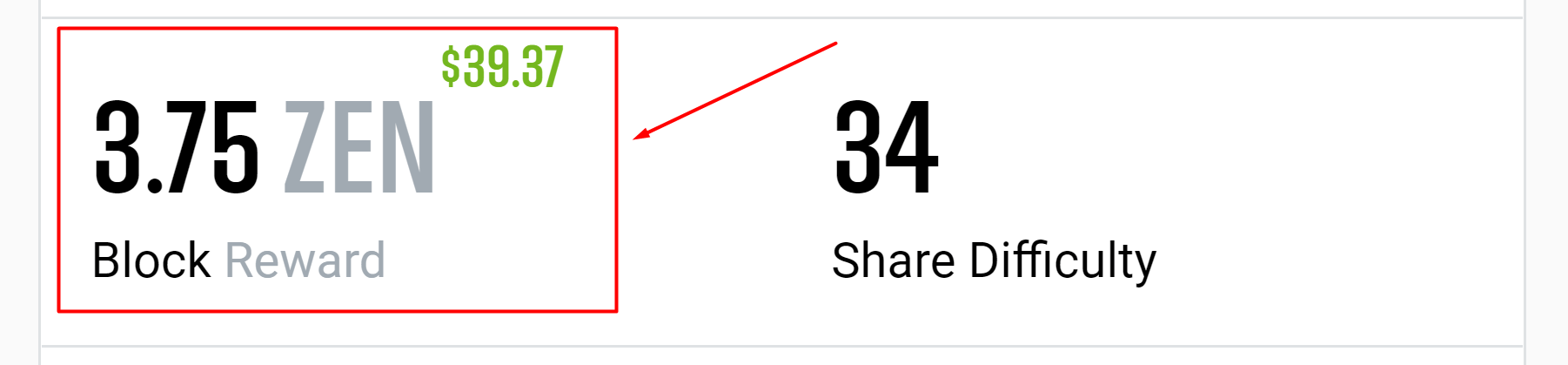
Horizen (ZEN) halving has happened on December 2 (block 840 000). Block reward has been halved from 7.5 ZEN to 3.75 ZEN. Please pay attention!
Grin Payout Issues
Grin payout procedure is getting more and more complicated. Poloniex has delisted Grin in November. This month HotBit exchange got issues with Grin as well. Hopefully, our dev team has found a workaround. The payouts are working now.
Important! Due to the upcoming Grin https-address termination we recommend all the Grin miners to start using TOR-address asap. Grin++ is a nice example of such a wallet.
Happy New Year!
And last but not least… We wish you an amazing 2021 year. We hope your profits would be high, and you and your friends would be safe and healthy!
Remember to join our Telegram chat and follow us on Twitter to get all the news as soon as possible.
Miner since 2017, the 2Miners pool co-founder. Became interested in cryptocurrencies at the dawn of the latest bull run and bought his first graphics cards. After having built and set up a few mining rigs, he realized that existing mining pools didn’t satisfy him – that’s how the idea of creating the 2Miners pool was born.
John published a series of articles about the basics of cryptocurrency mining. He gave valuable tips on how to buy ASICs and GPUs from abroad and then shared their mining performance. On the website, you can find early articles about cryptocurrency mining, blockchain in general and mining pool operation principles. The readers gave positive feedback on John’s practical guides, such as building an Ethereum mining rig and Nvidia 1080ti overclocking.
Unfortunately, we were experiencing issues with submitting GRIN payments to the users of HotBit exchange. Let us briefly explain what is the problem and how it can be potentially fixed, although we have no power to do so (it is entirely in HotBit’s hands).
How Do Grin Payouts Work
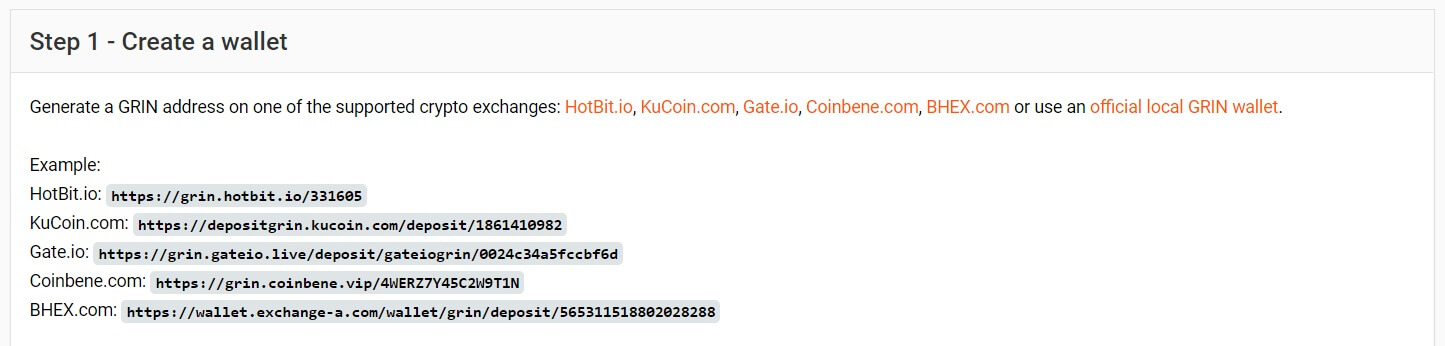
GRIN payments work like this: a special URL is supplied to each customer with a distinct wallet to be used for submission of the funds. The submission is done by GRIN wallet and is entirely automated (as in, despite the fact it is an URL, it is meant for robot interaction and not for human beings — a so-called API endpoint, if we can lose the definition a bit). When our pool pays out the proceedings to our GRIN miners, for each payment it connects to that URL, passes in the required data, disconnects, and repeats the process over for the next customer.
Cloudflare Protection
Enter the world of the modern World Wide Web with automated spambots, crawlers, and DDoS attacks. To countermeasure these things specialized solutions are engineered, one of which is the widely popular CloudFlare. Its automated algorithms analyze each access to the web site pages and present special guard pages to the visitor if they think it is unusual activity.
HotBit is using CloudFlare to protect their Web front (a very right thing to do, I might add). However, this protection is also enabled on the GRIN payment endpoints, so when our pool pays out to different HotBit customer wallets in a succession, naturally CloudFlare thinks it may be some unusual activity and responds by presenting a visitor check webpage. The problem is, the parties communicating are, in fact, computer programs, and they are not designed to bypass the “human check”. This causes our payments to fail — overly cautious algorithms on the CloudFlare side plus improper configuration on the HotBit side (they should have added an exception for the machine-operated endpoints on their CloudFlare dashboard) make them stall and not go through.
Conclusion
The talented team of 2Miners engineers has managed to create a temporary workaround that bypasses CloudFlare security checks for the time being, but in reality, it is HotBit that should be fixing the issue on their side. We are in contact with them but with the little outcome so far (they suggest using different VPNs to pay out to our miners). Hopefully, we will reach a competent person on their end at last…
Meanwhile, we highly recommend our Grin miners to use other Grin wallets. If you have any problems with Grin payouts please write to our Telegram Chat or directly to Helpdesk.
Remember to follow us on Twitter to get all the news as soon as possible.
The 2Miners pool co-founder, businessman, miner. In 2017 started mining cryptocurrencies and built many rigs on his own. As a result, he gained lots of practical knowledge and became interested in sharing it with others.
In his articles on 2Miners, he shares useful tips that he tried and tested himself. For example, Darek gives advice on how to buy hardware components for the basic mining rig and how to connect them to each other correctly. He also explained lots of complicated terms in simple words, such as shares, mining luck, block types, and cryptocurrency wallets. After the pool was launched, he published a series of articles ‘Crypto Mythbusters’ where he explained how to protect the network against 51% attack, talked about cryptocurrency mining difficulty and difficulties of launching your own node.
November 2020 Work Progress Report: Ethereum Classic Hardfork, Zcash Halving, Pirl Delisting
December 1, 2020
Ethereum Classic hardfork, Zcash halving, attacks on Grin network, Pirl delisting, new ASIC firmware, ethash library bug found by 2Miners team.
Ethereum Classic Hardfork
ETC Thanos hardfork has been performed successfully at block 11 700 000 on November 28. ECIP-1099 proposal was implemented and DAG file has been reduced. Starting from this date 3GB graphics cards have received the opportunity to mine again. The new algorithm is called etchash. It is not much different from ethash though. Just the epochs are now switching every 60 000 blocks and not 30 000 blocks as before.
Ethash ASIC’s do not support etchash algorithm. Nicehash doesn’t support it as well. Therefore the Ethereum Classic network is maintained by GPU’s only.
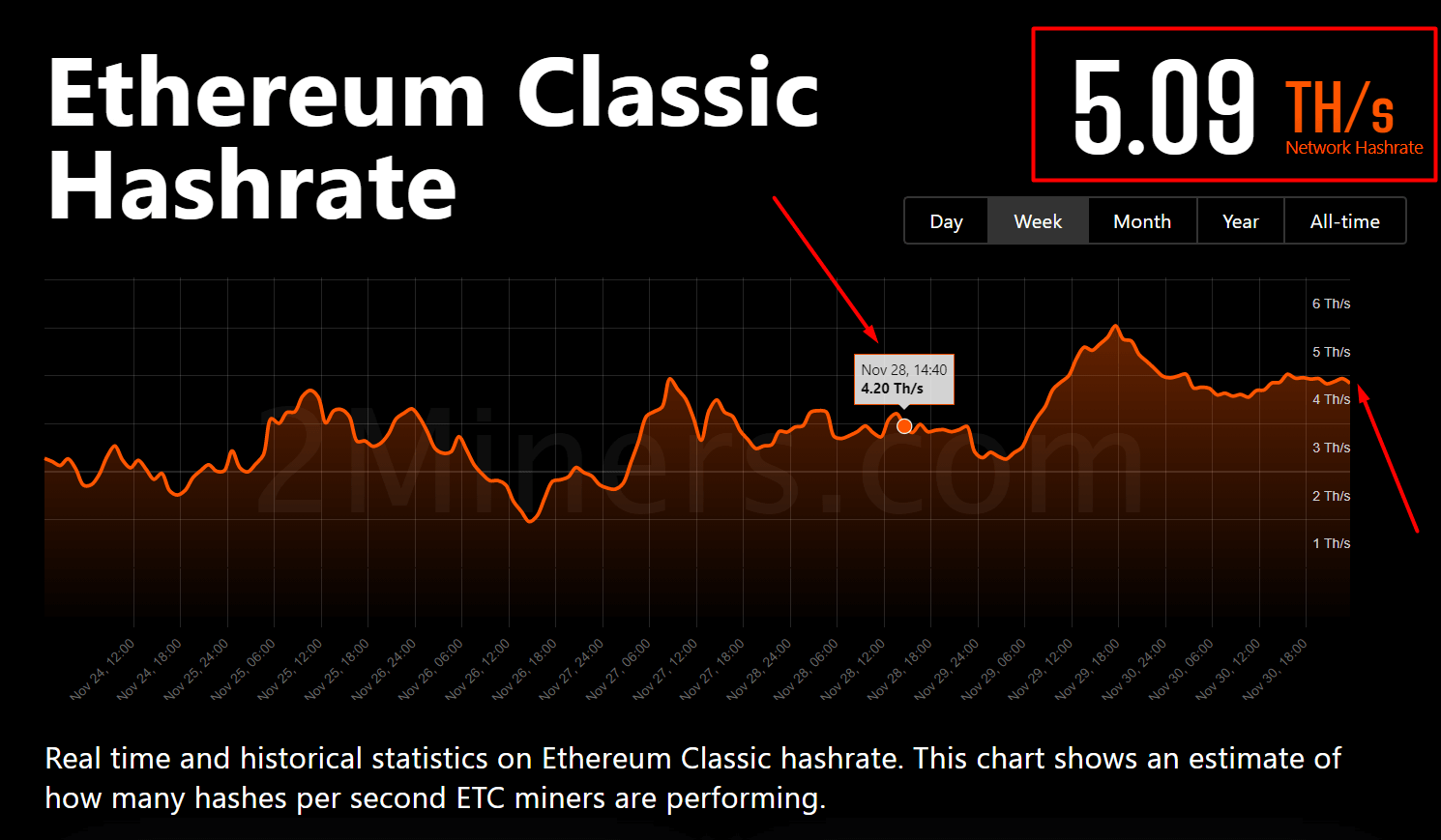
Straight after the hardfork the network difficulty has dropped. Then it has started to grow. Right before the fork the network hashrate was 4.26 TH/s. Now it is 5.09 TH/s so we’ve seen almost 20% growth recently.
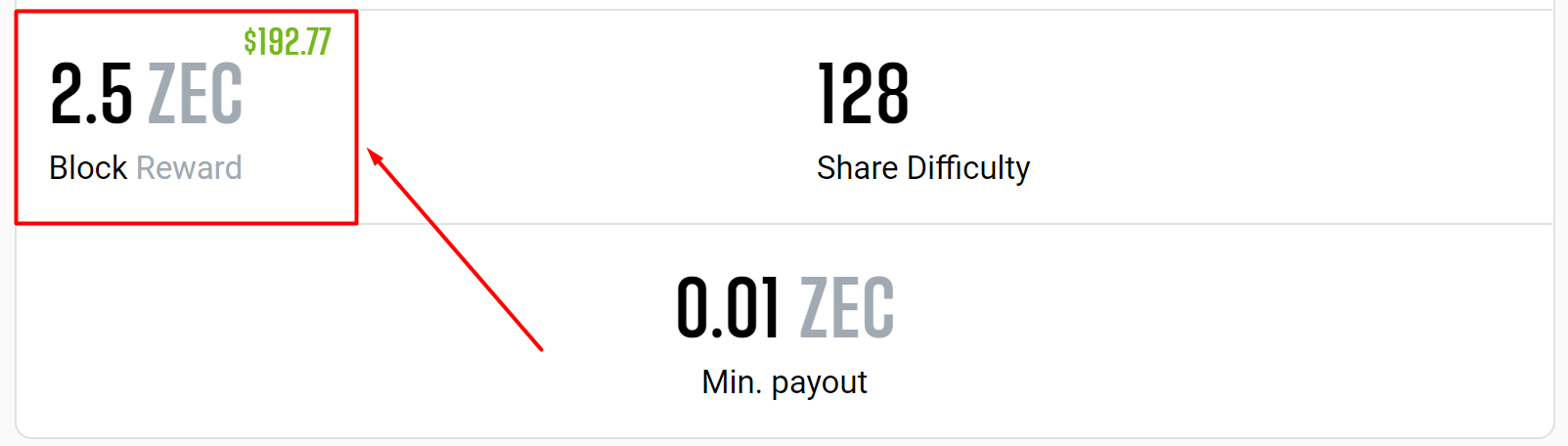
Zcash halving has happened at block 1 046 400 on November 18. Block reward has been reduced twice from 5 ZEC to 2.5 ZEC. 2CryptoCalc has been updated. Btw. if you’d like to learn more how does the cryptocurrency mining calculator work, read our article How to Use 2CryptoCalc Mining Profitability Calculator
Grin Network Under Attack
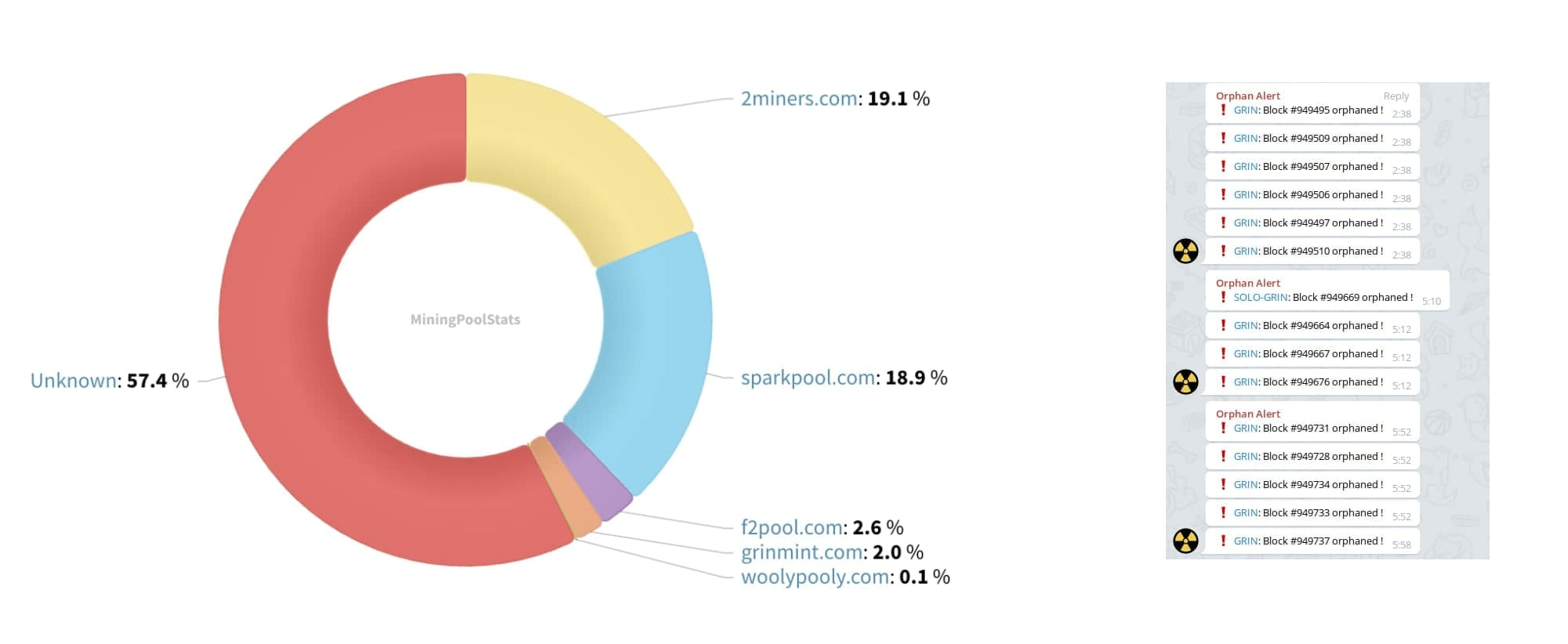
We’ve noticed an attack on Grin cryptocurrency network on November 8. This was a classic 51% attack. Hopefully, we have not heard of any crypto exchanges being victims of this attack.
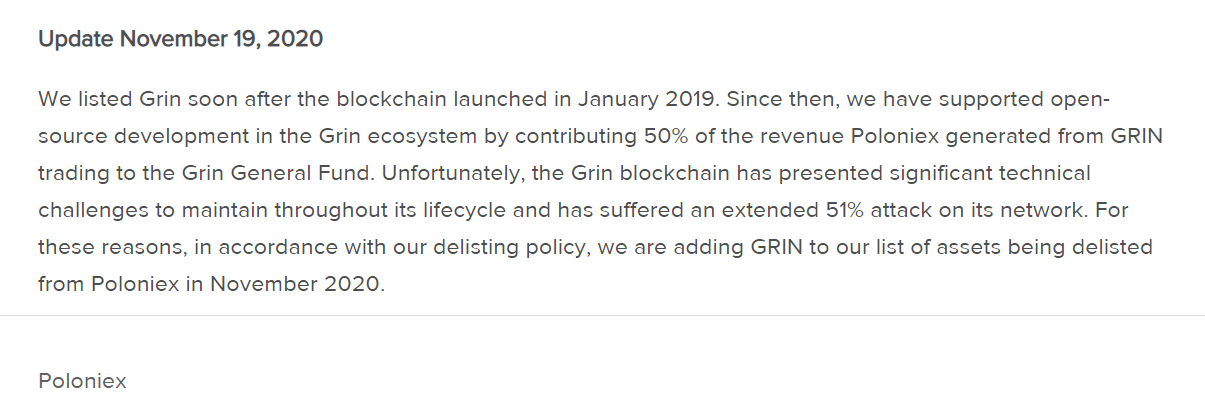
Unfortunately, Poloniex has decided to delist Grin. That really hurts as many of 2Miners Grin miners were using this exchange. As our pool is completely anonymous that is impossible to transfer the balance from one wallet to another one. If you still have some Grin coins unpaid on 2Miners and you were using Poloniex which is now closed, please send a message to our Helpdesk. Our support team will do its best to figure that out for you.
Pirl Delisting
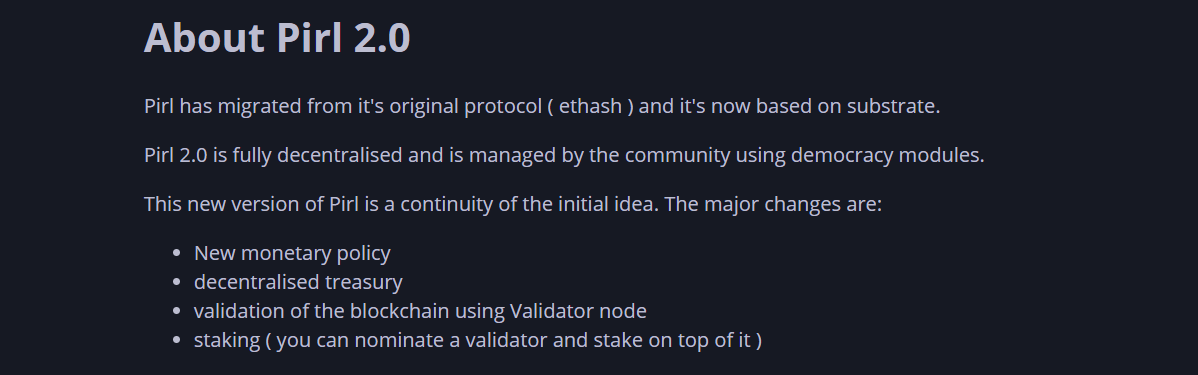
Pirl mining has been terminated at block 7 640 000 on November 15. Pirl developers have decided to switch to POS completely. We have closed the pool and paid out the balances to our miners.
New Innosilicon Ethash ASIC Firmware
A lot of our miners have reported the hashrate decrease for their ASIC miners in Ethereum and Ethereum Classic pools. The issue was the increasing DAG file size as always. Even Innosilicon A10 Pro with 5GB memory on-board were performing at only 80-85% of the hashrate specified by the manufacturer.
You could also download it from our Telegram chat as the Innosilicon website could be really slow sometimes.
Innosilicon A10 with 4GB memory on-board couldn’t mine Ethereum and Ethereum Classic anymore. The DAG file on ETH network is too big while ETC has changed the algorithm. The only option is to upgrade the hardware increasing the memory.
The 2Miners pool co-founder, businessman, miner. In 2017 started mining cryptocurrencies and built many rigs on his own. As a result, he gained lots of practical knowledge and became interested in sharing it with others.
In his articles on 2Miners, he shares useful tips that he tried and tested himself. For example, Darek gives advice on how to buy hardware components for the basic mining rig and how to connect them to each other correctly. He also explained lots of complicated terms in simple words, such as shares, mining luck, block types, and cryptocurrency wallets. After the pool was launched, he published a series of articles ‘Crypto Mythbusters’ where he explained how to protect the network against 51% attack, talked about cryptocurrency mining difficulty and difficulties of launching your own node.
How to Use 2CryptoCalc Mining Profitability Calculator
November 30, 2020
Buying and setting graphics cards up is not enough to start mining. At all times, you need to know a lot about different cryptocurrencies: their mining difficulty, overall network hash rate, and even potential hacking issues. 2CryptoCalc helps you save time and find the most profitable cryptocurrencies for mining. Let’s see how to use this tool to its full potential, with screenshots and examples.
Should You Buy a Mining Rig?
If you haven’t bought a graphics card or other mining equipment yet, 2CryptoCalc will help you evaluate mining profitability. Remember that the calculator is not a fortune teller. It doesn’t know the price of Ethereum tomorrow or how many new miners will join the industry in a week.
Let’s say, your friend is selling a rig of eight Nvidia 1070 graphics cards. He said that he had used it for three years, it had paid off long ago. So he doesn’t need it anymore. The price is $1,300. At the same time, you are thinking of becoming a miner. Would you buy it? How would you know if you need it?
Let’s use 2CryptoCalc. We look for the GTX 1070 on the main page and indicate the number of GPUs, eight in our case. The calculator shows that the rig profitability is $8.00 per day.
Remember that the calculator doesn’t count electricity and other expenses. Electricity costs differ. 1 kWh may cost you $0.1, $0.05, or almost $0.01.
All calculations were done at the time of writing. Go to 2CryptoCalc and enter required values to get the latest data.
How much electricity does the rig consume? It depends on the number of GPUs and the algorithm. Your friend that is selling the rig will likely give you all the numbers. If you have no idea how much energy the rig can consume, google it or search in this Telegram chat about hardware.
The rig of eight Nvidia 1070 cards consumes around 1 kWh, or 24 kWh per day. Let’s say you pay $0.066 per kWh then 24 x $0.066 = $1.6. These are your electricity expenses.
8 – $1.6 = $6.4 per day.
This is the profitability of your rig. Calculating the payback period is easy.
$1300 / $6.4 = 203 days
Now you might ask: “And that’s it? That easy?” Not quite. As mentioned before, the calculator can’t predict the future. Plus, the rig is old, so the PSU may fail and GPUs may break. But if you imagine that in the next 203 days there will be no drastic changes in the chosen cryptocurrency network and no equipment problems, the calculations are pretty accurate.
Plus, after 203 days you will still own the same rig. It will become a bit older, but eight GPUs and motherboard with CPU would cost no less than $650.
Which GPU is the Best for Mining?
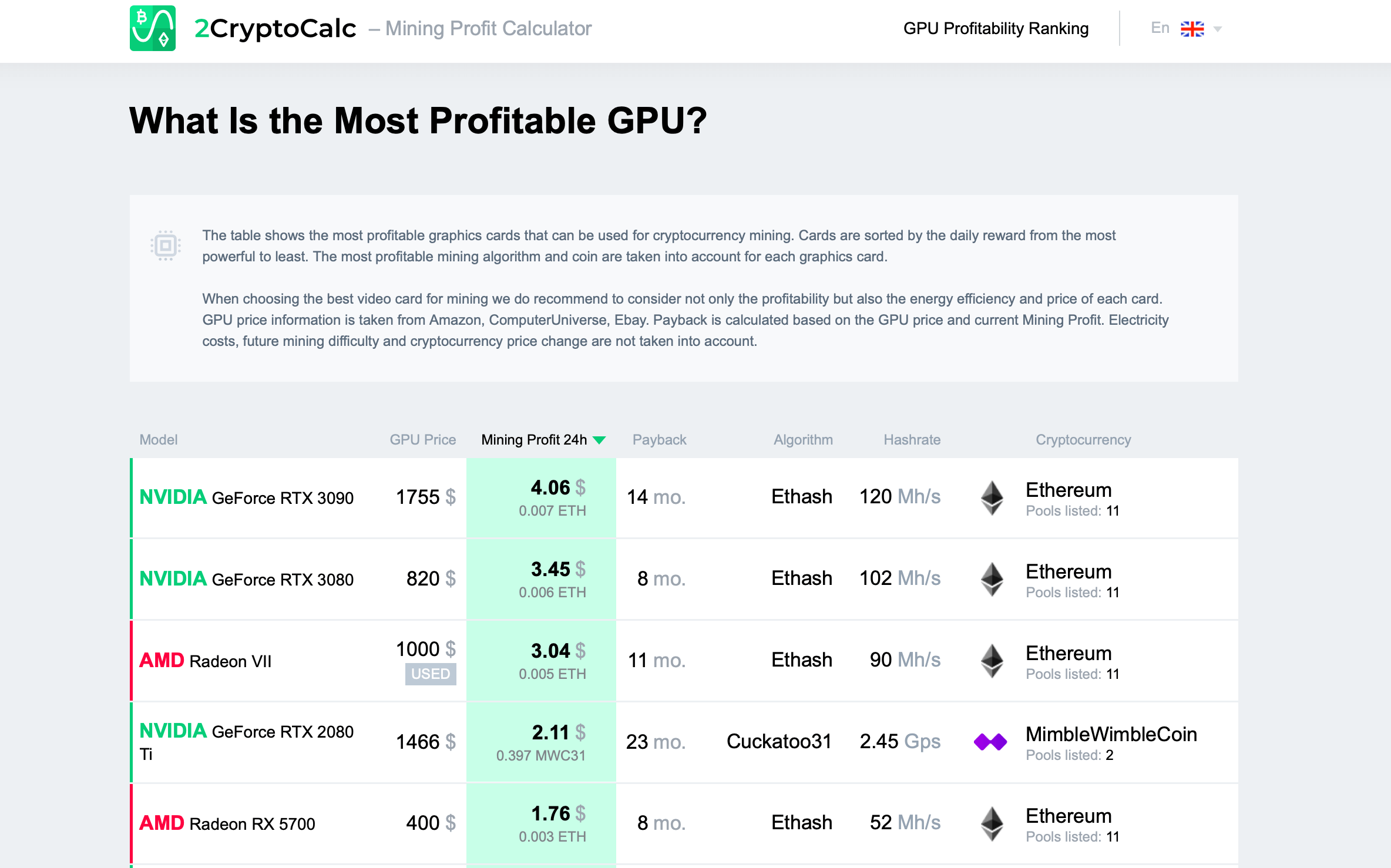
Let’s say, you want to find out the most profitable GPU for mining. But there are too many factors: prices, brands, availability, etc. 2CryptoCalc has a page dedicated to the most profitable GPUs.
Here you can find approximate payback periods, prices, and mining profitability.
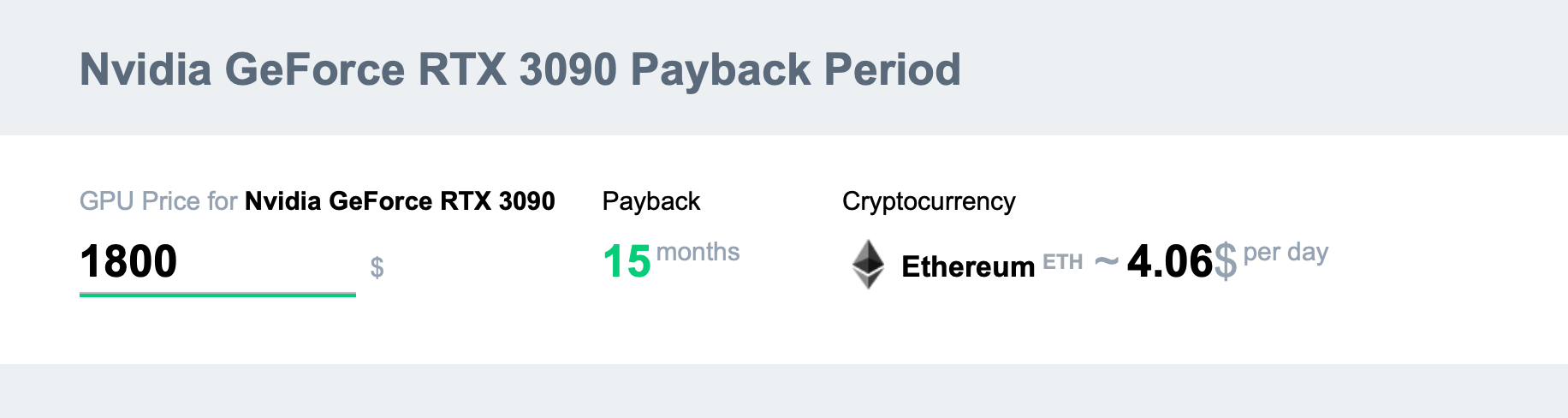
The pricing will not always correspond to the place where you live. If you see that the price you have is completely different, you can go to the page of a certain graphics card and enter your price there. This way, you will get the accurate estimation of the payback period.
Is Mining on Gaming Computers Profitable?
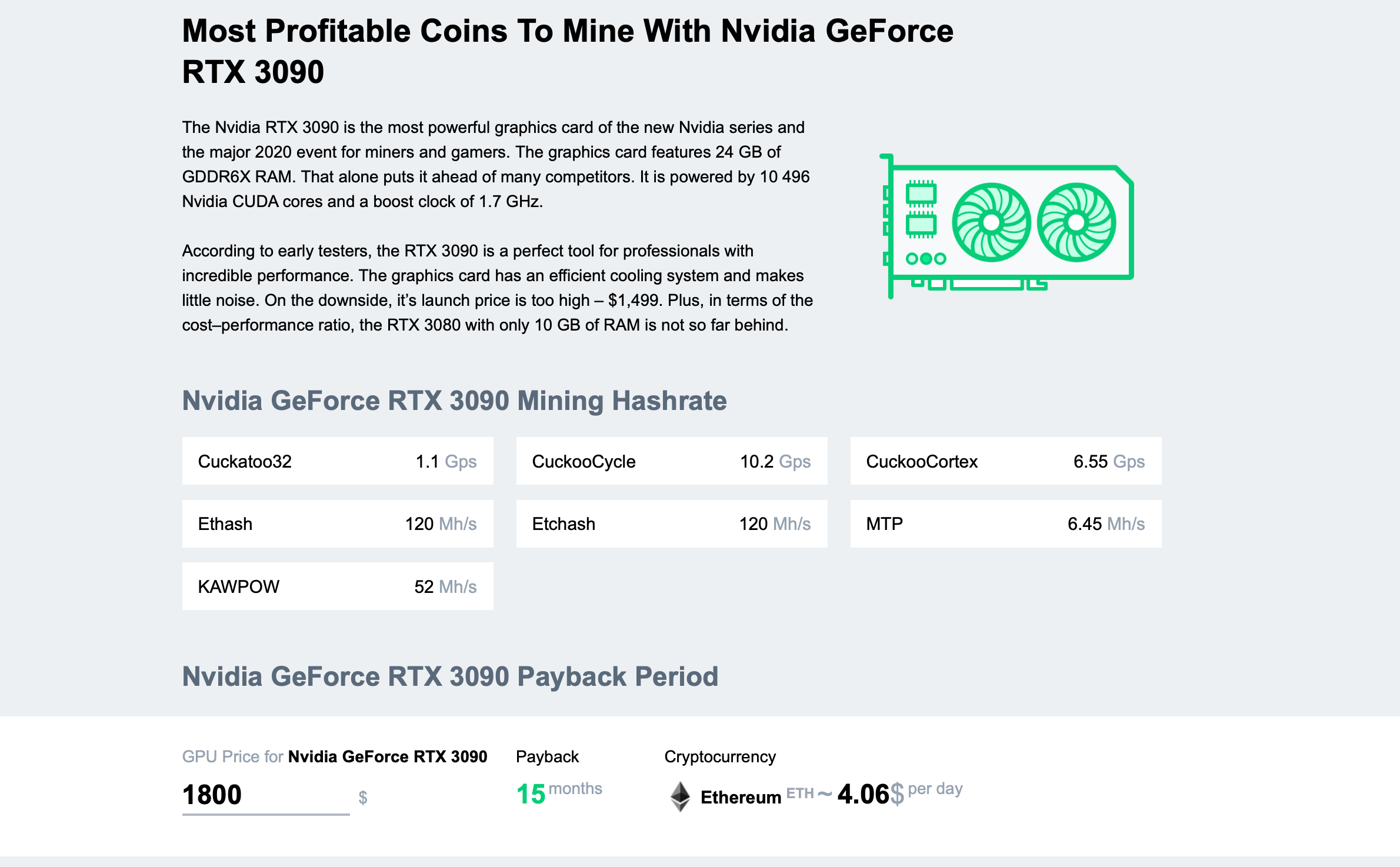
Let’s say, you are a gamer with a cool gaming computer. You’ve heard that people use GPUs for mining, but never tried it out. No worries. 2CryptoCalc will help. Go to the main page, find your GPU and click on it.
If you don’t see your GPU on the list, it is probably too old for mining. Mining with 3GB GPUs is close to impossible.
If you mine with it all day, it will bring $4.06. On the same page you can see the payback period if a graphics card mines 24/7. Remember that the calculator doesn’t count electricity.
We have already explained above how you can estimate your electricity cost.
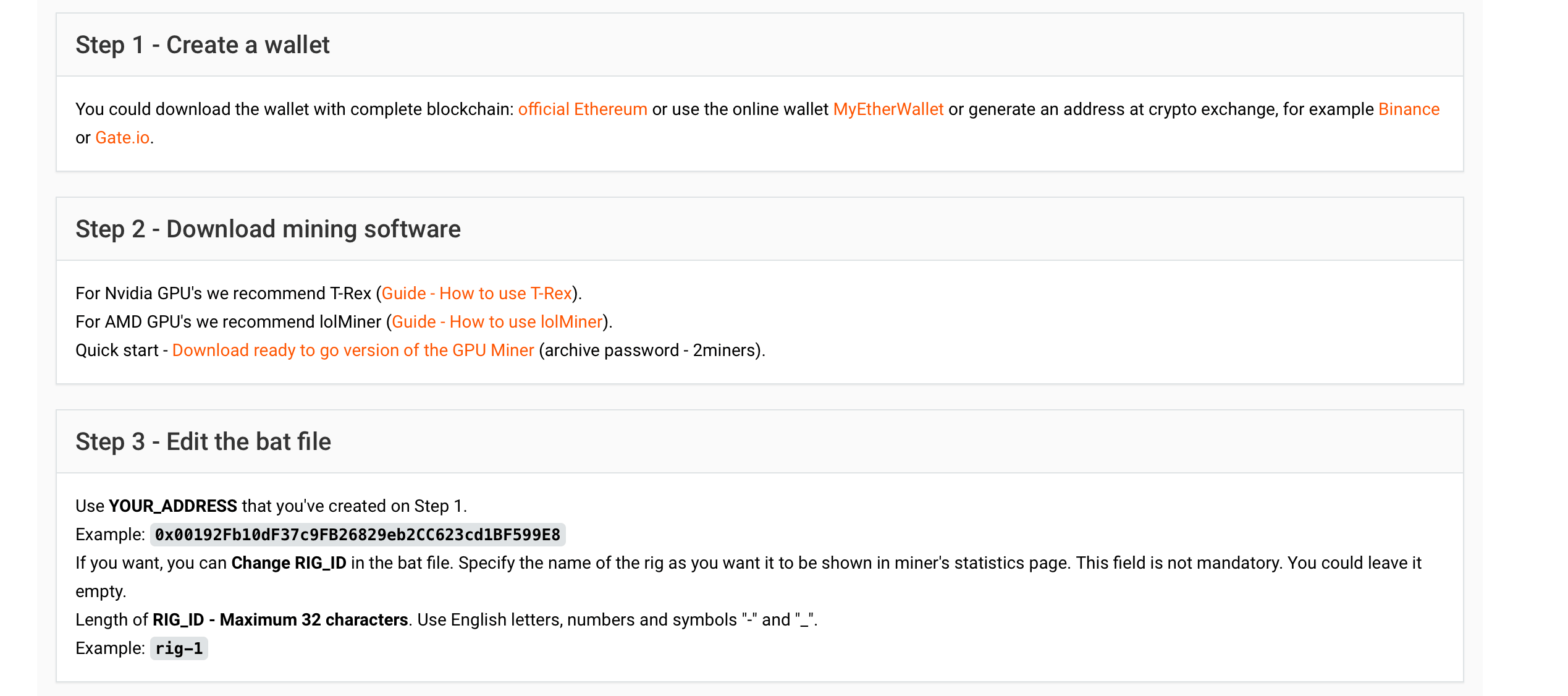
If you are satisfied with the result and interested in mining, the next step is to find the most profitable coin for your graphics card. To find it, go to the 2Miners pool. Each pool’s How to Start Mining page tells you which software you need to download and how to get a cryptocurrency wallet. It also has a video tutorial on mining setup that’s only 2–3 minutes long. It will take you the same amount of time to actually set up your equipment. Here is what the How to Start Mining page of the Ethereum pool looks like.
If several coins are equally profitable and you have doubts, choose Ethereum if it’s available. Ethereum is the second most popular coin in the world. It is supported by a billion wallets and exchanges, and you can always exchange it at the best rate.
Only Bitcoin could be better than Ethereum, but you need special ASIC devices to mine Bitcoin, and such devices become obsolete in just a year. Read more on the topic in our article “ASIC vs. GPU Mining Rig: What is Better?”
An Average Miner
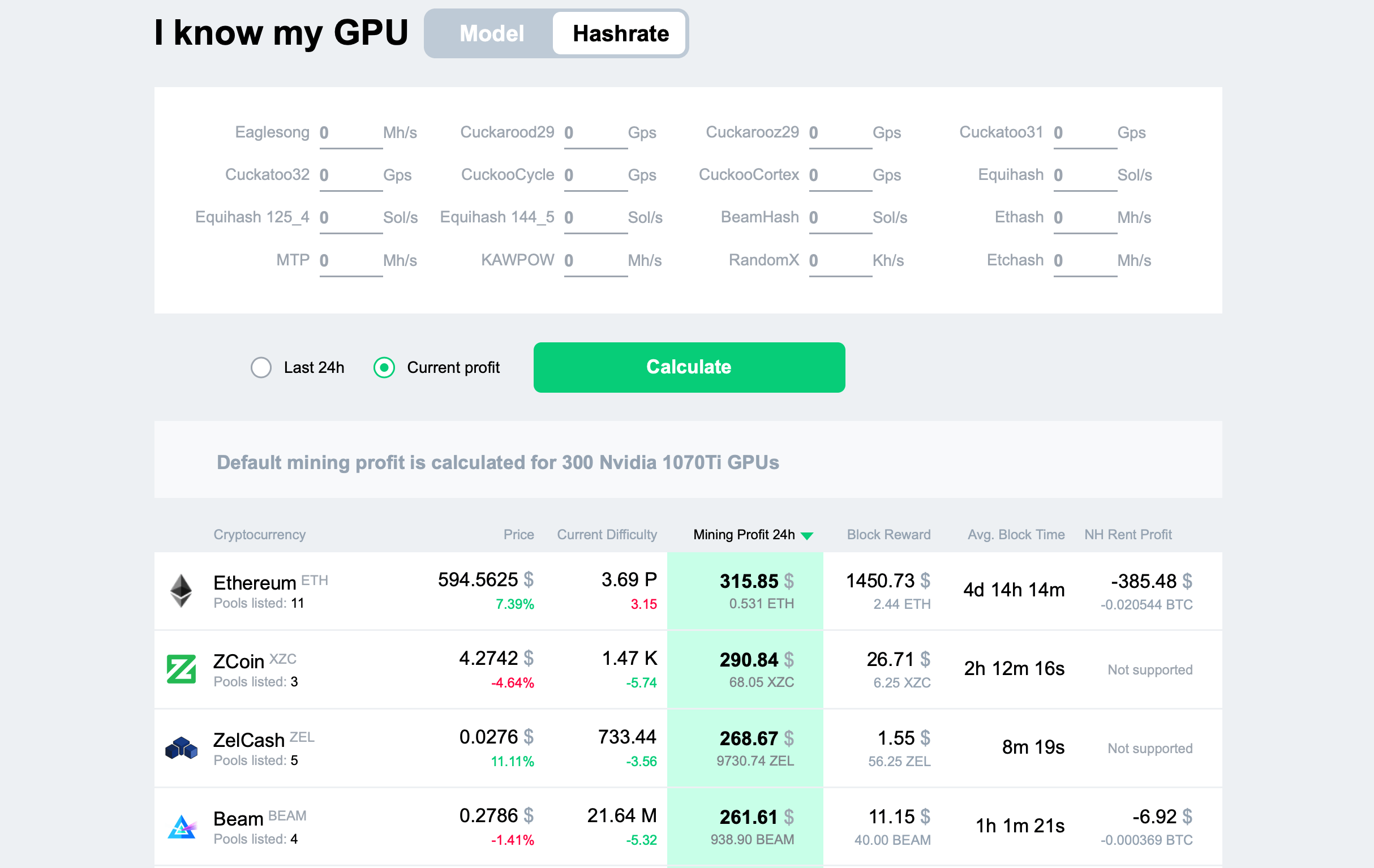
Let’s say, you are a professional miner and have always used WhatToMine. However, you don’t find it easy to use. 2CryptoCalc is just right for you. If you know the hash rate for each algorithm, you can enter it directly. The calculator will show the most profitable coins. Save the link with your hash rate, add it to bookmarks and open every day with just one click.
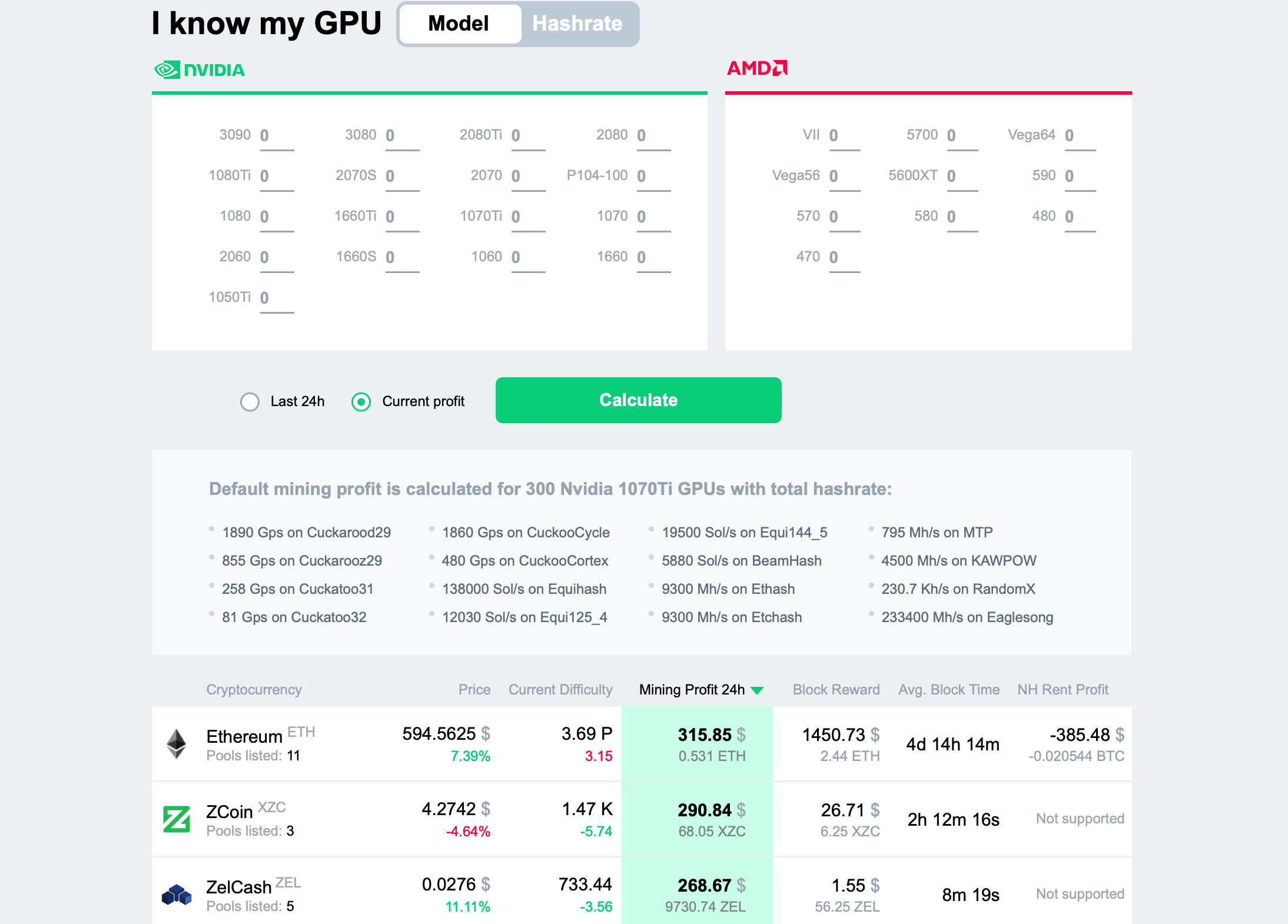
Many users, including professional miners, like to define the number of GPUs instead of hash rates. So far, it’s the perfect solution if you want to find the best coin for mining. Enter the number of your GPUs on the main page of the calculator. You will see the list of the most profitable coins. In addition, the calculator will notify you if some of your graphics cards can’t mine certain coins.
If you don’t enter the number of GPUs, then by default, the 2CryptoCalc main page shows you mining profitability for 300 Nvidia 1070Ti graphics cards. It may be useful if you like to always stay up to date and see the big picture. For example, you may want to know how profitable mining is overall, or which cryptocurrency is leading today.
Imagine if your GPUs mine Zcoin, and Ethereum difficulty has gone down by 40% today, and you don’t have a clue. Make sure to check out the calculator to stay up to date.
Solo Mining
We have written a lot about solo mining. Here are the main materials.
Everyone wants to be independent, but not everyone is able to figure out solo mining and whether it’s worth the try. When miners are in the pool, they work together – like hunters in the tribe – and when they find the bag, they share it with each other. In solo, you are on your own. If you are lucky enough to catch a deer, your family will have dinner tonight. Otherwise, they will stay hungry. It could never happen in the pool, because a miner/hunter gets his share in any case.
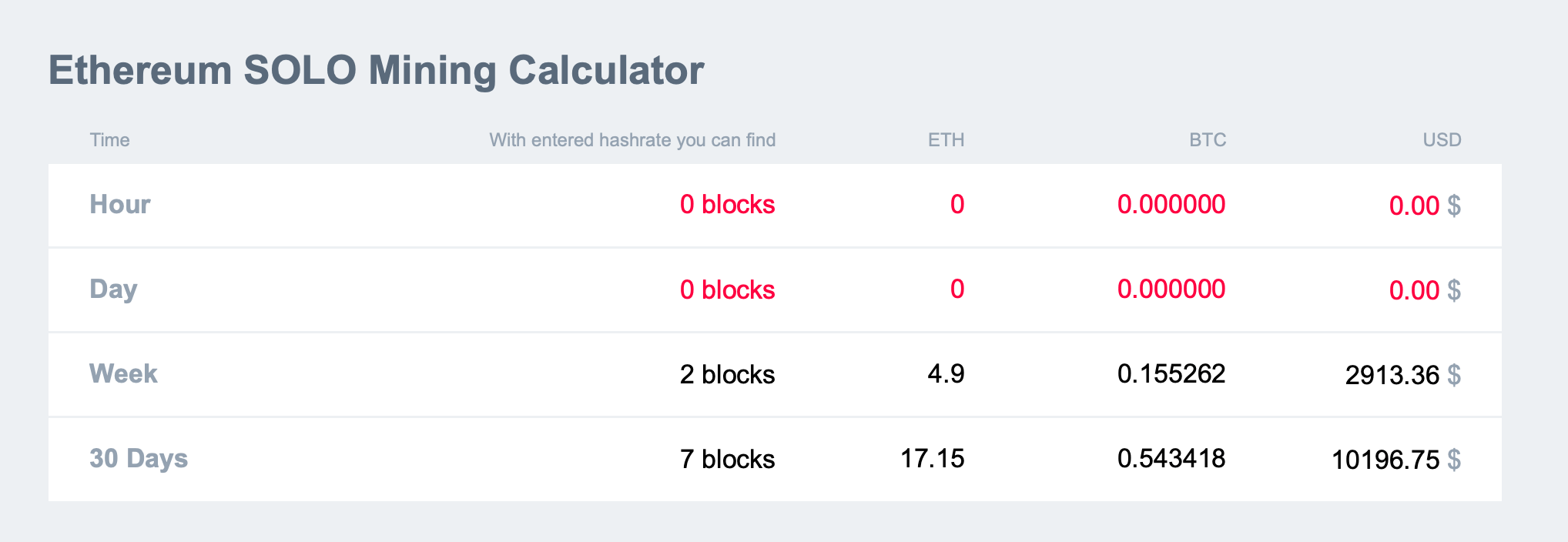
Amateur hunters often aim too high trying to hunt not just a deer, but an elephant with a slingshot. Two or three days have passed and they still don’t have an elephant. Why is that? 2CryptoCalc can help you estimate your success probability. Luck is exactly what we mean here, because mining is a random process.
If the calculator says you can’t find at least one or two blocks per day, solo mining is not for you. Even if the calculator shows two blocks per week (as you can see on the screenshot above), we wouldn’t recommend solo mining. If luck is not on your side, you will remain without blocks and rewards for a few weeks. In this case you’d better mine in the pool or choose a simpler coin.
Remember that the calculator operates in an ideal world (i.e. with 100% luck). The real world is far from ideal.
If the calculator shows zero blocks, it doesn’t mean that you will never find one. You will. Even one weak GPU can find a block. It’s a matter of patience, cryptocurrency rate changes, and other factors. There aren’t many miners that would actually wait for a week to find a block.
How to Rent Power from Nicehash
Let’s say, you know that you can sell your graphics cards into slavery to Nicehash and you also know that you can buy hash rate there and direct it to any mining pool. Some miners don’t want to search for the most profitable coins today and learn how to set up mining software. Such lazy miners sell their cards into slavery to Nicehash that uses them for mining.
Nicehash lets you rent mining power of any kind and at any price. It can be one card or the whole factory. You can often rent them for less than you’d get directly from mining with them in the pool. This is what the Nicehash business model looks like: renting cards from lazy miners to then rent them to miners that can use their brains and 2CryptoCalc.
Let’s see how 2CryptoCalc.com can help us make a profit by renting power from Nicehash.
All the calculations were made at the time of writing. Go to 2CryptoCalc and enter required values to get the latest data.
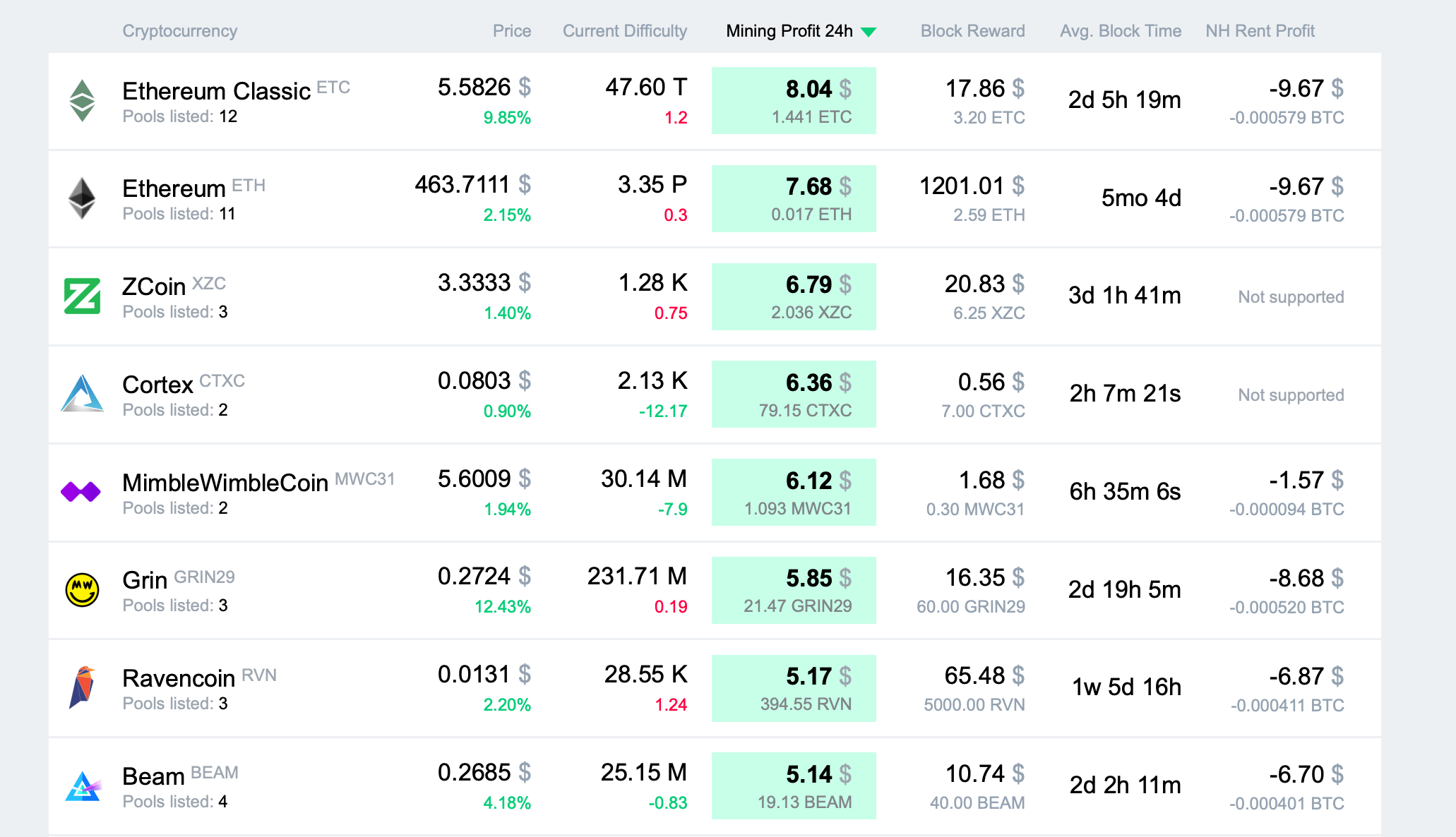
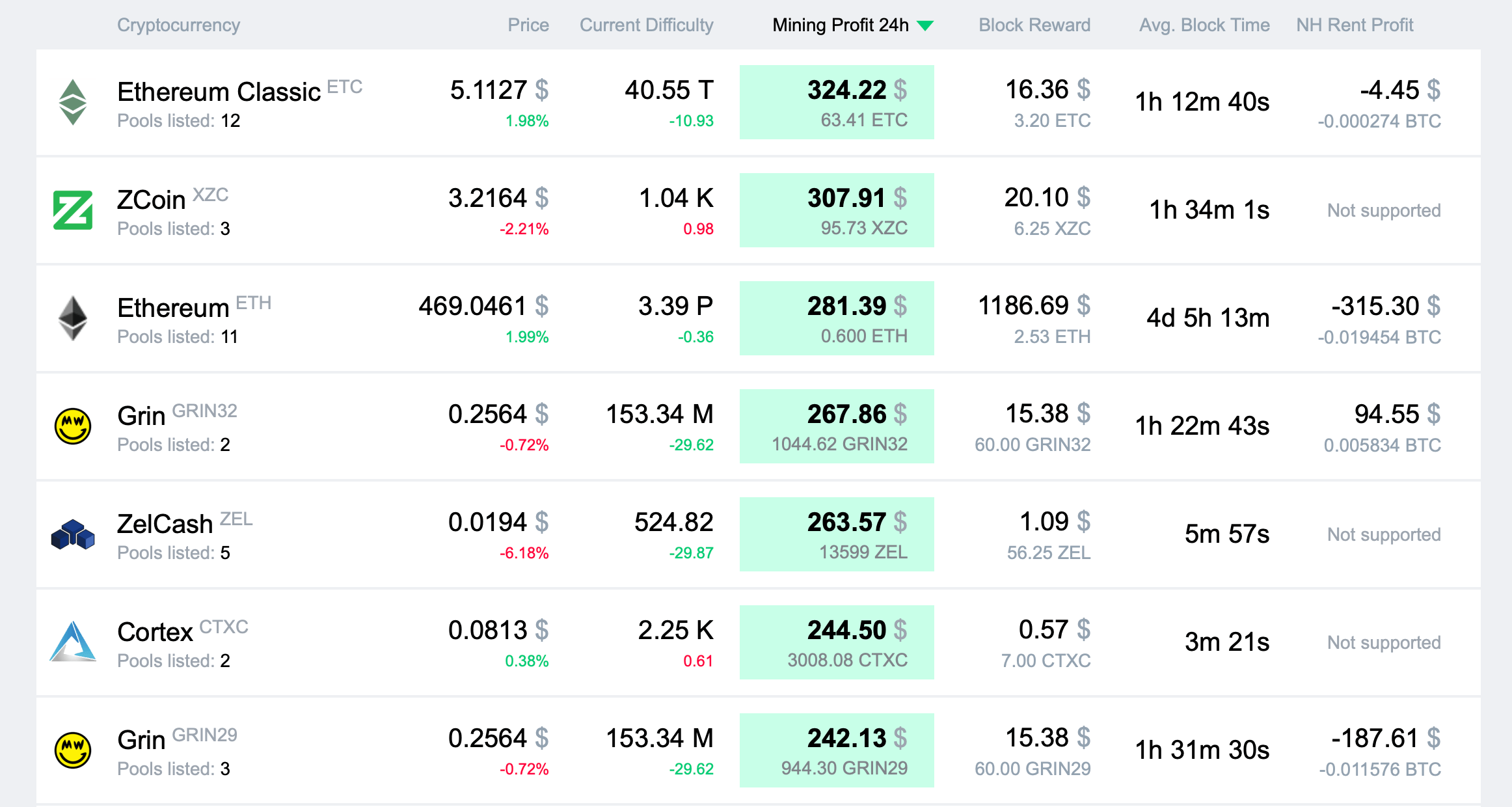
The main page of the calculator has a row called NH Rent Profit. Make sure to check it out regularly. Whenever you see something like Grin has on the screenshot above, go and rent power right away. You are guaranteed to make a profit. But first, finish reading this article.
Let’s look at Ethereum Classic. The calculator shows that renting power from Nicehash will put you in the red. There is a big BUT here. The calculator takes the maximum current price on Nicehash, while in reality Nicehash is an auction with a particular mechanism: the more hash rate you buy, the lower the price.
Important note. Whichever coin or algorithm you take, the principle is always the same.
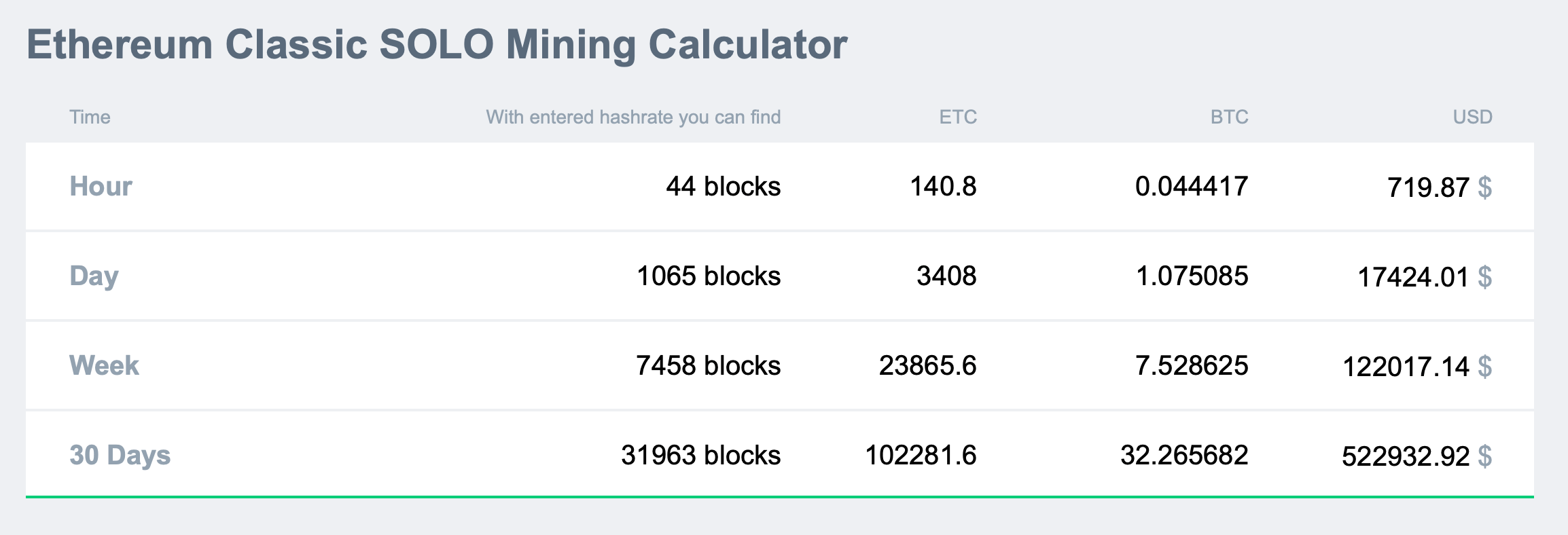
Let’s calculate ETC mining for 0.5 TH/s using 2CryptoCalc. Let’s go there, enter 500000, and scroll to the SOLO section.
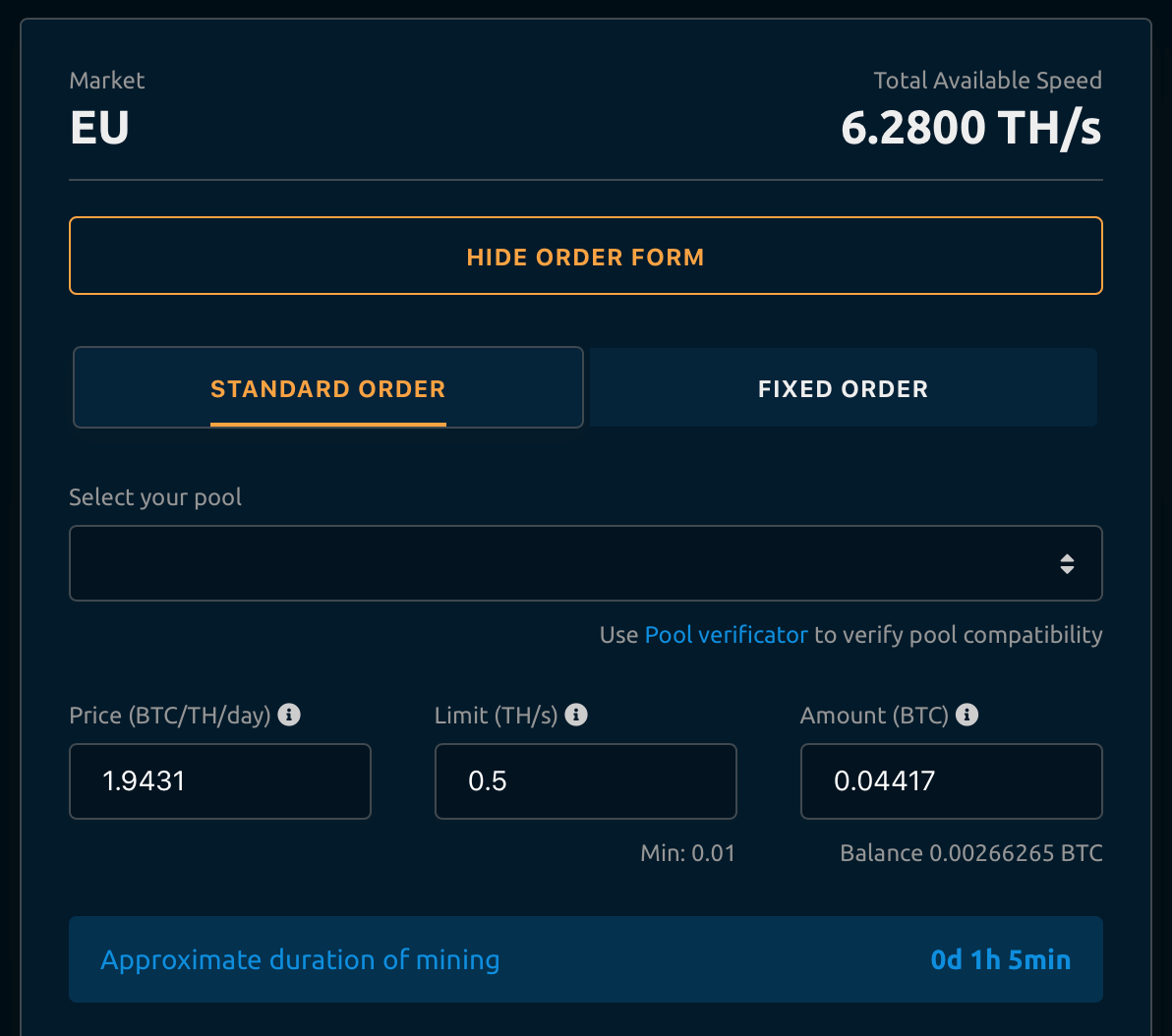
If we mine for an hour with a hash rate of 0.5 TH/s, we’ll get 0.044417 BTC.
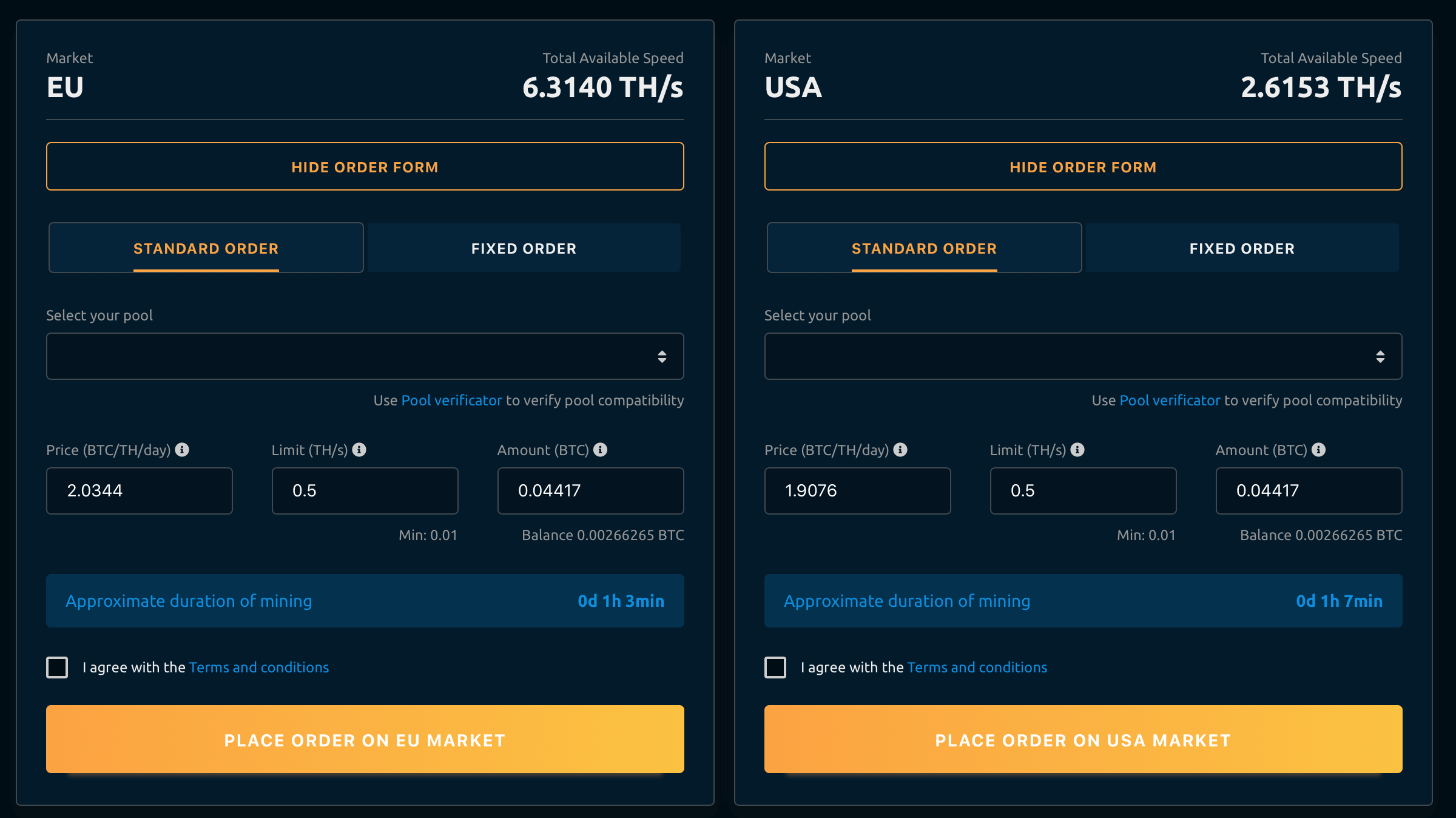
Let’s go to Nicehash, choose the algorithm to mine ETC, and enter our values – 0.5 TH/s and 0.044417 BTC. So we can mine for 1 hour and 3 minutes. This is the result you get if the price is 2.0344 BTC/Th/Day. But as we said before, it’s not the optimal price. Let’s see how much others quote for power.
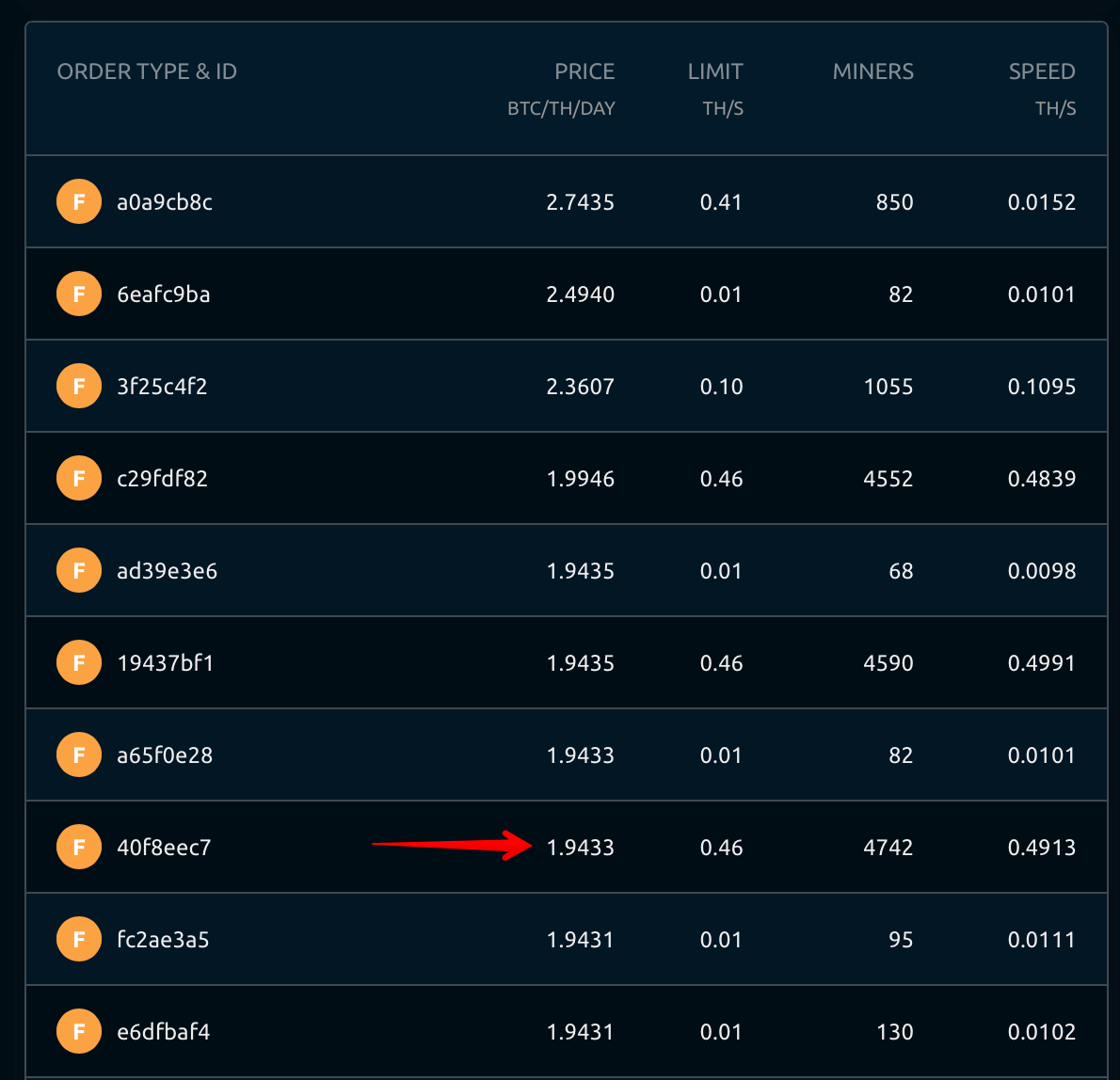
Here’s someone renting almost 0.5 TH/s for 1.9433 BTC/Th/Day, which is less than 2.0344 BTC/Th/Day. Let’s consider these numbers with the price.
We will be able to mine for 1 hour 5 minutes. As you remember, the calculator has predicted 44 blocks per hour, that is, 0.73 blocks per minute. Let’s multiply the remaining 5 minutes by 0.73. We get almost 4 blocks. At the time of writing, one ETC block is valued at $16. 4*$16 = $64. This is our potential profit in this case. If we take 1 TH/s instead of 0.5 TH/s, we’ll get $128 per hour.
Please pay attention that Ethereum Classic is no longer supported by Nicehash. The calculation above is just an example. However, it should perfectly work for other coins.
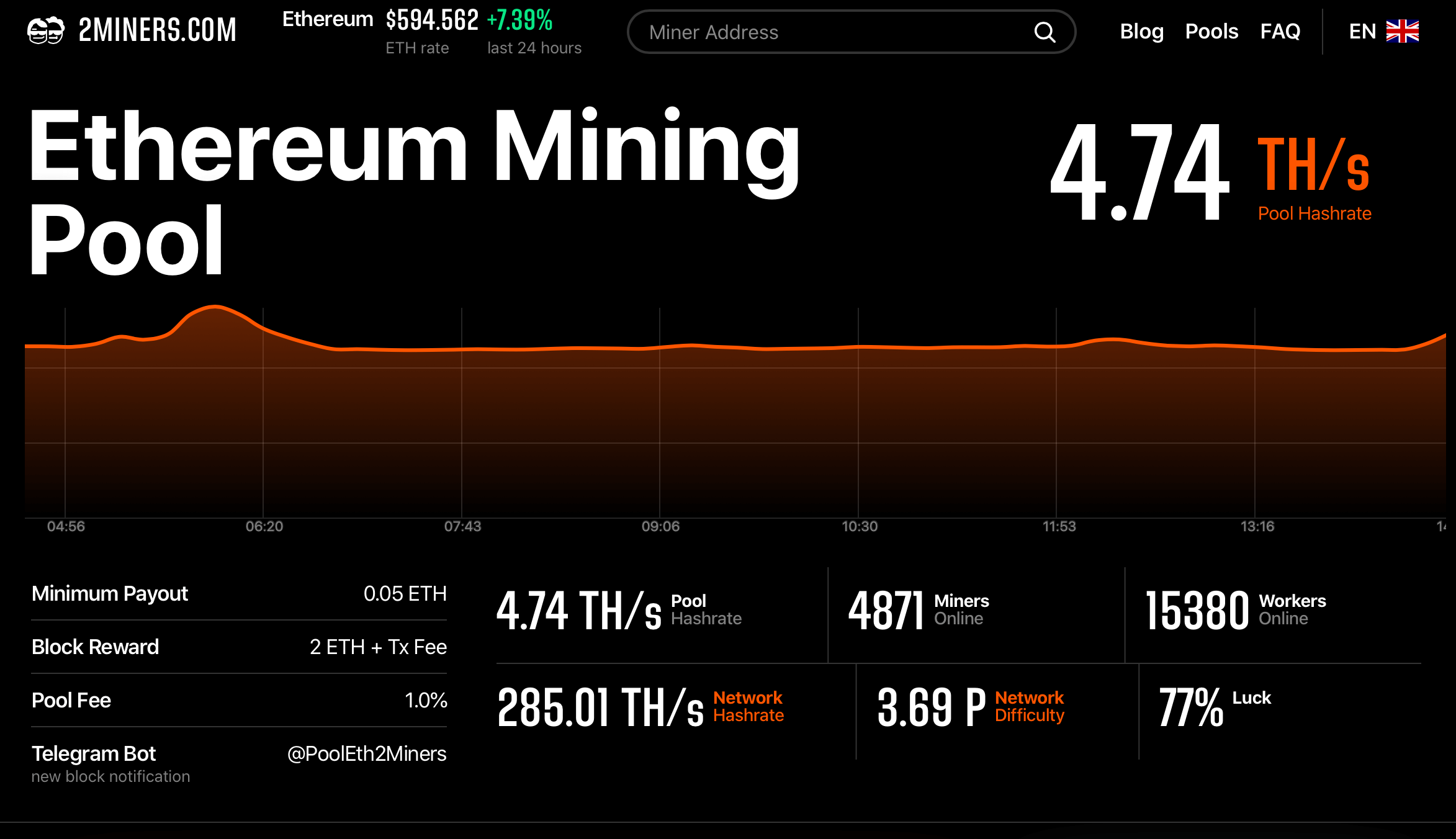
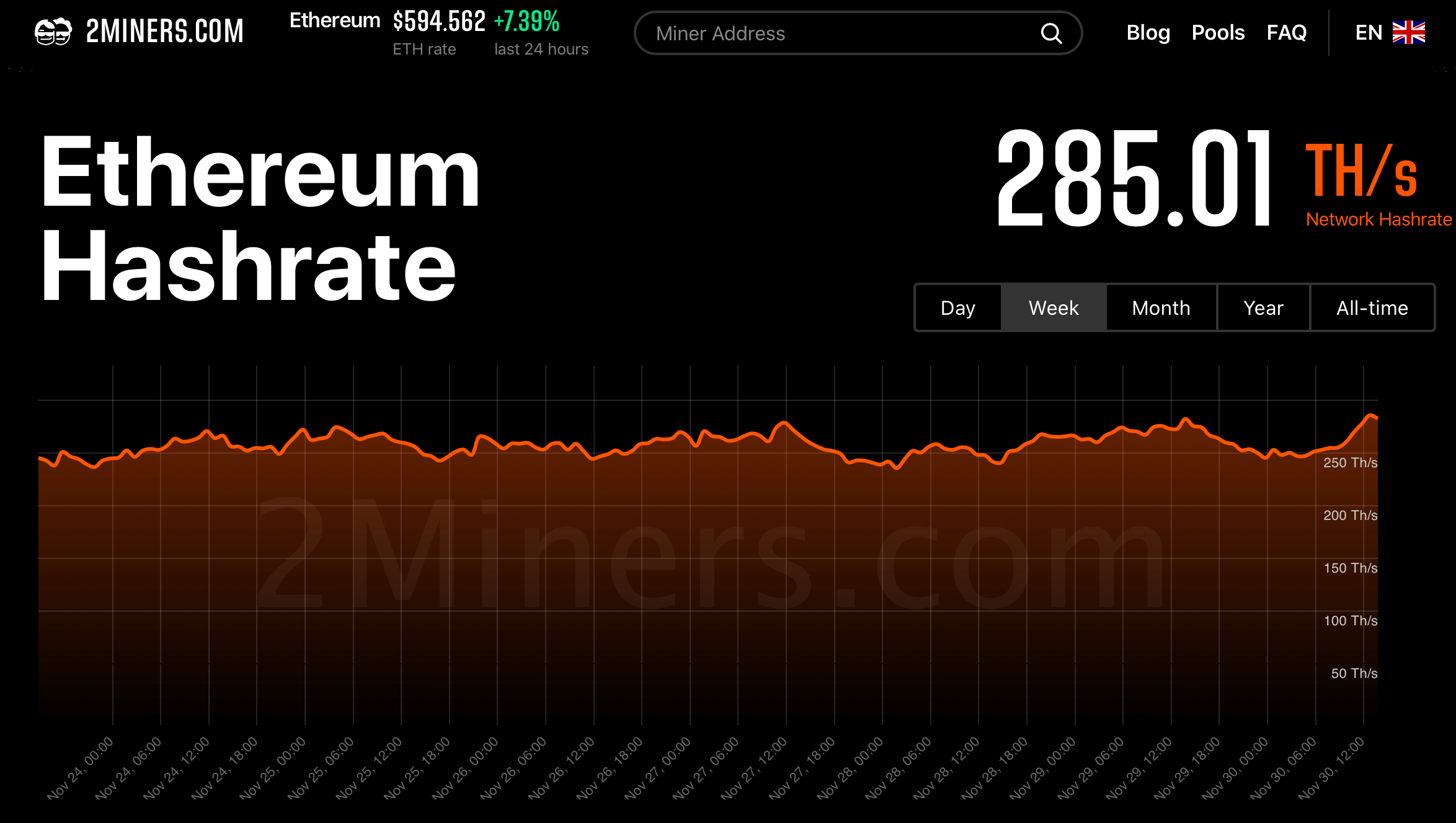
Please remember that the cryptocurrency exchange rate is changing all the time, just like the difficulty and network hash rate. You can monitor these values at 2Miners.com.
After clicking, you’ll get to the page with the data you need.
Then you can open the stats page and monitor the data in real time.
Remember to follow us on Twitter to get all the news as soon as possible.
Miner since 2017, the 2Miners pool co-founder. Became interested in cryptocurrencies at the dawn of the latest bull run and bought his first graphics cards. After having built and set up a few mining rigs, he realized that existing mining pools didn’t satisfy him – that’s how the idea of creating the 2Miners pool was born.
John published a series of articles about the basics of cryptocurrency mining. He gave valuable tips on how to buy ASICs and GPUs from abroad and then shared their mining performance. On the website, you can find early articles about cryptocurrency mining, blockchain in general and mining pool operation principles. The readers gave positive feedback on John’s practical guides, such as building an Ethereum mining rig and Nvidia 1080ti overclocking.
October 2020 Work Progress Report: ETC Network Protection, Ravencoin Security Audit
November 2, 2020
New milestone for the Ethereum pool, ETC Network protection, Ravencoin security audit, Ethash ASIC problems, multiple miner updates.
2Miners Ethereum Mining Pool
We’ve carried out the planned expansion of our European data center infrastructure so we can maintain the traditional high quality of our services. Ethereum pool has been moved to the new even more powerful dedicated servers. Thanks to our developers the transition has been performed smoothly without any interruptions of the mining process.
Meanwhile, Ethereum PPLNS Pool has reached a new milestone of 4000 Miners Online.
Ethereum Classic Network Protection
Great news for ETC Miners. MESS Network Security Solution has been implemented on block 11 380 000. No successful attacks have been performed on the network in October.
We’ve reduced the block maturation time for Ethereum Classic to 500 new blocks (approx. 2 hours). Payouts are processed automatically every 2 hours if the minimum amount 0.1 ETC has been reached.
Please pay attention that Ravencoin is an open-source project without any treasuries, dev fees etc. so they really needed this help. Lead dev of Ravencoin Tron Black has stated that $40 000 required for the security audit has been successfully raised. We were happy to help the RVN team to reach this important target.
A lot of our miners have recently reported the hashrate decrease for their ASIC miners in Ethereum and Ethereum Classic pools. The issue is the increasing DAG file size as always.
Even Innosilicon A10 Pro with 5GB memory on-board is already performing at only 80-85% of the hashrate specified by the manufacturer.
We could do nothing to help our miners from the pool side. We suggest ASIC owners to write to the ASIC manufacturers and ask for the new firmware. This is the only solution.
A10 owners are currently trying to find the best firmware in our Telegram Chat.
Starting from epoch 382 (approx. December 16), all 4GB GPUs will stop mining Ethereum. The problem is the gradually increasing DAG file size. Luckily, the developers are working hard to find a solution, and they already have one. The lolMiner developers have released the updated software version adding the so-called zombie mode for cryptocurrency mining. This mode will enable 4GB GPUs to mine Ethereum even at the beginning of 2021. The same functionality has been implemented in TeamRedMiner. Check our article How to Mine Ethereum and Ethereum Classic on 4GB GPUs
Other software developers have released the new versions of the miners as well. We’ve updated our Quick Start Archive. Archive password is 2miners
Such popular miners are included:
gminer 2.28
lolminer 1.11
t-rex 0.18.1
nbminer 32.1
phoenix 5.1c
The popular Claymore’s miner will stop mining Ethereum Classic and Ethereum very soon (ETC on November 6, ETH on December 29). Please prepare another mining software in advance. We’ve launched a test pool and experimented with different Ethash miners to find the best one. We highly recommend our post Claymore’s Ethereum Miner Stops Working. Best Alternatives
Epoch Number and DAG Size
Lately, everybody keeps talking about Ethash (Dagger-Hashimoto) epoch number and DAG file size. These important parameters are now shown on 2Miners pool dashboard for each Ethash coin.
Remember to follow us on Twitter to get all the news as soon as possible.
The 2Miners pool co-founder, businessman, miner. In 2017 started mining cryptocurrencies and built many rigs on his own. As a result, he gained lots of practical knowledge and became interested in sharing it with others.
In his articles on 2Miners, he shares useful tips that he tried and tested himself. For example, Darek gives advice on how to buy hardware components for the basic mining rig and how to connect them to each other correctly. He also explained lots of complicated terms in simple words, such as shares, mining luck, block types, and cryptocurrency wallets. After the pool was launched, he published a series of articles ‘Crypto Mythbusters’ where he explained how to protect the network against 51% attack, talked about cryptocurrency mining difficulty and difficulties of launching your own node.
Ethereum Classic Will Not Be Supported by ASICs and Nicehash
November 1, 2020
Mid-2020 wasn’t the best time for Ethereum Classic. The network suffered from several 51% attacks in August and September. As a result, miners lost a lot of their earnings. ETC took action by decreasing the DAG file size. This way, even 3GB GPUs can mine ETC and the hash rate is significantly higher. But this is not the only positive change. Let’s see what to expect from ETC in the future.
Ethereum Classic DAG File Problem
First of all, ETC is really going to decrease the DAG size. DAG is a special data block uploaded to the GPU memory when a mining device launches. You can’t mine the cryptocurrency and get rewards without DAG.
ETC developers may cut DAG down on #372 epoch when the file size was 3.91GB. If they cut it down on #376 epoch, it will be 2.47GB. So even 3GB GPUs would be able to mine ETC.
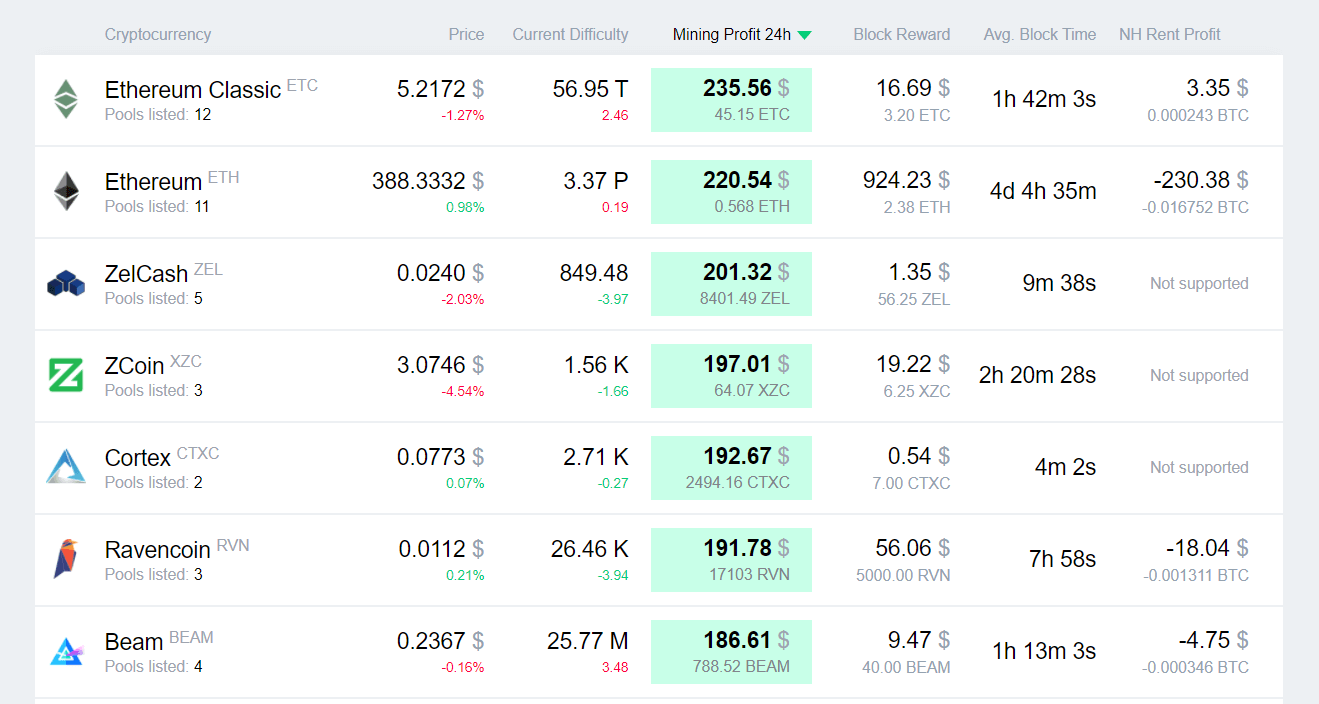
In this case, everybody wins. The network would be more secure thanks to a higher hash rate, which would discourage hackers from attacks. The owners of 3GB GPUs would make a nice profit. 2CryptoCalc profitability calculator often places Ethereum Classic at the top of the ranking.
Plus, earnings would come through in the form of the reputable coin (as opposed to little-known projects). In reality, the owners of 3GB GPUs have even more good news. ASIC miners and old mining software will not be able to mine ETC.
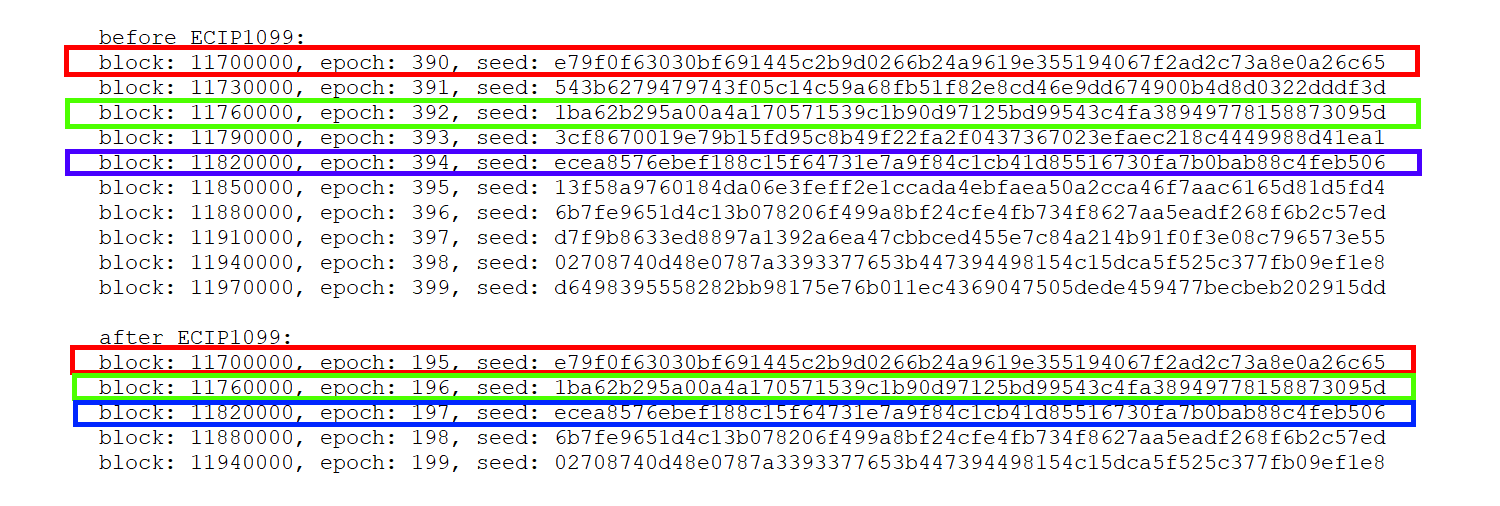
On block 11 700 000 блоке (epoch 390) epoch size will be increased from 30 000 blocks to 60 000 blocks. ETC will reduce the epoch number from 390 to 195. DAG file would be generated with seedHash parameter for epoch 390 but with epoch 195 size! SeedHash parameter generation is different for the new Ethash algorithm used for Ethereum Classic. This is how the seedHash is generated before and after ECIP1099:
As you see from the image above the seedHash would be generated “through one”.
In simple words: Mining pool is sending seedHash parameter to the miner to define the epoch. Miner gets this parameter and thinks that is is for example epoch 390 and 4 GB DAG file should be generated. However for ETC this seedHash represents the 195 epoch and 2 GB DAG file should be generated. Miner couldn’t work properly and it will send invalid shares to the pool.
ASICs to Stop Mining Ethereum Classic
Recently, we have received more news. First of all, Innosilicon, renowned for its ASICs, has made a statement. Innosilicon A10 won’t be able to mine Ethereum Classic if the algorithm changes.
Changing the algorithm is part of the ETC security plan presented in August 2020.
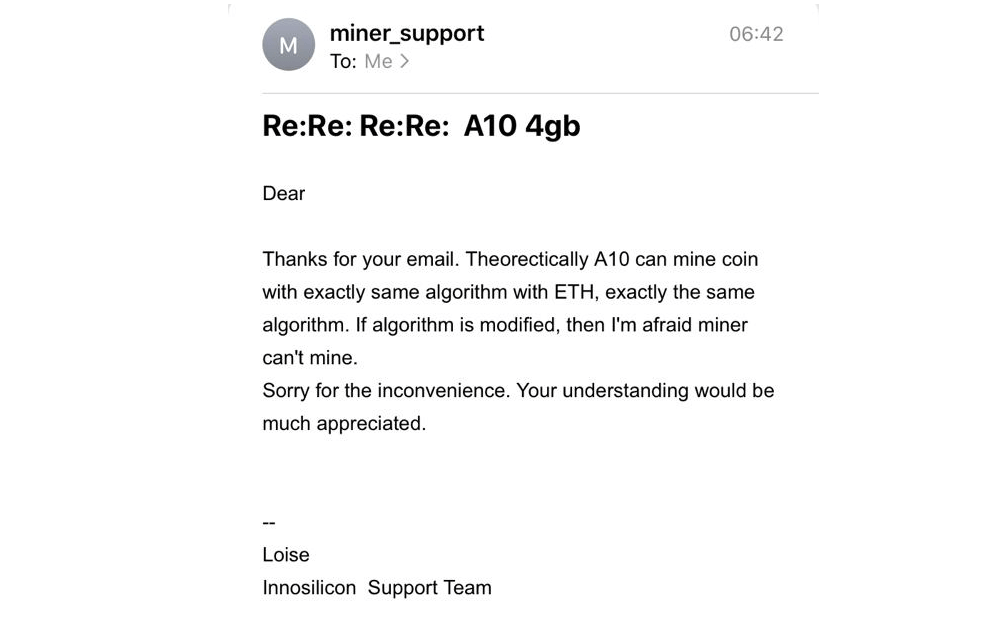
Here is what Innosilicon says.
In theory, A10 can mine the cryptocurrency with the same algorithm that Ethereum has. If the algorithm changes, the mining device won’t be able to mine.
So when Ethereum Classic implements the changes, ASICs like Innosilicon 10 and Antminer E3 won’t threaten the network anymore. Remember that ASICs are highly efficient, which lets them concentrate large computing powers. For this reason, the earnings of GPU owners are much lower.
Nicehash Won’t Support Ethereum Classic
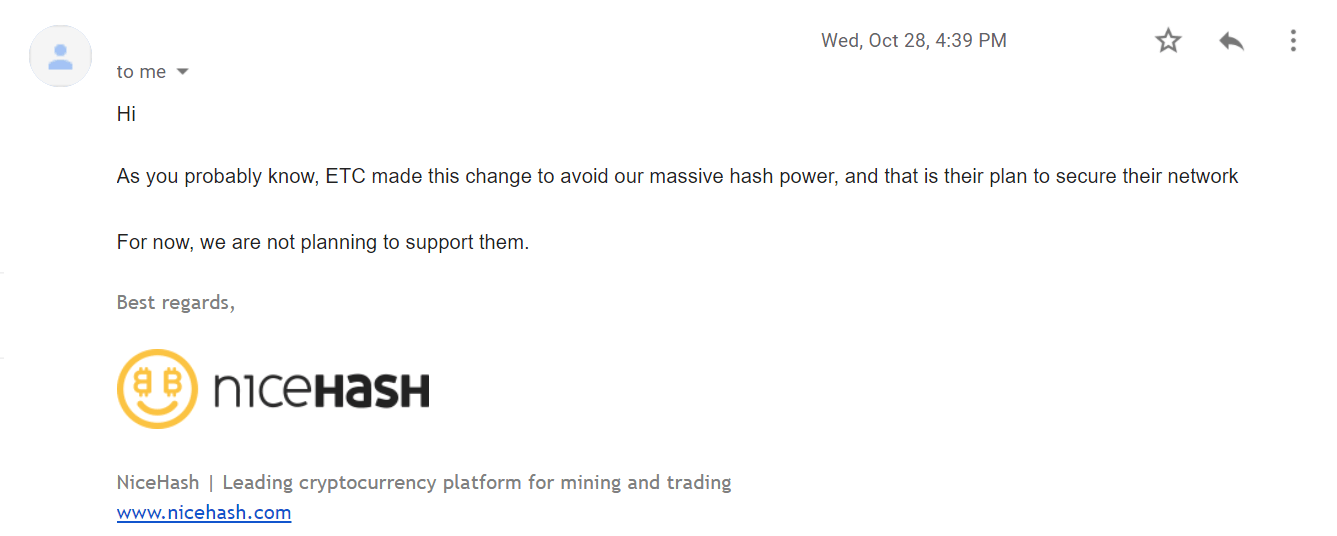
Nicehash is not going to support Ethereum Classic. The platform confirmed the information.
As you probably know, ETC made this change to avoid our massive hash power, and that is their plan to secure their network. For now, we are not planning to support them.
So after the update potential attackers won’t be able to rent computing power from Nicehash, the same platform used to perform 51% attacks on the network. This will ensure that miners are safe and will get their earnings.
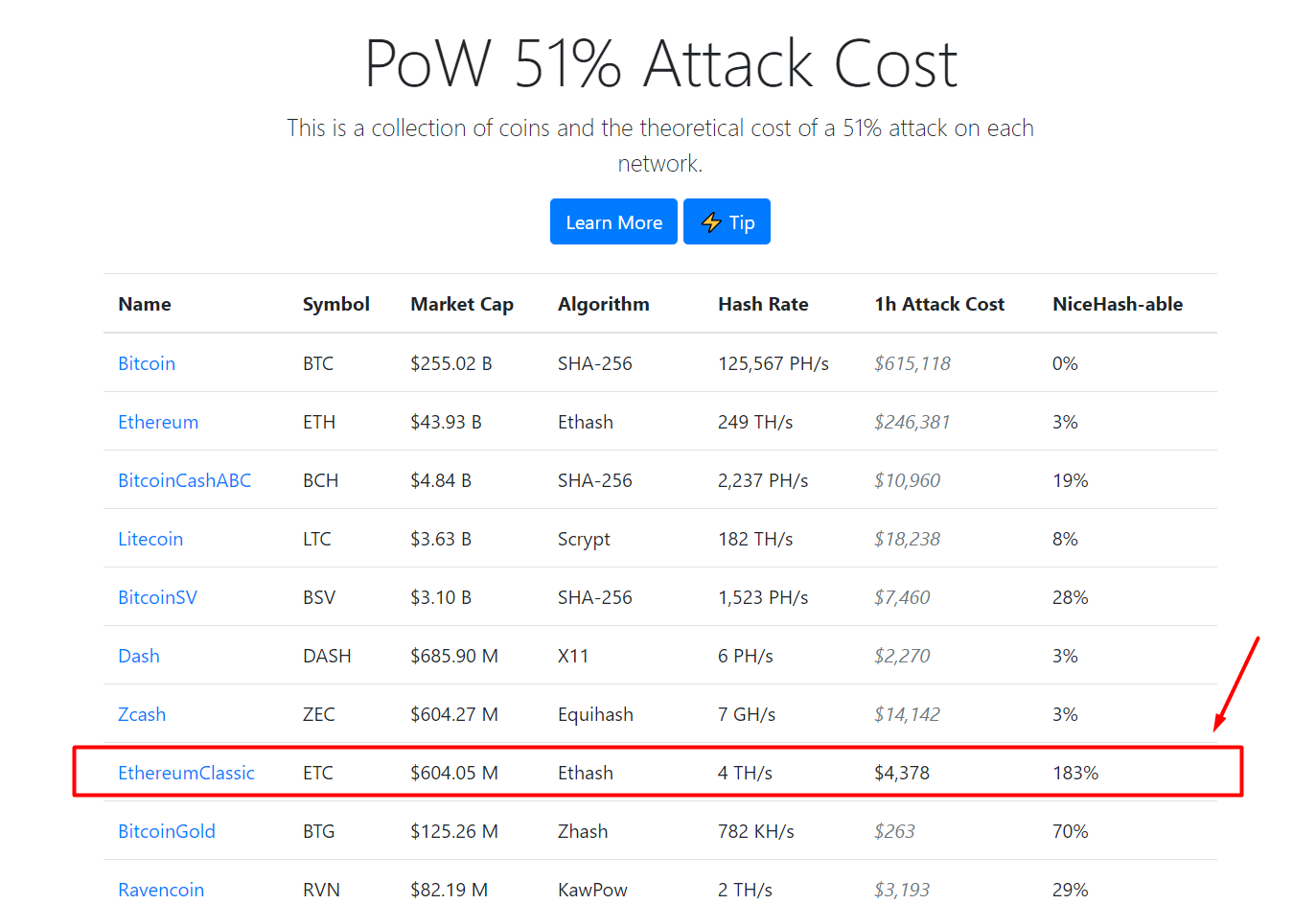
We checked some recent data. As of now, you can attack Ethereum Classic at a quite low cost. A one-hour attack would cost $4,378. Nicehash has more than enough available power to do that. So miners should be happy with the news.
3GB and 4GB GPU Mining
This news is fantastic for the ETC community and miners with weak equipment. If everything goes well, the network will be secure against 51% attacks, get a ton of hash rate thanks to 3GB GPUs, and get rid of ASICs. Ethereum Classic will have all the conditions for future development.
These changes will also benefit the network decentralization. Computing power will be distributed more evenly among more users. This is what every blockchain project must strive for.
Remember to follow us on Twitter to get all the news as soon as possible.
Miner since 2017, the 2Miners pool co-founder. Became interested in cryptocurrencies at the dawn of the latest bull run and bought his first graphics cards. After having built and set up a few mining rigs, he realized that existing mining pools didn’t satisfy him – that’s how the idea of creating the 2Miners pool was born.
John published a series of articles about the basics of cryptocurrency mining. He gave valuable tips on how to buy ASICs and GPUs from abroad and then shared their mining performance. On the website, you can find early articles about cryptocurrency mining, blockchain in general and mining pool operation principles. The readers gave positive feedback on John’s practical guides, such as building an Ethereum mining rig and Nvidia 1080ti overclocking.